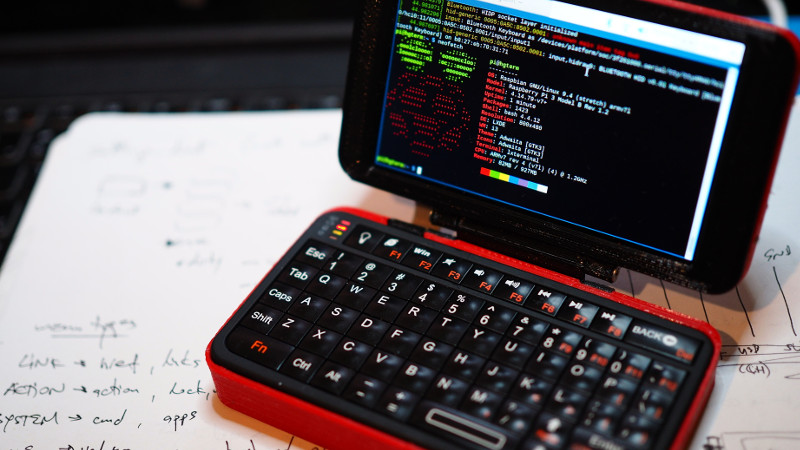
Every so often, the maker world produces a device that makes perfectly sensible adults whisper, “I do not need this,” while already mentally clearing space on the desk. A Raspberry Pi mini laptop is exactly that kind of object. It is not trying to replace a MacBook, a gaming laptop, or the office workstation that sounds like a small leaf blower under pressure. It is something more specific, more charming, and honestly more exciting: a tiny, hackable, portable computer that feels like it escaped from a cyberpunk novel after stopping at a school robotics club.
The idea has been around for years. Raspberry Pi boards have been squeezed into wooden boxes, 3D-printed shells, recycled laptop bodies, portable terminals, lapdocks, and devices that look like props from a sci-fi movie where everyone knows Linux. But one build in particular captured the mood perfectly: a tiny Raspberry Pi clamshell computer with a touchscreen, compact keyboard, battery, and 3D-printed enclosure. It was small, clever, slightly ridiculous, and completely lovable. In other words, it was the Raspberry Pi mini laptop we wanted.
Today, that idea feels more practical than ever. Raspberry Pi hardware is faster, displays are better, portable keyboards are less terrible than the “texting under a desk in 2008” era, and battery packs have matured from suspicious rectangles into reliable power sources. With Raspberry Pi 5, Compute Module 5, official touch displays, NVMe storage options, and a growing ecosystem of modular handheld computers, the dream of a serious Raspberry Pi mini laptop is no longer just a weekend experiment. It is becoming a real category.
Why a Raspberry Pi Mini Laptop Still Feels Magical
The modern laptop market is excellent, but also a little boring. Most machines are sealed slabs: faster this year, thinner next year, increasingly allergic to screwdrivers. A Raspberry Pi mini laptop goes in the opposite direction. It invites you to open it, modify it, break it, fix it, and learn something before breakfast. It is not just a computer; it is a conversation with the hardware.
That is the core appeal. A Raspberry Pi laptop is not only about portability. It is about ownership. You can choose the screen. You can swap storage. You can wire in sensors, attach GPIO accessories, add a custom keyboard, build a case, or redesign the hinge because the first version wobbled like a nervous flamingo. A normal laptop says, “Please do not open.” A Raspberry Pi mini laptop says, “Where did we put the tiny screwdriver?”
For students, tinkerers, Linux users, retro-computing fans, robotics hobbyists, and field technicians, that openness matters. A pocketable Raspberry Pi machine can become a coding workstation, portable terminal, network diagnostic tool, retro game system, writing device, sensor dashboard, home automation controller, or lightweight development box. The best part is that it can become all of those things without pretending to be perfect at any one of them.
The Original Charm: Tiny, Clamshell, and Unapologetically Nerdy
The classic Raspberry Pi mini laptop formula is simple in theory and delightfully chaotic in practice. Take a Raspberry Pi, add a small touchscreen, find a keyboard that does not make your thumbs file a formal complaint, include a battery, and wrap everything in a compact case. The result looks easy until you remember that cables have thickness, batteries need protection, displays need mounting, heat has opinions, and hinges are mechanical philosophy in miniature.
The build that inspired so much admiration used a Pimoroni HyperPixel touchscreen HAT, a stripped-down Raspberry Pi with bulky connectors removed, a mini Bluetooth keyboard, a lithium-ion pouch cell from a deconstructed USB power bank, and a tidy 3D-printed clamshell enclosure. That combination was important because it understood the assignment. It was not merely a Raspberry Pi glued to a screen. It was a thoughtfully packaged palmtop computer.
That distinction matters. A great Raspberry Pi mini laptop needs to feel like one coherent device. The screen should sit at a usable angle. The keyboard should be reachable. The battery should not dangle like a science fair afterthought. Ports should be accessible. Cooling should be considered. The machine should close. Bonus points if it closes with a satisfying little click, because we are only human.
What a Modern Version Should Have
If we were designing the Raspberry Pi mini laptop that we want today, the heart of the machine would probably be a Raspberry Pi 5 or a Compute Module 5. Raspberry Pi 5 brings a 2.4GHz quad-core Arm Cortex-A76 processor, improved I/O through the RP1 controller, better USB bandwidth, and PCI Express support for fast storage. That means the mini laptop can feel less like a novelty and more like a useful everyday tool for coding, writing, browsing documentation, managing servers, and running lightweight desktop apps.
Compute Module 5 may be even more exciting for builders because it packages Raspberry Pi 5-class performance into a module designed for custom carrier boards. A custom mini laptop could use CM5 to place ports exactly where they belong, expose GPIO cleanly, include charging circuitry, route display connections properly, and avoid the “tiny computer wearing a backpack full of adapters” look. In a handheld or clamshell design, layout is everything.
A Five- to Seven-Inch Touchscreen
The sweet spot for a Raspberry Pi mini laptop is probably a 5-inch to 7-inch display. A 5-inch model feels like a true pocket terminal. A 7-inch model becomes more comfortable for reading documentation, writing Python, or configuring a network without squinting so hard your forehead becomes a secondary input device. Official Raspberry Pi Touch Display 2 options help make this idea more realistic because they offer multitouch input, compact sizing, and Raspberry Pi OS compatibility.
Resolution matters, but usability matters more. A tiny 4K screen sounds impressive until your terminal font becomes a rumor. A practical mini laptop needs a display that is sharp enough for text, bright enough for field use, and friendly to Linux scaling. The goal is not “cinema in your pocket.” The goal is “I can edit a config file on a train without wishing I had brought a magnifying glass.”
A Keyboard Built for Real Typing
The keyboard is where many mini computers go from adorable to mildly punishing. A good Raspberry Pi mini laptop should not require a stylus, a prayer, or unusually pointy fingers. It needs a compact QWERTY layout with enough travel and feedback to make short writing sessions possible. The ClockworkPi uConsole shows one direction: a small keyboard, backlighting, a mini trackball, and game-style controls. That kind of input system makes sense for a device that lives somewhere between laptop, terminal, and handheld console.
For a clamshell Raspberry Pi laptop, the best setup might be a thumb-friendly keyboard for the smallest model and a near-netbook keyboard for a 7-inch or 8-inch version. Add a small optical trackpad or trackball, dedicated function keys, and maybe a few programmable macro buttons. The macro buttons could launch a terminal, toggle Wi-Fi, open an editor, or activate “panic mode,” which should legally be required to open htop.
Battery Life That Does Not Inspire Anxiety
Battery life is the difference between “portable” and “technically movable.” A Raspberry Pi 5 can draw enough power that battery design becomes serious business. A modern mini laptop should target at least five to seven hours of mixed use, with USB-C charging, proper battery protection, fuel-gauge reporting, and safe thermal management. Pilet, a newer Raspberry Pi 5-powered portable mini-computer concept, points in this direction with its claimed 7-hour battery life and modular approach.
The dream version would support USB-C Power Delivery and allow the user to charge from a normal laptop charger or power bank. It should also expose battery percentage accurately inside Raspberry Pi OS. Nobody wants to SSH into their own handheld just to ask, “How sleepy are you?”
NVMe Storage, Because microSD Has Suffered Enough
microSD cards are convenient, cheap, and responsible for many emotional support backups. But for a device meant to act like a laptop, NVMe storage is a big upgrade. Faster boot times, more reliable write performance, and larger capacity all make the mini laptop feel more polished. Raspberry Pi 5’s PCIe support and the growing number of M.2 accessories make SSD storage a realistic feature rather than a luxury.
Raspberry Pi 500+ shows how much difference storage can make in the broader Raspberry Pi computing experience. It includes internal SSD storage and support for M.2 NVMe drives, which is exactly the kind of direction a mini laptop should follow. A pocket computer with a real SSD feels less like a project board and more like a dependable companion.
How It Compares With Current Raspberry Pi Laptop Ideas
The Raspberry Pi laptop ecosystem is broader than it first appears. Some devices are true laptops. Some are lapdocks. Some are handhelds. Some are cyberdecks, which is maker-speak for “computer that looks like it can intercept satellite messages while playing chiptunes.” Each approach has advantages.
The ArgonOne Up is one of the most laptop-like modern examples. It uses Raspberry Pi Compute Module 5 and wraps it in a more conventional laptop form factor with upgrade potential and M.2 expansion. It is the machine for people who want a Raspberry Pi laptop that feels closer to a real productivity device. The tradeoff is size and cost. It is portable, but not exactly pocketable.
CrowView Note takes another route. It is a portable monitor with keyboard, touchpad, speakers, and battery that can work with devices such as Raspberry Pi 5, Jetson Nano, mini PCs, and phones. This is practical because the Raspberry Pi can remain separate, but it also means the result feels more like a smart lapdock than a self-contained mini laptop. Still, for classrooms, workshops, and quick project demos, that flexibility is excellent.
ClockworkPi uConsole is closer to the handheld terminal fantasy. With its compact keyboard, trackball, small display, and modular computer core options, it feels like a spiritual cousin of the Raspberry Pi mini laptop. It is less about replacing a laptop and more about giving hackers a pocketable Linux machine with personality. Personality, in this category, is not a bonus. It is half the product.
Pilet pushes the idea even further by presenting a modular Raspberry Pi 5-powered portable computer in 5-inch and 7-inch variants. That is exciting because it recognizes that one size will not satisfy everyone. Some users want a pocket terminal. Others want a small tablet. Others want a console-like device with swappable controls. The best future Raspberry Pi mini laptop may not be a single product; it may be a modular platform.
Who Would Actually Use This?
A Raspberry Pi mini laptop is not for everyone, and that is a strength. It is for people who see a 40-pin GPIO header and think, “Finally, the outside world has an API.” It is for students learning Linux, Python, electronics, and networking. It is for makers who need a portable control station for robots, cameras, sensors, or home automation experiments. It is for sysadmins who want a small terminal they can toss in a bag. It is for retro-computing fans who miss the days when computers had weird shapes and stronger opinions.
It could also be a fantastic writing machine. A small Linux clamshell with a distraction-light interface, long battery life, and a decent keyboard would be perfect for drafts, notes, documentation, and field journals. Install a plain text editor, sync with Git, and suddenly you have a tiny writing studio that does not interrupt you with twelve notifications about cloud storage, shopping discounts, and a meeting you never wanted.
For education, the benefits are obvious. A Raspberry Pi mini laptop makes computing tangible. Students can see the board, understand the connections, experiment with code, and learn that computers are not magic rectangles assembled by distant wizards. They are systems made of choices. That lesson is more valuable than any benchmark score.
The Problems That Still Need Solving
As charming as the idea is, a Raspberry Pi mini laptop has real challenges. Thermal design comes first. Raspberry Pi 5 is powerful for its size, but it needs airflow or a smart heatsink solution when working hard. A tiny sealed case can become a pocket-sized toaster tribute if the designer ignores heat.
Power is next. A stable battery system must handle peak loads, charging, screen power, USB peripherals, and safe shutdown behavior. Cheap shortcuts are tempting, but lithium batteries are not where you want to improvise like a jazz drummer. A good design needs proper battery management and clear documentation.
Then there is ergonomics. A mini laptop can be too small. The screen can be too cramped. The keyboard can be too fussy. Ports can be placed where cables collide with your hands. A great design needs testing by actual humans, not just calipers. The best mini laptop is not the smallest possible machine; it is the smallest machine that remains pleasant to use.
The Raspberry Pi Mini Laptop We Want
So what would the ideal version look like? Picture a rugged 7-inch clamshell with a sharp touchscreen, a surprisingly good keyboard, a small trackball, USB-C charging, five to seven hours of battery life, NVMe storage, exposed GPIO through a protected expansion door, stereo speakers, a camera connector, and a case that can be opened without destroying three warranty stickers and your faith in design.
Inside, a Compute Module 5 would sit on a custom carrier board. The carrier would provide clean power management, M.2 storage, accessible ports, and a fan or passive cooling path. The hinge would be firm. The screen would tilt far enough to use on a desk or lap. The software image would boot into Raspberry Pi OS with sensible scaling, battery reporting, keyboard shortcuts, and optional profiles for terminal mode, writing mode, classroom mode, and retro gaming mode.
Most importantly, it would be documented. Schematics, printable parts, repair guides, and expansion examples would turn it from a gadget into a platform. The Raspberry Pi community thrives when people can copy, improve, remix, and teach from a design. A mini laptop that hides its secrets misses the whole point.
Experience: Living With a Raspberry Pi Mini Laptop
Using a Raspberry Pi mini laptop is a very different experience from using a normal laptop. A mainstream laptop fades into the background when it works well. A Raspberry Pi mini laptop stays present. You notice the boot sequence. You notice the screen scaling. You notice the keyboard layout. You notice which USB-C cable actually behaves itself. At first, that sounds like a downside. After a while, it becomes part of the fun.
The first joy is the sense of immediacy. Open the lid, boot into Raspberry Pi OS, launch a terminal, and the device feels ready for small missions. It is perfect for checking a script, editing a Markdown file, testing a sensor, flashing a microcontroller, or logging into a server. You do not feel like you are carrying a computer so much as a toolkit. The mindset changes. Instead of asking, “Can this replace my laptop?” you ask, “What can I make this do today?”
The second joy is portability with purpose. A Raspberry Pi mini laptop is not portable in the same way a phone is portable. A phone is a communication device that reluctantly lets you write code if you enjoy suffering. A Raspberry Pi mini laptop is a small computer first. It has a real shell, real files, real ports, and real Linux behavior. That makes it much better for learning and experimenting. You can sit at a café, on a train, in a classroom, or beside a robot that has chosen violence, and still have a useful development environment.
The third joy is repairability. When something goes wrong, you can usually investigate it. Maybe the battery cable is loose. Maybe the display ribbon needs reseating. Maybe the case needs a slightly wider opening for airflow. These are solvable problems. Better yet, they are educational problems. Every fix teaches you more about the machine. A sealed consumer laptop may be more polished, but a Raspberry Pi laptop is more honest. It shows its work.
Of course, the experience is not all sunshine, GPIO, and tiny keyboard glory. The device will not love heavy browser tabs. Some desktop apps will feel cramped. Battery life depends heavily on screen brightness, CPU load, wireless use, and attached peripherals. If you expect ultrabook smoothness, you may be disappointed. If you expect a pocketable Linux lab with a mischievous grin, you will probably be delighted.
The best experience comes from setting realistic roles. Use it as a field terminal, coding notebook, portable documentation station, retro gaming box, electronics controller, or distraction-light writing machine. Do not ask it to be a 16-inch workstation. Let it be weird. Let it be small. Let it be the computer equivalent of a multi-tool: not perfect for every job, but wonderfully satisfying when it is the right tool at the right moment.
That is why the Raspberry Pi mini laptop idea keeps coming back. It scratches an itch that normal computers ignore. It gives makers a machine they can understand, customize, and carry. It turns computing back into something physical and playful. And in a world of sealed devices, subscription features, and laptops that require courage just to replace a battery, that little clamshell Raspberry Pi feels quietly rebellious.
Conclusion
This is the Raspberry Pi mini laptop that we want because it represents more than a cute gadget. It is portable computing with curiosity built in. The best version combines Raspberry Pi 5-class performance, a compact touchscreen, usable keyboard, safe battery system, NVMe storage, thoughtful cooling, and open documentation. It should be small enough to carry, powerful enough to matter, and hackable enough to make every owner wonder what to modify next.
A Raspberry Pi mini laptop will never be the most practical computer for everyone. That is fine. The world already has enough practical rectangles. What it needs is a tiny Linux clamshell that makes learning, building, repairing, coding, and tinkering feel exciting again. Give us that, and yes, we absolutely want one.