Note: This article is based on current information from Instagram/Meta help resources, Meta Business documentation, Meta transparency tools, and reputable digital marketing references. Instagram updates menus and labels from time to time, so the path names may shift slightly, but the core methods remain useful.
Introduction: Instagram Ads Are EverywhereBut They Are Not Invisible
Instagram ads have become part of the furniture. You open the app to check one recipe, one vacation photo, or one deeply emotional Reel about a dog learning to use buttons, and suddenly there it is: a perfectly targeted ad for a blender, hiking boots, skincare, software, or a couch you did not know your living room was judging you for not owning.
The good news is that Instagram ads are not mysterious little ghosts floating through your Feed. They are discoverable, searchable, reviewable, andwhen necessaryhideable. Whether you are a regular user wondering, “Why am I seeing this ad?” or a marketer trying to study competitors without hiring a detective in sunglasses, Instagram gives you several ways to find ads.
This complete guide explains how to find ads on Instagram using the app, Meta Ad Library, ad activity tools, account transparency features, and smart research habits. We will cover where ads appear, how to identify them, how to view ads you recently interacted with, how to inspect a brand’s active ads, and how to use those discoveries for better shopping decisions, competitor research, or campaign inspiration.
What Counts as an Instagram Ad?
An Instagram ad is paid content that appears in places such as the Feed, Stories, Reels, Explore, and other Instagram placements. It may look like a normal post, video, carousel, or Story, but it is usually labeled with an ad indicator such as “Ad” or “Sponsored,” depending on the format and current platform labeling.
The tricky part is that Instagram ads are designed to feel native. That does not mean they are sneaky in a villain-with-a-cape way; it means they are built to match the style of the platform. A Reel ad looks like a Reel. A Story ad looks like a Story. A Feed ad looks like a polished post that went to marketing school and came back with a budget.
Common Places You Can Find Ads on Instagram
You can usually spot Instagram ads in several main areas:
- Feed: Sponsored posts appear between organic posts as you scroll.
- Stories: Full-screen vertical ads appear between Stories from accounts you follow.
- Reels: Short-form video ads appear between Reels as you swipe.
- Explore: Ads may appear while browsing discovery content.
- Shops or shopping-related placements: Product-focused ads may appear where commerce features are available.
If you are trying to find ads on Instagram for research, do not only scroll the Feed. Reels and Stories often reveal very different creative strategies because advertisers adapt their hooks, text overlays, video length, and calls to action for each placement.
How to Identify Ads While Scrolling Instagram
The easiest way to find Instagram ads is simply to watch for the label. On most ad formats, Instagram displays a small “Ad” or “Sponsored” label near the advertiser’s name or post information. You may also see a call-to-action button such as “Shop Now,” “Learn More,” “Sign Up,” “Download,” “Send Message,” or “Book Now.”
Here is a simple example: imagine you are scrolling through Reels and see a video from a fitness brand you do not follow. The video has polished captions, a product demonstration, a “Shop Now” button, and a label under the account name. Congratulations, you have found an Instagram ad. No magnifying glass required.
Signs a Post Is Probably an Ad
Sometimes the label is small, so look for supporting clues:
- A visible ad label near the account name.
- A call-to-action button below the creative.
- A brand you do not follow appearing in your Feed, Stories, or Reels.
- Highly polished product visuals with a clear sales goal.
- A landing page link, app download prompt, lead form, or shopping button.
Do not confuse paid ads with influencer sponsorships. A creator may post branded content and disclose a paid partnership, but that is not always the same as an ad delivered through Meta’s advertising system. Some posts can be both organic branded content and boosted paid content, which is why checking the brand’s active ads can be useful.
How to See Ads You Recently Interacted With on Instagram
Have you ever tapped an ad, got distracted, and then spent ten minutes trying to find it again like it was a sock lost in the laundry dimension? Instagram provides a way to view ads you recently interacted with through Accounts Center and Ad preferences.
The exact menu wording may vary depending on your device, location, and app version, but the general path usually looks like this:
- Open the Instagram app.
- Go to your profile.
- Tap the menu icon in the top-right corner.
- Open Accounts Center.
- Go to Ad preferences.
- Look for Ad activity or a similar section showing ads you recently interacted with.
This feature is especially helpful when you clicked an ad for a product, service, app, or article and want to revisit it later. It can also help you understand the kinds of ads that are catching your attention. Your thumb may be revealing your interests before your brain has finished its coffee.
How to Find a Brand’s Active Instagram Ads
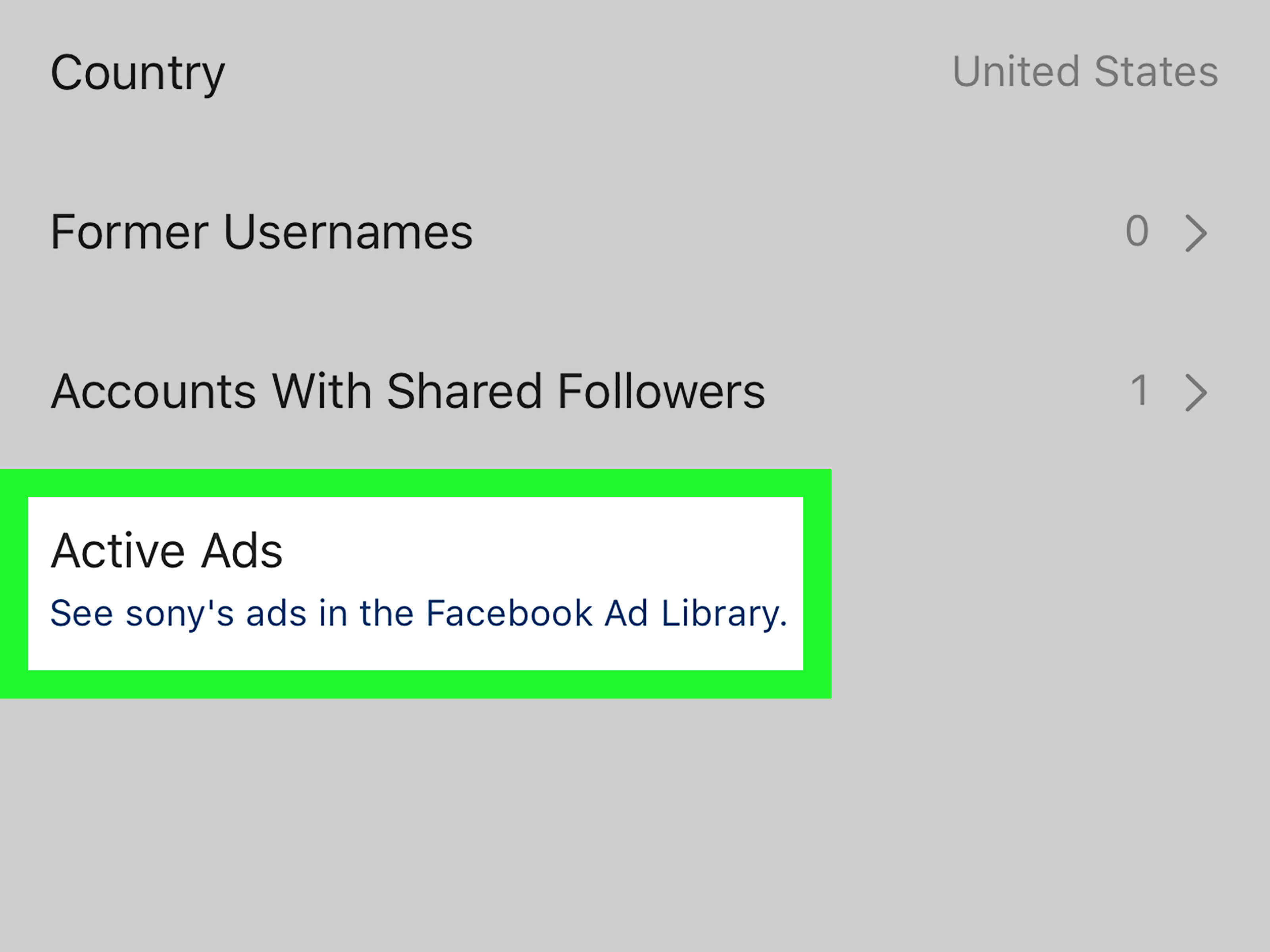
One of the most useful ways to find ads on Instagram is by checking whether a specific account is running active ads. Instagram offers an account transparency route that can lead you to active ads in Meta Ad Library.
Here is the basic process:
- Go to the Instagram profile of the brand, creator, or business you want to research.
- Tap the three-dot menu or account information area, depending on your app version.
- Select About This Account.
- Look for Active Ads.
- Open the available ad results in Meta Ad Library.
This method is excellent for competitor research. For example, if you run an online jewelry store, you can look at how similar brands advertise: Are they using lifestyle images, close-up product shots, Reels with creators, discount messaging, or seasonal campaigns? If one competitor has several active ads around “Mother’s Day gifts,” that is a clue about timing, positioning, and audience intent.
How to Use Meta Ad Library to Find Instagram Ads
Meta Ad Library is one of the best tools for finding ads across Meta technologies, including Facebook and Instagram. It is a public search tool that lets users search for ads by keyword or advertiser. You can use it even if you are not logged in, which makes it one of the easiest ways to research Instagram ads without needing a business account.
Step-by-Step: Search Instagram Ads in Meta Ad Library
- Open Meta Ad Library in your browser.
- Select your country or market.
- Choose the ad category if prompted. For most commercial research, select all ads.
- Type a brand name, advertiser name, or keyword into the search bar.
- Review the results and look for ads that include Instagram placements.
- Open individual ads to inspect creative, copy, landing pages, and running status.
Let’s say you search for “running shoes.” You may see ads from athletic brands, local stores, ecommerce retailers, or fitness apps. Some will use short video. Others will use carousel images. Some will lead with a discount. Others will sell a lifestyle: “Run farther, feel better, look like you definitely stretch.” The more ads you review, the easier it becomes to recognize patterns.
What You Can Learn From Meta Ad Library
Meta Ad Library is not just a place to peek at ads. Used properly, it is a research lab. You can study:
- Creative formats: image, video, carousel, Reels-style content, or Story-style vertical assets.
- Messaging angles: discounts, social proof, urgency, education, humor, problem-solution copy, or lifestyle branding.
- Calls to action: “Shop Now,” “Learn More,” “Subscribe,” “Install,” or “Get Offer.”
- Campaign timing: seasonal promotions, launches, holidays, or evergreen ads.
- Offer structure: free shipping, bundles, first-order discounts, trials, or limited-time deals.
For marketers, this is gold. Not “retire tomorrow” gold, but definitely “stop guessing and start noticing what the market is doing” gold.
How to Find Competitor Ads on Instagram
Finding competitor ads on Instagram is one of the smartest ways to understand your niche. The goal is not to copy. Copying is lazy, risky, and usually obvious. The goal is to identify patterns and opportunities.
Build a Competitor Ad Research List
Start with 5 to 10 competitors. Include direct competitors, larger industry leaders, and brands that serve the same audience with a different product. For example, if you sell eco-friendly water bottles, your list might include bottle brands, outdoor gear companies, fitness lifestyle brands, and sustainable living shops.
For each brand, check:
- Whether they are running active ads.
- Which products or offers they promote most often.
- Whether their ads focus on price, quality, identity, convenience, or emotion.
- How often they use Reels-style video versus static images.
- What landing pages their ads send people to.
When you compare several brands, you may discover a gap. Maybe everyone is promoting discounts, but nobody is educating customers. Maybe everyone uses polished product photography, but nobody uses creator-style demos. That gap can become your opening.
How to Find Ads You Saw But Did Not Click
This is harder. Instagram’s ad activity tools are most useful for ads you interacted with, not every ad that flashed past your eyes while you were half-watching TV. If you remember the brand name, go directly to the profile and check active ads. If you remember only the product category, use Meta Ad Library and search keywords.
For example, if you saw an ad for a “minimalist desk lamp” but forgot the brand, search Meta Ad Library for terms like “desk lamp,” “minimalist lamp,” “home office lighting,” or “LED desk light.” Then filter visually by creative and copy. This is not perfect, but it is often faster than trying to recreate your exact Instagram scrolling session, which sounds like a punishment invented by a very bored algorithm.
How to Find Ads Through Instagram Ad Preferences
Instagram’s Ad preferences area helps you understand and adjust how ads are shown to you. In Accounts Center, you can review ad topics, ad activity, and certain information used to personalize ads. Depending on your account and region, you may be able to manage activity information from ad partners or choose whether you see more personalized or less personalized ads.
To explore this area:
- Open Instagram.
- Go to your profile.
- Tap the menu icon.
- Open Accounts Center.
- Select Ad preferences.
- Review sections such as ad topics, ad activity, and information used to show ads.
This does not simply help you find ads. It helps you understand why certain ads appear. If Instagram thinks you are interested in travel, pets, fitness, or kitchen gadgets, your ad experience may reflect those signals. It is like looking into a marketing mirrorsometimes flattering, sometimes confusing, and occasionally convinced you need a luxury cat hammock.
How to Hide, Report, or Give Feedback on Instagram Ads
Finding ads is useful, but controlling them matters too. If an ad is irrelevant, repetitive, misleading, or simply annoying, Instagram allows you to provide feedback. Usually, you can tap the menu on the ad and choose options such as hide, report, or learn why you are seeing it.
Use these controls when:
- The ad is not relevant to you.
- You see the same ad too often.
- The ad seems misleading, suspicious, or inappropriate.
- You want to understand why it appeared.
For everyday users, this can improve the ad experience over time. For marketers, it is also a reminder: bad targeting and weak creative are not just ignored; they may be actively hidden. Nobody wants their expensive campaign to become the digital equivalent of a flyer stuck under a windshield wiper.
How Marketers Can Analyze Instagram Ads Without Copying Them
Competitor ad research should be ethical, strategic, and original. The point is to learn the market, not photocopy someone else’s campaign and hope nobody notices. Spoiler: people notice.
Use a Simple Ad Research Framework
When reviewing Instagram ads, use this five-part framework:
- Hook: What catches attention in the first second?
- Problem: What pain point or desire does the ad address?
- Proof: Does it use reviews, demonstrations, results, creator trust, or statistics?
- Offer: What is being sold, discounted, bundled, or promised?
- Action: What does the ad ask the viewer to do next?
For example, a skincare ad might open with “Still dealing with dry skin after moisturizing?” That is the hook and problem. Then it shows texture, customer reviews, and before-and-after style visuals. The offer might be 20% off a starter kit, and the call to action is “Shop Now.” Once you break down enough ads this way, you stop seeing “random content” and start seeing strategy.
Best Keywords to Search in Meta Ad Library
If you are using Meta Ad Library to find Instagram ads, your search terms matter. Brand names are the easiest starting point, but keywords can reveal unknown competitors and creative trends.
Try searches based on:
- Product type: “running shoes,” “meal prep,” “online course,” “travel backpack.”
- Audience: “new moms,” “small business owners,” “students,” “remote workers.”
- Problem: “back pain,” “save time,” “organize closet,” “learn Spanish.”
- Offer: “free trial,” “limited time,” “bundle,” “50% off.”
- Season: “Black Friday,” “summer sale,” “holiday gifts,” “back to school.”
Do not stop after one search. A brand selling productivity software might not use the word “productivity” in every ad. It may use “focus,” “workflow,” “team collaboration,” “AI assistant,” or “project management.” Search like a human, not like a robot wearing a tiny tie.
How to Save and Organize Instagram Ad Examples
Finding ads is only half the job. Organizing them is where the real value appears. Create a simple spreadsheet or document with columns for brand, industry, format, hook, offer, call to action, landing page, and notes. If you are researching for content strategy, add a column for “idea inspired by this ad” so you turn observation into action.
You can also group ads into categories such as:
- Best hooks
- Strong product demos
- Great Reels ads
- Good Story layouts
- Interesting offers
- Weak ads to avoid
Yes, weak ads are useful too. Sometimes the fastest way to improve your own campaign is to look at a confusing ad and say, “Let us never do that.”
Common Mistakes When Searching for Instagram Ads
Only Looking at Big Brands
Big brands have large budgets, but their strategy may not fit your business. A global fashion label can run brand-awareness ads with moody lighting and one mysterious sentence. A small store may need clearer offers, stronger proof, and more direct calls to action.
Assuming Every Active Ad Is Successful
An active ad is not automatically a winning ad. It may be new, under testing, or running with a small budget. Long-running ads can be stronger signals, but even then, you are making educated guesses, not reading the advertiser’s private dashboard.
Copying Instead of Translating
Use competitor ads as research, not templates. Translate the strategy into your own brand voice, audience, offer, and creative style. If a competitor uses humor, you do not need to steal the joke. Create your own. Preferably one that does not sound like it was assembled in a conference room by twelve people named “Brand Team.”
Practical Examples of Finding Instagram Ads
Example 1: You Want to Revisit a Product Ad
You tapped an ad for a travel backpack but forgot the brand. First, check your Instagram ad activity in Accounts Center. If it appears there, open it again. If not, search Meta Ad Library for “travel backpack,” “carry-on backpack,” and related terms. Compare images until you recognize the product.
Example 2: You Want to Research a Competitor
You run a coffee subscription business. Go to competitor Instagram profiles, open “About This Account,” and check active ads. Then search their brand names in Meta Ad Library. Note whether they focus on freshness, convenience, origin stories, discounts, or gift subscriptions.
Example 3: You Want Better Creative Ideas
You are planning Reels ads for a fitness app. Search for terms like “home workout,” “fitness app,” “strength training,” and “30 day challenge.” Study how ads use the first three seconds, captions, music, creator demos, and calls to action. Then build original concepts based on patterns that match your brand.
of Real-World Experience: What Finding Instagram Ads Teaches You
After spending enough time finding and studying Instagram ads, one thing becomes very clear: the best ads rarely feel like ads at first. They feel like helpful tips, quick entertainment, a personal recommendation, or a tiny story that happens to include a product. The worst ads, on the other hand, barge into your scroll like someone yelling “LIMITED OFFER” through a megaphone at a library.
One practical experience is that Instagram ad research works best when you separate personal taste from market behavior. You may dislike a loud ad with giant captions and exaggerated reactions, but if similar ads appear across many competitors, that style may be working for a certain audience. The goal is not to ask, “Would I click this?” The better question is, “What kind of person would click this, and why?”
Another useful lesson is that Reels ads and Feed ads often tell different stories. Feed ads tend to reward clarity: clean visuals, strong product positioning, readable copy, and a clear offer. Reels ads reward speed and motion. If a Reel ad does not create curiosity almost immediately, the viewer is gone. The thumb is ruthless. It has no loyalty. It will abandon your ad for a raccoon video in less than a second.
When researching competitors, it helps to look for repeated ideas. One ad might be a test. Five ads using the same angle suggest a strategy. If a brand keeps promoting “free shipping over $50,” that offer probably matters to its buyers. If another brand keeps showing customer testimonials, trust may be the main conversion barrier. If a software company keeps using comparison ads, it may be trying to win customers from better-known competitors.
Saving ads is also more valuable than people expect. A small swipe file of 30 to 50 ad examples can become a powerful creative library. You can review it before writing copy, planning product photography, briefing a designer, or building a campaign. The point is not to copy the exact ad. The point is to avoid starting from a blank page, which is where good ideas often go to take a nap.
For everyday users, finding Instagram ads can make the platform feel less mysterious. When you know how to check ad activity, open ad preferences, and view active ads from an account, you gain more control. You can revisit useful ads, hide irrelevant ones, and report suspicious content. That is especially important because not every polished ad deserves your trust. A beautiful design can still lead to a bad offer, a weak product, or a questionable website.
The biggest takeaway is simple: Instagram ads are not just interruptions. They are signals. They show what brands are testing, what customers are responding to, what offers are popular, and how creative trends evolve. If you are a consumer, those signals help you shop smarter. If you are a marketer, they help you create better campaigns. And if you are both, congratulationsyou now have a socially acceptable reason to scroll Instagram and call it “research.”
Conclusion: Finding Instagram Ads Is a Skill Worth Learning
Learning how to find ads on Instagram gives you more control, better awareness, and sharper marketing insight. You can identify ads while scrolling, review ads you recently interacted with, inspect a brand’s active ads, search Meta Ad Library, and manage your ad preferences through Accounts Center.
For users, this means fewer mystery ads and more confidence. For marketers, it means better competitor research, stronger creative ideas, and a clearer understanding of what is happening in your niche. Instagram may be full of ads, but once you know where to look, those ads become useful information instead of background noise.
So the next time an Instagram ad catches your eye, do not let it disappear into the scroll fog. Check your ad activity, search the advertiser, inspect the creative, and learn from it. Your future campaignsor your future shopping decisionsmay thank you.