Note: This article uses “The Shady School” as a playful way to explore Shader Academy, shader programming, WebGL, WebGPU, and the oddly satisfying art of teaching a computer how to paint with math.
Welcome to The Shady School, Where Pixels Do Homework
Some schools teach algebra. Some teach history. Some teach you how to survive cafeteria meatloaf without questioning your life choices. But The Shady School teaches something stranger and far more colorful: how to write shaders, those tiny programs that tell your graphics card how to turn numbers into glowing planets, rippling water, spinning cubes, neon grids, and the occasional accidental digital soup.
The phrase may sound like a suspicious academy hidden behind a foggy alley, but in the world of computer graphics, “shady” is a compliment. It points to shaders: small pieces of code that run on the GPU and control how objects appear on screen. If video games, 3D websites, animations, simulations, and interactive art had a secret kitchen, shaders would be the chefs. They season light, color, texture, movement, and depth. Sometimes they overdo the salt, but that is why debugging exists.
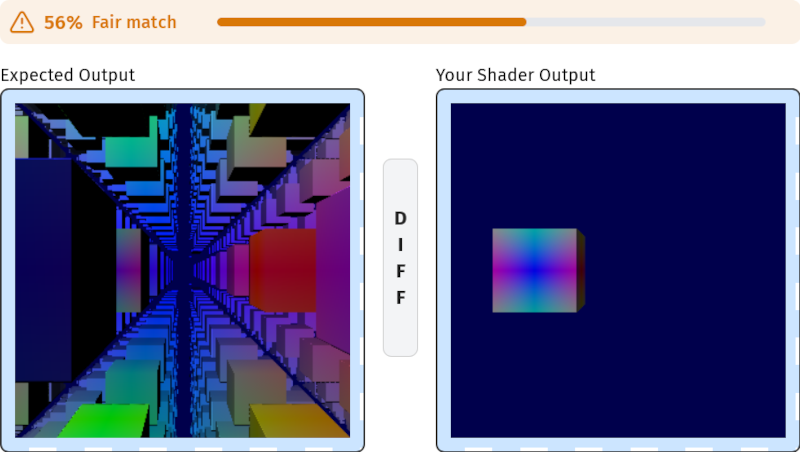
Shader Academy, the real inspiration behind this topic, is an interactive learning platform where users practice computer graphics through hands-on challenges. Instead of reading a giant manual and quietly wondering whether your brain has left the room, learners solve visual tasks directly in the browser. The platform gives you code, a target image, your rendered result, and feedback that shows how close your shader is to the expected output. It is less like a lecture hall and more like a gym for pixels.
What Is a Shader, Really?
A shader is a small program that runs on the graphics processing unit, or GPU. While the CPU is excellent at general tasks, the GPU is built to perform many similar operations at once. That makes it ideal for graphics, where thousands or millions of pixels may need color calculations every frame. In simple terms, shaders help decide where things go and what they look like.
The two shader types beginners usually meet first are vertex shaders and fragment shaders. A vertex shader handles the positions of points that make up shapes. It helps move, rotate, scale, or transform geometry. A fragment shader, often called a pixel shader, decides the final color of pixels. It can create gradients, lighting, shadows, textures, reflections, fog, and effects that make a flat rectangle suddenly look like a sci-fi portal that charges rent.
In WebGL, shaders are commonly written in GLSL, a C-like language designed for graphics. In WebGPU, a newer web graphics API, shaders are written in WGSL, the WebGPU Shading Language. The names may look like someone dropped a keyboard into alphabet soup, but the idea is clear: write code that the GPU can run efficiently.
Why The Shady School Matters
Learning shaders is notoriously tricky because the results are visual, mathematical, and sometimes emotionally dramatic. A missing semicolon may not simply break your program; it may turn your beautiful sunset into a black rectangle of judgment. Traditional tutorials often explain the theory, but beginners need practice. They need to see what happens when a number changes from 0.2 to 0.8, when a texture coordinate flips, or when time is added to a sine wave.
That is where a challenge-based platform becomes valuable. Shader Academy focuses on learning by solving. A beginner might start with a simple fragment shader that fills the screen with a color. Then the lessons may move into gradients, textures, blending, interaction, transformations, 3D scenes, raymarching, or compute-style exercises. Each challenge gives the learner a specific visual goal. That goal matters because graphics programming is easier to understand when your code produces something you can actually see.
The best part is the immediate feedback. If the target image shows a smooth blue-to-purple gradient and your screen looks like radioactive toothpaste, you know something is off. The platform’s visual comparison system helps learners understand not only whether the answer is correct, but how close it is. For creative coders, that is gold. For perfectionists, it is both gold and a tiny emotional trap.
How Shader Academy Turns Confusion Into Practice
1. It Starts With Small Visual Goals
Good education breaks large ideas into smaller pieces. Shader Academy does this by offering bite-sized challenges. Instead of asking learners to build an entire game engine, it may ask them to adjust a fragment color, sample a texture, move a cube, blend two values, or react to mouse position. These small wins build confidence.
That matters because shader programming can feel intimidating at first. Coordinates, matrices, vectors, uniforms, varyings, buffers, textures, pipelineseach term sounds like it belongs in a spaceship manual. But when learners see a direct connection between one line of code and one visible result, the fog clears. The shader stops being mysterious and starts behaving like a very fast, very picky paintbrush.
2. It Makes Math Less Scary
Shaders use math constantly. Coordinates define position. Vectors represent direction, color, or movement. Matrices transform objects in 3D space. Functions like sine, cosine, mix, step, smoothstep, dot product, and normalize appear so often that they practically deserve student ID cards.
However, shader math is not the dry worksheet version of math. It is math with fireworks. Change a sine wave and a surface pulses. Normalize a vector and lighting becomes smoother. Mix two colors and a texture gains atmosphere. For visual learners, this is a powerful way to understand concepts that may have felt abstract in a classroom.
3. It Encourages Experimentation
The beauty of browser-based shader learning is that you can experiment quickly. Change a number. Run the shader. Watch the result. Accidentally create a digital swamp. Change it again. This loop is essential for creative coding.
Many developers learn best by tinkering. Shader Academy supports that style because the challenges provide structure without removing curiosity. A learner can follow the assignment, then push beyond it. What if the color changes with time? What if the mouse controls brightness? What if the texture repeats? What if the cube grows angry and spins dramatically? The GPU will not judge. It will simply render your choices at high speed.
WebGL, WebGPU, and the New Classroom for Graphics
The modern browser has become a serious platform for graphics education. WebGL brought GPU-powered 2D and 3D rendering to the web through JavaScript and GLSL shaders. It made it possible to create interactive graphics without asking users to install special plugins. WebGPU goes further by offering a newer, lower-level API designed to map more closely to modern GPU capabilities.
For learners, this matters because the web reduces friction. A student can open a browser, load a challenge, and start coding. No enormous setup ritual. No twenty-minute dependency ceremony. No mysterious installer that asks for permission to reorganize your soul. The browser becomes the classroom, the GPU becomes the lab, and the shader editor becomes the notebook.
WebGPU also introduces compute shaders, which are useful for tasks beyond traditional drawing. Compute shaders can process data in parallel, making them valuable for simulations, particles, image processing, and other heavy workloads. In practical learning terms, this means students can move from coloring pixels to making systems behave: particles flowing, meshes changing, or thousands of elements updating at once.
Who Should Attend The Shady School?
The Shady School is not only for professional graphics engineers. It is useful for game developers, web developers, digital artists, UI designers, creative coders, technical artists, students, and anyone who has ever looked at a glowing animated background and thought, “I want to make that, preferably without crying into my keyboard.”
Game developers use shaders for lighting, water, fire, dissolve effects, outlines, terrain, post-processing, and stylized visuals. Web developers use them for interactive landing pages, product demos, data visualization, and immersive interfaces. Artists use shaders to create procedural patterns, generative art, and motion graphics. Technical artists use them to bridge the gap between visual design and engine performance.
Even if you never plan to become a shader specialist, learning the basics can improve how you think about graphics. You begin to understand why some effects are expensive, why textures matter, why lighting behaves strangely, and why your laptop fan sounds like it is preparing for takeoff when you render too many particles.
What Makes a Good Shader Learning Path?
Start With Fragment Shaders
Fragment shaders are usually the friendliest entry point because they produce immediate color results. A beginner can start by setting a single color, then build gradients using screen coordinates. From there, they can explore patterns, time-based animation, and mouse interaction. This creates a satisfying learning curve because every concept appears directly on screen.
Move Into Textures
Textures are images or data that shaders can sample. Learning to use textures helps students understand UV coordinates, sampling, filtering, wrapping, blending, and image-based effects. A texture challenge might ask the learner to display an image, tint it, mix it with a color, or distort it using coordinates.
Learn Vertex Transformations
Once colors and textures make sense, vertex shaders introduce movement and shape manipulation. Learners can scale, rotate, translate, or deform objects. This is where matrices enter the story, usually wearing a suspiciously formal hat. Matrices may seem difficult at first, but their purpose is practical: they move objects through space.
Explore 3D and Lighting
Lighting is where shaders become magical. A sphere can look flat until normals, light direction, and material properties join the party. Then it suddenly has volume. Students learn how diffuse lighting, specular highlights, shadows, and surface normals affect realism and style.
Experiment With Advanced Effects
After the basics, learners can explore raymarching, signed distance fields, procedural noise, post-processing, compute shaders, particle systems, and simulations. These topics sound advanced because they are, but challenge-based learning makes them approachable one step at a time.
Specific Examples of What Learners Can Build
A beginner at The Shady School might first create a full-screen color shader. That sounds simple, but it teaches the core structure of a fragment shader. Next, they might create a gradient from left to right using pixel coordinates. Then they may add time, making the gradient pulse. Suddenly, the screen is alive.
Another challenge might involve displaying a texture and blending it with a red color. This teaches sampling and the mix function. A mouse interaction task might ask the learner to change color based on cursor position. A transformation challenge might require scaling a scene by two or moving a cube one unit to the side. These examples are small, but they teach the building blocks behind much larger visual systems.
Advanced learners might work on raymarching scenes, where shapes are rendered through distance functions rather than traditional mesh geometry. Others may explore compute-driven particle systems, where thousands of particles update through GPU calculations. At that point, The Shady School starts feeling less like school and more like wizardry with a compiler.
The SEO-Friendly Truth: Shader Programming Is Becoming More Useful
Search interest around terms such as learn shaders, shader programming, WebGPU tutorial, GLSL tutorial, and interactive computer graphics reflects a broader trend: visual computing is no longer limited to game studios. The web now hosts 3D product configurators, browser-based design tools, data visualization dashboards, interactive maps, virtual showrooms, educational simulations, and generative art platforms.
As browsers become more capable, developers who understand GPU concepts gain an advantage. They can build smoother experiences, optimize performance, and create visuals that stand out in a crowded digital world. The internet is full of rectangles. A good shader can make one of those rectangles shimmer like it has a secret.
Common Beginner Mistakes in The Shady School
Forgetting the Coordinate System
Many shader problems begin with coordinates. Beginners often expect screen positions to behave like regular pixel values, but shader environments frequently use normalized coordinates, UV coordinates, clip space, or other coordinate systems. Understanding the range of values is half the battle.
Mixing Up Vertex and Fragment Responsibilities
A vertex shader moves points. A fragment shader colors pixels. They work together, but they do different jobs. Putting heavy pixel-level work in the wrong place can hurt performance. Putting position logic in the wrong stage can produce results best described as “modern art with a bug report.”
Ignoring Precision and Performance
Shaders run many times, often once per pixel or once per vertex. A tiny inefficient calculation can become expensive when repeated millions of times. Learning best practices early helps students write shaders that look good and run well.
Expecting Perfect Results Immediately
Shader learning involves trial and error. Black screens happen. Weird colors happen. Objects vanish. Textures stretch like taffy. This is normal. The important skill is learning to inspect values, simplify the problem, and rebuild gradually.
Why Visual Feedback Beats Passive Learning
Reading about shaders is useful, but writing shaders is where understanding sticks. Visual feedback creates a tight loop between idea and result. When a learner changes a line of code and instantly sees a new color, shape, or motion, the brain connects the concept more deeply.
This is why challenge-based platforms work so well. They turn abstract graphics theory into a game-like process. The target image gives a destination. The code editor gives control. The comparison tool gives feedback. The learner gets a little dopamine when the match improves. Education may not always need confetti, but let us be honest: confetti helps.
Experiences From The Shady School: of Pixel-Flavored Reality
My first imaginary day at The Shady School began with confidence, which was adorable. I opened a basic shader challenge and thought, “How hard can it be to color a square?” This is the sentence every graphics beginner says moments before discovering that a square can absolutely fight back. The goal was simple: make the canvas match a reference color. I typed a value, ran the shader, and produced something close enough to blue that only a committee of designers would complain. Progress!
The next lesson involved gradients. Suddenly, color was not just color; it depended on position. The left side of the screen needed one shade, the right side another. I learned that coordinates are the secret map of shader programming. Once I understood that every pixel had a location, the screen stopped being a flat image and became a field of possibilities. It felt like discovering that graph paper had been hiding inside my monitor all along.
Then came textures. I sampled an image, blended it with another color, and accidentally made it look like the image had spent three weeks inside a tomato. Still, the mistake was useful. I began to understand that shaders are not just about writing correct code; they are about shaping relationships between values. A texture coordinate slightly shifted can create motion. A color mix can change mood. A simple function can turn a plain image into a stylized effect.
The hardest moment arrived with transformations. Moving a cube sounded easy until matrices entered the room. Matrices are the kind of math concept that looks innocent from a distance but brings luggage. Scaling, rotating, translating, projectioneach one changes how geometry appears. At first, I treated matrices like magical blocks copied from tutorials. Later, after enough practice, I began to see them as tools for describing space. That shift felt huge. The cube was no longer bullying me. We had entered negotiations.
Mouse interaction was the first time shader programming felt playful. Moving the cursor and watching color respond gave the lesson a sense of life. It reminded me that shaders are not only for cinematic explosions or glossy game effects. They are also for interfaces that feel responsive, educational tools that show invisible concepts, and small moments of delight that make users pause and smile.
The biggest lesson from The Shady School is patience. Shader programming rewards curiosity, but it does not always reward speed. You learn by breaking things carefully. You learn by changing one value at a time. You learn by turning a black screen into a gray screen, then into a gradient, then into something that looks almost intentional. And when the final image matches the reference, even by 98 percent, you feel like you have shaken hands with the GPU and survived.
Final Thoughts: The Shady School Is a Bright Idea
The Shady School is more than a clever title. It represents a better way to learn a difficult technical skill: visually, interactively, and with enough structure to prevent beginners from wandering into the wilderness of GPU programming wearing flip-flops.
Shader Academy and similar learning resources show why computer graphics education is changing. Students no longer have to begin with giant textbooks or complex local setups. They can practice directly in the browser, compare their output, and learn by doing. That hands-on experience is essential because shaders are not fully understood until they are seen, tested, broken, fixed, and occasionally blamed for things that were definitely our fault.
For anyone interested in WebGL, WebGPU, GLSL, WGSL, game visuals, interactive websites, or creative coding, The Shady School is worth attending. Bring curiosity, patience, and a healthy respect for semicolons. The pixels are waiting.