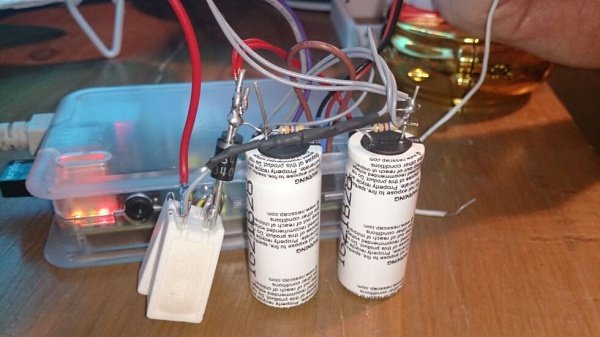
A Raspberry Pi is a tiny computer with a big personality. It can run a home automation hub, a network monitor, a retro gaming station, a weather dashboard, a print server, or that one “temporary” project that has somehow lived on your desk for three years. But even the cleverest Pi has one classic weakness: yank the power at the wrong moment, and your microSD card may respond with the digital equivalent of dropping a plate of spaghetti on the floor.
That is where a Raspberry Pi UPS using supercapacitors becomes interesting. Instead of building a full battery backup system designed to run for hours, a supercapacitor UPS is usually designed for a much humbler but extremely useful mission: keep the Pi alive just long enough to detect power loss, finish writing data, and shut down gracefully. Think of it as a parachute, not a jetpack.
Supercapacitors, also called ultracapacitors or EDLCs, store energy like ordinary capacitors but at much higher capacitance values. They charge quickly, tolerate many more charge-discharge cycles than typical rechargeable batteries, and are especially good at short ride-through events. For Raspberry Pi projects, that makes them a smart option when your goal is not “run all night,” but “do not corrupt my files because someone kicked the power strip.”
What Is a Raspberry Pi UPS?
A UPS, or uninterruptible power supply, provides backup power when the main supply disappears. In the desktop PC world, this usually means a heavy box with a lead-acid or lithium battery inside. In the Raspberry Pi world, the idea can be much smaller. A Pi UPS may only need to provide power for 10 to 60 seconds, depending on the operating system, connected devices, and shutdown process.
The Raspberry Pi is not fond of weak power. Raspberry Pi 4 commonly expects a solid 5V USB-C supply with enough current for the board and peripherals, while Raspberry Pi 5 can demand even more headroom, especially when USB devices are attached. If voltage sags, the Pi may show undervoltage warnings, throttle performance, disconnect USB devices, or behave like a cat that has just noticed a cucumber.
A proper Raspberry Pi UPS should do three things well: deliver stable 5V power, detect when main power has failed, and give the operating system enough time to shut down safely. A supercapacitor-based UPS handles the energy storage part differently from a battery UPS, but the goal is the same: controlled survival during a power interruption.
Why Use Supercapacitors Instead of Batteries?
Batteries are excellent when you need long runtime. A lithium battery pack can keep a Pi alive for minutes or hours, depending on capacity and load. But batteries also bring charging rules, aging concerns, temperature sensitivity, shipping restrictions, and safety considerations. Supercapacitors are not magic, but they are refreshingly practical for short backup intervals.
Supercapacitors Charge Fast
A supercapacitor can recharge much faster than a battery, provided the charging circuit limits current safely. That is helpful for projects that experience brief power dips or frequent interruptions. If your Pi sits in a workshop, garage, kiosk, or remote cabinet where power flickers occasionally, the supercapacitors can recover quickly after each event.
They Handle Many Cycles
Supercapacitors are built for repeated charge and discharge cycles. A battery UPS may gradually lose capacity after repeated cycling, while a well-designed supercapacitor system can tolerate a large number of short events. For a Raspberry Pi data logger, router monitor, or industrial-style controller, that cycle life can be more valuable than long runtime.
They Are Great for Graceful Shutdown
The best use case for a Raspberry Pi supercapacitor UPS is graceful shutdown. When main power disappears, the UPS gives the Pi a warning through GPIO or another signal. The Pi then runs a shutdown command before the capacitors run out of useful voltage. It is less dramatic than a battery backup, but it solves the most common problem: file corruption caused by sudden power loss.
How a Supercapacitor UPS Works
A simplified Raspberry Pi UPS using supercapacitors has four major blocks: the main power input, a charger or power-management circuit, the supercapacitor bank, and a regulated 5V output. The main supply powers the Pi during normal operation and charges the supercapacitors. When input power fails, the circuit switches to the stored energy in the capacitors and keeps the 5V rail alive.
The trick is regulation. A capacitor’s voltage falls as it discharges. A Raspberry Pi does not want a slowly collapsing voltage rail; it wants a stable 5V supply. That means most practical designs need a DC-DC converter, often a buck-boost or boost converter, to maintain a safe output while the capacitor voltage changes.
Another key part is power-path control. A good UPS circuit should prevent the Pi from back-feeding the input supply, avoid sudden output drops during switchover, and limit inrush current when empty capacitors begin charging. Supercapacitors can draw a large current if connected directly to a supply, so responsible charging is not optional. It is the difference between “engineering” and “why does this smell warm?”
The Energy Math, Without the Headache
Supercapacitor sizing starts with stored energy. The basic formula is simple: energy equals one-half times capacitance times voltage squared. In real use, you cannot use every joule stored in the capacitor because the converter has a minimum input voltage and is not 100% efficient. Still, the formula gives a useful starting point.
Suppose a small Raspberry Pi setup draws around 5 watts during shutdown. If the system needs 30 seconds to shut down cleanly, it needs about 150 joules of usable energy before conversion losses. Add converter inefficiency and a safety margin, and the required stored energy climbs. This is why tiny capacitors are not enough for a Pi, even though they look impressive on a parts list.
Many DIY supercapacitor UPS projects use large capacitors such as 10F, 25F, 50F, or more. When capacitors are placed in series to increase voltage rating, the total capacitance decreases. For example, two identical 50F capacitors in series behave like a 25F capacitor with double the voltage rating. That is a classic “electronics giveth, electronics taketh away” moment.
Important Design Considerations
1. Raspberry Pi Power Demand
The Pi model matters. A Raspberry Pi Zero or Zero 2 W is far easier to back up with supercapacitors than a Raspberry Pi 5 with USB SSD, camera, fan, and glowing accessories. Before designing a UPS, measure real current draw during normal use and during shutdown. Guessing is fine for party games, not power design.
Also remember that attached USB devices can dominate power consumption. A USB hard drive, LTE modem, display, or AI accelerator may pull far more current than expected. If the UPS only needs to protect the Pi, consider powering nonessential peripherals separately or switching them off immediately after power loss.
2. Regulated 5V Output
A Raspberry Pi needs a stable supply. A supercapacitor bank alone is not a UPS; it is an energy bucket. To make it useful, you need a regulator that can keep the output near 5V while the capacitor voltage falls. For many designs, a buck-boost converter is ideal because it can handle input voltage above or below the output voltage.
The converter must be rated for the Pi’s peak current. Do not choose a module based only on optimistic marketing numbers. Check sustained current, thermal performance, efficiency, and behavior at low input voltage. A converter that technically outputs 5V but becomes hot enough to toast breadcrumbs is not a success story.
3. Safe Supercapacitor Charging
Supercapacitors can look like a near-short circuit when empty. A charging circuit should limit current and stop charging at the correct voltage. If capacitors are used in series, each cell must stay within its voltage rating. Many supercapacitors are rated around 2.7V per cell, so a two-cell stack needs balancing to prevent one capacitor from being overvolted.
Balancing can be passive, using resistors, or active, using a dedicated controller. Passive balancing is simple but wastes a small amount of power. Active balancing is more efficient and precise, but it increases design complexity. For a project that must be reliable, dedicated supercapacitor charger and backup-controller ICs are often worth considering.
4. ESR and Voltage Drop
Equivalent series resistance, or ESR, is the hidden gremlin inside capacitors. A supercapacitor with high ESR will experience voltage drop under load and generate heat. Low ESR is important when the Raspberry Pi needs a burst of current. If your UPS works on the bench with no peripherals but collapses when the Pi writes to an SSD, ESR and converter limits are prime suspects.
5. Shutdown Signaling
A supercapacitor UPS should not merely keep the Pi alive; it should tell the Pi what happened. This can be done with a GPIO signal, a microcontroller, or a power-management board. When main power disappears, the Pi receives the signal and starts a shutdown process. Without that signal, the Pi may continue running cheerfully until the capacitors are empty, which is like using your parachute as a backpack.
A typical software approach uses a small script or system service that watches a GPIO pin. When the pin changes state, the script runs a safe shutdown command. More advanced systems can also monitor capacitor voltage, cancel shutdown if power returns quickly, or wait until critical services finish writing data.
Best Projects for a Supercapacitor Raspberry Pi UPS
A supercapacitor UPS is not ideal for every Raspberry Pi project, but it is excellent for several categories. The first is logging. Weather stations, environmental sensors, and workshop monitors often write data to storage. A controlled shutdown protects the filesystem and reduces the chance of losing recent measurements.
The second is networking. A Pi running Pi-hole, a lightweight router tool, or a monitoring dashboard may not need hours of backup, but it benefits from surviving short brownouts and shutting down cleanly during longer outages. Nobody wants DNS trouble because the lights blinked during dinner.
The third is embedded control. If the Pi is part of a kiosk, signage system, camera station, or lab instrument, a supercapacitor UPS can provide a professional layer of protection. In these environments, short runtime is often enough because the main concern is storage integrity, not continued operation.
When a Battery UPS Is Better
Supercapacitors are wonderful for short ride-through and graceful shutdown, but they are not a replacement for batteries in long-runtime applications. If you want your Raspberry Pi to keep recording video during a blackout, stay online for hours, or run outdoors overnight, a battery-based UPS is the more practical choice.
Batteries have much higher energy density, meaning they store more energy per size and cost. Supercapacitors store less energy but deliver it quickly and repeatedly. That makes them more like sprinters than marathon runners. Choose the storage technology based on the race you are running.
Common Mistakes to Avoid
Using Capacitors Without Regulation
Connecting a capacitor bank directly to a Raspberry Pi may seem tempting, but it is rarely a good UPS design. The Pi needs regulated voltage. As the capacitor discharges, the voltage drops, and the Pi may brown out before it has finished shutting down.
Ignoring Inrush Current
Empty supercapacitors can pull a large current when first connected. Without current limiting, the charger, power supply, connector, or PCB traces may be stressed. A safe design controls charge current and handles startup predictably.
Forgetting Cell Balancing
Series-connected supercapacitors need voltage balancing. If one cell rises above its rating, reliability and safety suffer. This is one of those details that looks boring until it becomes the entire plot.
Overestimating Runtime
A supercapacitor that sounds enormous on paper may only run a Pi for seconds under real load. Converter losses, voltage limits, ESR, peripheral current, and aging all reduce usable runtime. Always test with the actual project, not a fantasy version of the project that draws no current and never writes to disk.
A Practical Build Strategy
For most makers, the smartest route is not to design everything from scratch. Start with a known power-management module or a dedicated supercapacitor backup controller. Look for features such as regulated 5V output, current-limited charging, power-path management, low-voltage cutoff, status output, and support for safe shutdown signaling.
Then test in stages. First, power the Pi normally and measure current. Second, connect only the UPS and confirm the output stays stable under load. Third, test the power-fail signal without actually relying on the capacitors. Fourth, perform real shutdown tests while watching voltage. Finally, repeat the test with all peripherals attached.
A good target is to provide more backup time than the shutdown normally requires. If your Pi shuts down in 20 seconds, design for at least 40 or 60 seconds. This margin helps account for cold temperatures, capacitor aging, heavier CPU load, and the occasional Linux process that decides now is the perfect time to be dramatic.
Software Matters as Much as Hardware
The hardware gives your Raspberry Pi time. The software decides how to use it. A well-configured shutdown script should react quickly to power loss, stop important services, sync storage, and halt the system before the UPS voltage falls too low.
For database-heavy projects, configure applications to flush data frequently. For sensor projects, save readings in small batches rather than keeping everything in memory. For network devices, log the shutdown event so you know whether the UPS is doing its job. The goal is not just to turn off the Pi; the goal is to turn it off gracefully, like a tiny server wearing a tuxedo.
Safety Notes for Supercapacitor UPS Projects
Supercapacitors used in Raspberry Pi projects are usually low-voltage components, but they can deliver high currents if shorted. Use proper fusing, insulation, connectors, and wire gauge. Respect polarity. Follow datasheets. Avoid loose metal tools near charged capacitor banks. If you are not confident with power electronics, use a commercially designed module rather than improvising a circuit from mystery parts in a drawer.
Also consider enclosure design. A UPS board should not rattle around inside a case. Secure the capacitors, provide ventilation for regulators, and keep high-current paths short and well protected. A clean physical build is part of electrical reliability.
Real-World Experience: What Building a Raspberry Pi Supercapacitor UPS Teaches You
The first thing you learn from working with a Raspberry Pi UPS using supercapacitors is that “five volts” is not a casual suggestion. The Pi is a polite little board until the supply droops, and then it starts leaving clues: undervoltage warnings, random USB disconnects, filesystem complaints, or unexplained reboots. At first, these symptoms feel like software bugs. After enough troubleshooting, you realize the power system has been quietly heckling you from the corner.
One useful experience is measuring the actual shutdown time. Many people assume a Raspberry Pi shuts down in a few seconds. Sometimes it does. Sometimes it does not. A Pi running a simple sensor script may halt quickly, while a Pi running Docker containers, a database, a USB SSD, and network services may need noticeably more time. This matters because the UPS does not care about optimism. It only cares about joules.
Another lesson is that peripherals are sneaky. A bare Raspberry Pi may behave beautifully on a supercapacitor backup, but add a USB drive, cooling fan, display, or camera and the runtime can shrink fast. During testing, it helps to remove nonessential loads after a simulated power failure. For example, a microcontroller or MOSFET-controlled power path can disconnect LEDs, fans, or external devices while keeping the Pi alive long enough to shut down. It feels a little ruthless, but in a blackout, the filesystem gets the lifeboat first.
Supercapacitor charging also teaches patience. Because empty capacitors can demand a large current, a current-limited charger is not just a nice feature; it is central to reliability. In a good design, the system starts predictably, the capacitors charge at a controlled rate, and the Pi does not brown out while the UPS is refilling its energy reserve. In a bad design, everything technically works until the one day it does not, usually when you are showing the project to someone else.
Testing power loss is another experience worth taking seriously. Do not test only once. Pull input power repeatedly. Try short outages, long outages, quick returns, and power loss during boot. Watch what happens if power returns while the Pi is already shutting down. A robust UPS should handle awkward timing gracefully. Real power failures are not courteous enough to follow your test script.
You also discover that a supercapacitor UPS changes how you think about reliability. It is not about making the Pi immortal. It is about controlling failure. Power will fail. Someone will unplug the wrong adapter. A storm will blink the lights. A cheap cable will betray you. The UPS gives your Raspberry Pi a chance to say, “Excuse me, I need to put my files away,” instead of face-planting into corrupted storage.
Finally, the best experience is the quiet kind: nothing happens. The power flickers, the UPS catches it, the Pi shuts down properly, and the project boots again later without drama. No heroic repair session. No reimaging the card. No muttering at midnight while holding a USB keyboard. That calm reliability is the whole point. A Raspberry Pi supercapacitor UPS is not the flashiest upgrade, but it is one of those small engineering decisions that makes a project feel finished.
Conclusion
A Raspberry Pi UPS using supercapacitors is a practical, elegant solution for projects that need safe shutdown more than long backup runtime. Supercapacitors charge quickly, handle frequent cycles, and provide enough short-term energy to protect the operating system from sudden power loss. The key is designing the system properly: stable 5V regulation, safe charging, cell balancing, low ESR, reliable power-fail detection, and software that shuts the Pi down before the stored energy runs out.
For compact embedded systems, data loggers, home lab tools, and network appliances, a supercapacitor UPS can be the difference between a resilient project and a tiny computer with trust issues. Build it carefully, test it honestly, and your Raspberry Pi will thank you by doing what computers rarely do during power failures: leaving quietly and cleanly.