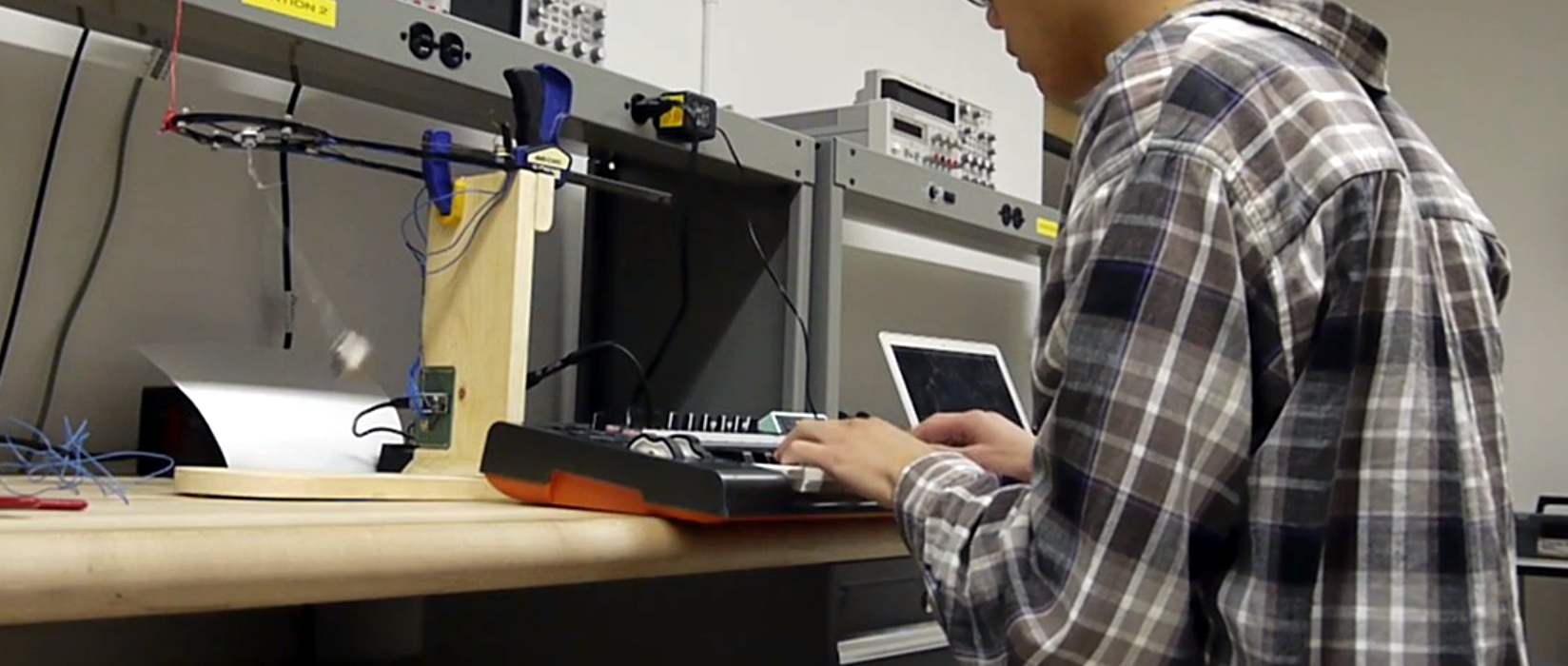
A MIDI controller usually looks like something you would expect to find in a studio: pads, knobs, sliders, keys, maybe a few blinking LEDs pretending they are in charge of the spaceship. A pendulum MIDI controller, however, walks into the room with a totally different attitude. It does not ask you to twist a knob. It asks gravity to do a little dance.
The idea behind a pendulum MIDI controller is wonderfully strange and surprisingly practical: let a swinging object generate musical control data. Instead of manually adjusting filter cutoff, delay feedback, modulation depth, pitch bend, or other parameters, the natural motion of a pendulum becomes the performer. The result can be slow, hypnotic, unpredictable, and deeply musical. It is part instrument, part sculpture, part physics lesson, and part “why didn’t I build this in my garage already?”
The concept gained attention through projects such as Modulum, a pendulum-based MIDI controller that used the swing of a physical object as a low-frequency modulation source. Related experimental builds like PendulumSynth have expanded the idea further by using motion sensors, microcontrollers, wireless data, USB MIDI, and control voltage outputs to turn real-world movement into sound design. In plain English: a ball swings, sensors notice, code translates the movement, and your synth suddenly behaves like it has discovered interpretive dance.
What Is a Pendulum MIDI Controller?
A pendulum MIDI controller is an experimental music interface that converts the motion of a swinging pendulum into MIDI messages. MIDI, short for Musical Instrument Digital Interface, is the communication language that lets electronic instruments, computers, drum machines, synthesizers, and digital audio workstations talk to one another. A pendulum controller does not usually create sound by itself. Instead, it sends instructions to something that does create sound.
Think of it as a physical low-frequency oscillator, or LFO. In a synthesizer, an LFO is commonly used to create repeating changes over time. It can make vibrato, tremolo, wah-like filter movement, pulsing volume, rhythmic panning, or dreamy delay modulation. A pendulum naturally creates repeating motion, so it makes sense to use that motion as a musical control source. The difference is that a software LFO is mathematically perfect, while a real pendulum is charmingly imperfect. It has friction, wobble, drift, and personality. In music, personality often wins.
The Basic Signal Chain
Most pendulum MIDI controller designs follow a simple logic:
- A pendulum swings in physical space.
- A sensor measures its angle, acceleration, rotation, or position.
- A microcontroller reads the sensor data.
- Software scales the data into useful musical values.
- The controller sends MIDI, USB MIDI, OSC, or CV data to external gear.
- A synthesizer, DAW, sampler, or effects processor responds in real time.
That sounds technical, but the musical result is easy to understand. When the pendulum swings left, the filter opens. When it swings right, the reverb blooms. When it reaches the top of its arc, a note triggers. When it slows down, the modulation becomes gentler. Suddenly, motion is not just motion. It is arrangement, expression, and performance.
Why the Pendulum Idea Feels So Musical
The pendulum is one of the oldest visual symbols of rhythm. Clocks use it. Physics teachers love it. Hypnotists in old cartoons practically built a career on it. Musicians, meanwhile, spend their lives managing time, repetition, tension, and release. Put those ideas together and a pendulum MIDI controller starts to feel less like a novelty and more like a natural instrument waiting for someone to give it a USB cable.
Unlike a regular knob, a pendulum moves on its own after you set it in motion. That creates a musical relationship between the performer and the object. You are not controlling every value directly. You are shaping the conditions: how hard it swings, where it starts, how long the string is, how much resistance the system has, what parameter it controls, and how sensitive the mapping should be.
This makes the instrument feel alive. It is not random in the pure chaos sense, but it is not sterile either. It sits in a beautiful middle zone where physics behaves predictably enough to be useful and unpredictably enough to stay interesting.
How MIDI Makes the Swing Useful
MIDI is often misunderstood as “old keyboard cable technology,” but that is like calling the English language “old mouth software.” MIDI remains powerful because it is simple, flexible, and widely supported. A pendulum MIDI controller can send many types of messages, but the most common are MIDI Control Change messages, also known as MIDI CC.
A MIDI CC message can control parameters such as modulation wheel, volume, pan, expression, sustain, or custom-mapped controls inside a DAW. Most classic MIDI CC values range from 0 to 127. That range may sound small, but it is enough for many expressive gestures. A pendulum’s angle can be mapped to that range, so the lowest point might be 64, the far left might be 0, and the far right might be 127.
Once those values enter a DAW like Ableton Live, Logic Pro, FL Studio, Bitwig, or a hardware synth, they can control almost anything: filter cutoff, resonance, wavetable position, granular density, delay time, stereo width, distortion amount, sample start position, or lighting parameters for a performance setup. Yes, your pendulum can technically become the world’s most dramatic lighting intern.
Common Hardware Behind a Pendulum MIDI Controller
The hardware depends on how ambitious the build is. A simple version might use a microcontroller, a basic accelerometer, and USB MIDI. A more advanced version may include an inertial measurement unit, wireless communication, multiple pendulums, batteries, custom enclosures, and support for both MIDI and control voltage.
Microcontroller
A microcontroller is the brain of the project. Popular choices include Arduino-compatible boards, Teensy boards, STM32-based boards, Raspberry Pi Pico-style boards, and other small development boards with USB support. For a MIDI controller, native USB can be extremely helpful because it allows the device to appear as a class-compliant USB MIDI controller on a computer. That means less wrestling with drivers and more time making sounds that resemble a robot dreaming under a blanket.
Motion Sensor
A pendulum controller needs a way to measure movement. Accelerometers can detect acceleration. Gyroscopes detect rotation. Magnetometers help with orientation. IMU sensors combine several of these tools into one package. Sensors such as the BNO085 are popular in motion projects because they provide useful orientation and sensor fusion features, which can reduce the amount of math the builder has to do manually.
Wireless Module
Some pendulum projects place electronics inside the pendulum bob itself. In that case, wireless data can be useful because dangling signal wires may interfere with the swing. Radio modules, Bluetooth-style communication, or other wireless approaches can send motion data to a receiver, which then converts the data to MIDI, OSC, or CV.
Output Options
A pendulum MIDI controller can communicate in several ways. USB MIDI is convenient for computers and DAWs. Traditional serial MIDI can connect to hardware synths with DIN-style MIDI inputs. Control voltage is useful for modular synthesizers. OSC, or Open Sound Control, is common in experimental audio, interactive installations, and multimedia systems because it can carry high-resolution data over networks.
Musical Uses: Where the Pendulum Really Shines
The obvious use for a pendulum MIDI controller is modulation, but that word covers a lot of creative ground. A pendulum is especially good at slow, evolving movement. It can make a static synth patch feel organic, as if the sound is breathing instead of sitting in a chair checking its email.
Filter Movement
Map the pendulum to filter cutoff and you get a natural sweeping effect. A wide swing can open and close the filter dramatically. A smaller swing can add subtle tone movement. Because the pendulum slows at the top of each arc and speeds through the center, the movement feels more physical than a perfectly linear automation curve.
Delay and Reverb Control
Delay feedback, wet/dry mix, and reverb size are excellent targets. The pendulum can push a sound into a spacious wash and then pull it back again. Used carefully, this can make guitar, vocals, pads, or percussion feel cinematic. Used recklessly, it can turn your mix into a haunted aquarium. Both outcomes have fans.
Generative Notes and Triggers
A pendulum does not have to control only continuous parameters. It can also trigger notes when it crosses certain points. For example, each time the pendulum passes through the center, it could send a kick drum. At the far left, it could trigger a snare. At the far right, it could trigger a bell. Add several pendulums with different lengths and you get polyrhythmic patterns that evolve naturally over time.
Visual Performance
Because the controller is physical and visible, it adds stage presence. Many MIDI controllers are powerful but visually boring. A pendulum controller gives the audience something to watch. The performer can start it swinging, dampen it, redirect it, or interact with it like a kinetic sculpture. In a live electronic set, that visual element can make the difference between “cool track” and “wait, is that thing playing the synth?”
Why It Beats a Normal LFO Sometimes
A software LFO is precise, tempo-syncable, recallable, and dependable. That is wonderful. But sometimes dependable is also predictable. A pendulum MIDI controller introduces natural variation. Its motion changes over time as energy fades. It can wobble slightly. It may respond differently depending on how it is launched. This gives the sound a human-made-mechanical quality.
In music production, tiny imperfections often create emotional interest. A drummer does not hit every snare with identical force. A singer does not hold every note with laboratory-flat consistency. A pendulum controller brings that same idea into electronic modulation. It lets gravity become part of the performance.
Design Challenges and Smart Solutions
Of course, building a pendulum MIDI controller is not all smooth swinging and instant genius. There are challenges. Sensor readings can be noisy. MIDI data can flood a DAW if it is sent too quickly. Wireless systems can introduce latency. A pendulum can physically bump into things if the design is not controlled. And yes, if you build the enclosure poorly, your futuristic music sculpture may look like a fishing bobber having a midlife crisis.
Data Smoothing
Raw sensor data is often jittery. Smoothing algorithms can help. A moving average filter, low-pass filter, or dead zone can prevent tiny unwanted movements from creating nervous MIDI values. The goal is not to remove all life from the signal. The goal is to remove the digital hiccups while keeping the physical character.
Scaling and Mapping
The sensor may produce values in degrees, radians, acceleration units, or raw numbers. These must be mapped to useful musical ranges. For MIDI CC, that usually means 0 to 127. For pitch bend, it may require a different range. For OSC or CV, the output may be higher resolution. Good mapping is where the instrument becomes playable instead of merely interesting.
Rate Limiting
A controller does not need to send hundreds or thousands of MIDI messages every second for every tiny motion change. Rate limiting prevents data overload and makes the receiving synth or DAW happier. A steady stream of meaningful values is better than a firehose of nervous numbers.
Physical Safety and Stability
The pendulum should be built so it swings freely without damaging cables, electronics, furniture, pets, or the performer’s dignity. A stable frame, secure attachment point, protected wiring, and lightweight materials can make the difference between a musical instrument and an insurance claim with rhythm.
Creative Mapping Ideas for Producers
If you are producing electronic music, ambient music, experimental pop, film scores, modular synth performances, or interactive installations, a pendulum MIDI controller opens up a surprising number of ideas.
- Ambient pads: Map swing position to filter cutoff and reverb mix for slow evolving textures.
- Techno percussion: Trigger hits when the pendulum crosses fixed points.
- Granular synthesis: Use pendulum speed to control grain density.
- Guitar effects: Map motion to delay feedback or pitch modulation.
- Modular synth: Convert motion to CV for organic modulation.
- Live visuals: Send the same motion data to lighting or projection software.
- Film scoring: Use pendulum movement to create tension that feels physical and unstable.
The best mappings are usually the ones where the listener can feel the movement without the effect becoming too obvious. Like good seasoning, a pendulum controller can add flavor. Dump the whole jar in and suddenly everyone is politely drinking water.
Who Should Build or Use One?
A pendulum MIDI controller is ideal for musicians, sound designers, installation artists, electronic composers, DIY electronics fans, educators, and anyone who enjoys the point where music and physics shake hands. It is especially appealing if you are tired of controlling everything with a mouse. A mouse is efficient, yes, but it has never made a room full of people say, “Whoa, gravity just opened the filter.”
For teachers, the concept is also excellent. It connects physics, coding, electronics, and music in one project. Students can see how motion becomes data and how data becomes sound. That is more memorable than another worksheet about oscillation, unless the worksheet also has a synthesizer solo, which most worksheets rudely do not.
Experience Section: What It Feels Like to Work With a Pendulum MIDI Controller
The first experience of using a pendulum MIDI controller is less like operating studio gear and more like negotiating with a small planet. You give it a push, step back, and listen as the swing begins to shape the sound. At first, it feels almost too simple. The pendulum moves left and right; the synth responds. Then, after a few minutes, the deeper behavior starts to reveal itself. The swing is not perfectly mechanical. It breathes. It fades. It leans into the curve and then rushes through the middle. You begin to hear the arc, not just the modulation.
In a typical studio session, a producer might draw automation with a mouse or assign a knob to a parameter. That gives control, but it also locks the mind into straight lines and predictable gestures. With a pendulum controller, the body gets involved differently. Instead of drawing a curve, you launch one. A gentle push creates subtle movement. A stronger push creates wider drama. Damping the pendulum with your hand can quickly reduce intensity. Changing the mapping can turn the same physical swing from a filter sweep into a delay swell, a pitch shimmer, or a rhythmic trigger.
The most satisfying moments often happen when the pendulum is mapped to more than one destination. For example, imagine a soft synth pad where the horizontal swing controls filter cutoff while swing speed controls reverb amount. At the beginning, the sound opens and blooms. As the pendulum slows, the pad becomes calmer, darker, and more intimate. Nothing about that movement feels copied and pasted. It feels performed, even if the performer is partly gravity.
There is also a valuable lesson in restraint. The temptation is to map the pendulum to everything: filter, resonance, pitch, delay, distortion, pan, and maybe the studio coffee maker if it has MIDI. But the best results usually come from focused assignments. One strong mapping can be expressive. Three carefully balanced mappings can be magical. Ten mappings can sound like a synthesizer falling down stairs while filing a complaint.
For live performance, the experience becomes visual as well as sonic. Audiences understand motion instantly. They may not know what MIDI CC is, and frankly, they should not have to. They can see the pendulum swing and hear the sound change. That connection makes electronic performance feel less hidden. Instead of staring at a laptop and wondering whether the musician is performing or answering email, the audience sees a physical cause and hears a musical effect.
From a builder’s perspective, the most rewarding part is tuning the response. Small choices matter: how long the pendulum is, how heavy the bob feels, how smooth the data is, how often MIDI messages are sent, and whether the mapping is linear or curved. A short pendulum feels quick and nervous. A longer one feels slower and more cinematic. A heavy bob can look graceful but may need a safer frame. A lightweight bob is easier to manage but may feel less dramatic. This is where engineering becomes instrument design.
After spending time with the idea, the biggest takeaway is that a pendulum MIDI controller is not just a quirky gadget. It is a reminder that music technology does not have to hide inside rectangles. Sound can be shaped by wheels, strings, sensors, water, light, breath, pressure, and swinging objects. The pendulum works because it turns an invisible modulation curve into something you can see, touch, and influence. It makes electronic music feel physical again.
Conclusion
The phrase “Pendulum MIDI Controller Really Swings” sounds like a clever headline, but the idea behind it is genuinely powerful. A pendulum MIDI controller takes one of the simplest physical motions in the world and turns it into expressive musical control. By combining sensors, microcontrollers, MIDI messages, and creative mapping, it transforms gravity into modulation, rhythm, and performance.
Its charm comes from the balance between predictability and surprise. A pendulum is regular enough to be useful, yet organic enough to feel alive. It can behave like an LFO, a trigger source, a performance interface, a teaching tool, or a kinetic sculpture. For producers and DIY builders, it offers a playful reminder that innovation does not always mean adding more screens. Sometimes the best interface is a swinging object, a good sensor, and a willingness to let physics join the band.