Note: This article is written for web publication and is based on real maker, microcontroller, visual timer, and timekeeping concepts.
A traditional hourglass is one of the most poetic tools humans ever invented. It does not beep, flash, sync with the cloud, ask for a firmware update, or suddenly decide it needs your email address. It simply lets sand fall from one chamber to another, making time visible in the most elegant way possible. But what happens when that ancient idea meets microcontrollers, magnets, LEDs, sensors, code, and a little bit of delightful engineering mischief? You get a digital hourglass that counts down the seconds.
The phrase “digital hourglass” may sound like a contradiction. An hourglass is analog by nature. Digital devices count in precise units. One is soft and visual; the other is exact and electronic. But that contrast is exactly what makes the concept so fascinating. A digital hourglass does not merely replace sand with numbers. At its best, it turns time into an experience: visible, physical, interactive, and strangely emotional. It reminds us that a second is not just a unit on a clock. It is a tiny event.
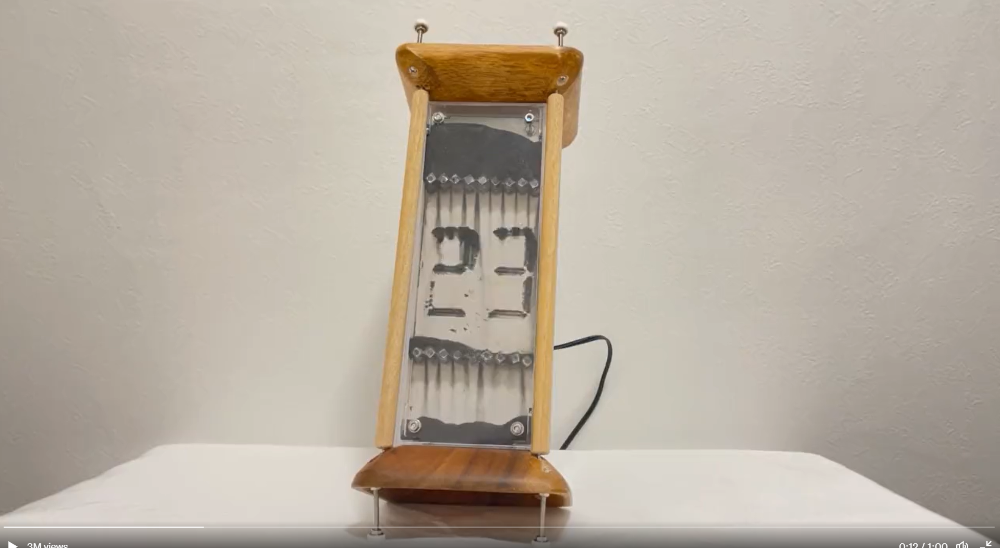
In modern maker culture, the digital hourglass has become a perfect small project with a surprisingly big personality. Some versions use LED matrices to simulate falling sand. Others use OLED screens, accelerometers, buzzers, tilt switches, or microcontrollers such as Arduino, ESP32, and Raspberry Pi Pico. One especially memorable design uses iron filings, magnetic fields, solenoids, and a glowing countdown that appears and disappears like a magic trick performed by a very nerdy wizard.
What Is a Digital Hourglass?
A digital hourglass is an electronic timer inspired by the shape, behavior, or feeling of a traditional sand timer. Instead of relying only on gravity and sand, it uses digital components to measure time and display progress. That display might be a line of LEDs, a pair of 8×8 LED matrices, a small OLED screen, a smartphone animation, or even physical material controlled by magnets.
The basic job is simple: start a countdown, show time passing, and signal when the timer reaches zero. The magic is in the presentation. A plain countdown timer says, “29, 28, 27.” A digital hourglass says, “Look, time is falling.” That difference matters because visual time is easier to feel. When people can see the remaining time shrink or flow, they often understand urgency faster than they do from numbers alone.
This makes digital hourglasses useful in classrooms, workshops, productivity routines, cooking, games, meditation sessions, science demonstrations, and design experiments. They are also excellent conversation starters. Put one on a desk, and someone will ask what it is. Put a noisy solenoid-based one on a desk, and everyone in the room will ask what it is, possibly while covering one ear.
The Charm of Counting Seconds Visibly
The second is one of the most familiar units in daily life, yet most of us rarely think about what it means. We count seconds while waiting for a microwave, holding a plank, watching a loading screen, or regretting an awkward message immediately after pressing send. In scientific timekeeping, the second is defined with extraordinary precision. In everyday life, however, a second is more emotional than mathematical. It can feel instant, endless, useful, wasted, exciting, or painfully slow.
A digital hourglass sits beautifully between those two worlds. The microcontroller can count with reliable precision, while the display makes the countdown feel physical. Each second becomes a visible change. An LED turns off. A pixel drops. A magnetic pattern shifts. A buzzer clicks. A number fades. The result is more engaging than a silent timer hidden in a phone app.
This is why visual timers are popular for focus work and learning environments. People do not always respond well to abstract time. A child who hears “five minutes left” may not understand the size of that promise. An adult trying to finish a task may ignore a clock in the corner. But a shrinking visual display is harder to dismiss. It turns time into a shape.
How a Digital Hourglass Works
Although designs vary widely, most digital hourglass projects share the same core parts: a controller, an input sensor, a display system, timing logic, and some kind of end-of-countdown feedback.
1. The Controller: The Brain of the Hourglass
The controller is usually a microcontroller board such as an Arduino Nano, Arduino Uno, ESP32, or Raspberry Pi Pico. This board keeps track of elapsed time, reads sensor input, and controls the display. In a Raspberry Pi Pico version, MicroPython can be used to write readable, beginner-friendly code. In Arduino-based versions, the Arduino IDE and C/C++ style sketches are common.
For a simple LED hourglass, the controller may only need to turn on one LED every few seconds. For a more advanced hourglass, it may calculate virtual sand movement, detect orientation changes, drive LED matrices, trigger buzzers, or control solenoids through transistors. In other words, the controller is the tiny stage manager making sure the performance of time does not miss its cue.
2. The Sensor: Knowing Which Way Is Up
A real hourglass starts when you flip it over. A digital hourglass should feel the same way. That is where tilt switches and accelerometers come in. A tilt switch can detect a simple change in orientation. An accelerometer can measure movement and position in more detail, making it possible to create smoother and more realistic falling-sand effects.
Basic projects often use a tilt sensor because it is affordable and easy to understand. When the device is turned upside down, the sensor changes state, and the microcontroller begins or resets the countdown. More advanced projects may use a three-axis accelerometer to detect rotation, shaking, pausing, or even playful movement. This gives the timer personality. Flip it, and it wakes up. Turn it sideways, and it may pause. Shake it, and perhaps the “sand” scatters like it has had too much coffee.
3. The Display: LEDs, Pixels, Numbers, or Magnetic Sand
The display is where the digital hourglass becomes art. LED strips can show progress as a shrinking bar. Individual LEDs can light up one by one as time passes. OLED screens can draw animated grains. LED matrices can simulate sand falling from the top chamber into the bottom chamber. A MAX7219 LED matrix driver is popular in Arduino-style builds because it allows multiple LEDs to be controlled using only a few microcontroller pins.
Then there are the more theatrical builds. A magnetic digital hourglass can use iron filings between clear panels, with solenoids and magnetic material shaping the countdown. In that kind of design, the numbers may appear in the falling material itself, creating a ghostly display that looks half scientific instrument and half haunted desk ornament.
The best displays do more than show time. They explain time. They make the user understand the countdown at a glance, without needing to calculate anything.
4. The Feedback: Clicks, Beeps, and “Time’s Up” Drama
A countdown timer needs a finish. Some digital hourglasses blink. Some beep. Some play a tone. Some display a final animation. A solenoid-based design can create a physical ticking sound each second, which adds drama and also reminds everyone nearby that a machine is counting down with serious commitment.
Feedback should match the use case. A classroom timer should be clear but not terrifying. A kitchen timer should be noticeable. A meditation timer should be gentle. A maker fair display can be noisy, bright, and slightly ridiculous, because half the fun is attracting curious people from across the room.
Why Makers Love This Project
The digital hourglass is popular because it teaches several skills at once without feeling like homework. It combines coding, electronics, design, mechanical thinking, and user experience. A beginner can build a simple LED version. An intermediate maker can add an accelerometer and matrix display. An advanced builder can experiment with magnetic materials, solenoids, 3D-printed frames, custom enclosures, and power management.
It is also forgiving. If your first version is not perfect, it can still look charming. A slightly uneven LED animation may feel handmade rather than broken. A buzzer that sounds a little too enthusiastic may become part of the personality. A case with visible screws and wires can look like a laboratory prop from a low-budget science-fiction movie, which is not necessarily a bad thing.
Most importantly, the project has a clear emotional payoff. You flip the device, and something happens. Time begins moving. The countdown becomes visible. At zero, the device reacts. That kind of immediate feedback makes the project satisfying for students, hobbyists, and anyone who enjoys building objects that do something understandable.
Design Ideas for a Better Digital Hourglass
A digital hourglass can be simple, but thoughtful design makes it memorable. The first design question is duration. A 30-second timer is great for demonstrations because nobody has to wait long. A 1-minute timer works well for quick tasks. A 5-minute timer suits classroom transitions, stretching, tea steeping, or short focus bursts. A 25-minute timer can support Pomodoro-style productivity sessions.
The second question is display style. Should the countdown show exact numbers, abstract progress, falling grains, or both? Numbers are precise, but animation is emotionally satisfying. Combining the two can be powerful: a visible sand effect for intuition and a small numeric countdown for accuracy.
The third question is interaction. Should flipping the hourglass restart it? Should turning it sideways pause it? Should shaking it reset the grains? Physical gestures make the object feel alive. They also make it more intuitive because users already understand how to handle a real hourglass.
The fourth question is sound. Be careful here. A soft tick can be pleasant. A loud tick can be funny for ten seconds and deeply unpopular after ten minutes. The correct volume depends on whether the device is meant for a desk, classroom, kitchen, exhibition table, or villain’s countdown chamber.
Practical Uses Beyond Looking Cool
A digital hourglass is not just a novelty. It can be genuinely useful. In a home office, it can mark short work sprints. In a classroom, it can help students see how much transition time remains. In a kitchen, it can time coffee brewing, tea steeping, eggs, or the dangerously optimistic “I’ll just toast this for a minute.”
For children, visual timers can make time less abstract. Instead of hearing an adult repeat “almost done,” they can see the remaining time. For adults, visual timers can reduce procrastination by making a task feel bounded. A countdown says, “You do not have to work forever. You only have to work until the sand runs out.” That is a much friendlier deal than staring at an endless to-do list.
Digital hourglasses also work beautifully as educational tools. They can demonstrate gravity, sensing, magnetism, embedded programming, binary control, current limits, display multiplexing, and the difference between measuring time and experiencing time. That is a lot of learning packed into an object that still looks nice on a shelf.
Common Build Challenges
The biggest challenge is usually not the countdown code. Counting seconds is easy compared with making the device feel smooth, reliable, and satisfying. In LED matrix builds, animation quality matters. If the virtual grains move too randomly, the effect becomes messy. If they move too mechanically, the hourglass loses charm.
Power is another important issue. LEDs, buzzers, and especially solenoids can draw more current than a microcontroller pin can safely provide. That is why builders use transistors, MOSFETs, driver boards, external power supplies, and protective diodes for inductive loads. A microcontroller should control power-hungry parts, not personally wrestle them like a tiny electronic bodybuilder.
Mechanical alignment can also be tricky. If a project uses physical particles such as iron filings, the flow must be controlled carefully. Too fast, and the countdown feels rushed. Too slow, and the user may begin questioning life choices. Consistent flow is what makes an hourglass believable.
Finally, the enclosure matters. Clear acrylic, 3D-printed frames, wood, metal, or layered panels can all work. A good enclosure protects the electronics while making the visual effect easy to see. A bad enclosure hides the best part, rattles when flipped, or makes battery replacement feel like solving a puzzle designed by an angry raccoon.
What This Project Says About Time
The digital hourglass is interesting because it does not simply modernize an old object. It questions what we want from timers. Do we want precision? Beauty? Motivation? A satisfying ritual? A reason to stop scrolling and start working? The answer is usually yes to all of the above.
Smartphones already have accurate timers. Laptops already have clocks. Smart speakers can set reminders. Yet physical timers remain popular because they create presence. They sit in the room with us. They do not disappear behind notifications. They do not tempt us with messages, apps, or a mysteriously urgent need to check the weather in a city we do not live in.
A digital hourglass gives us the best of both worlds. It has the accuracy and programmability of electronics, but the visual poetry of an analog object. It counts seconds, but it also gives those seconds a body.
Experience Notes: Living With a Digital Hourglass
Using a digital hourglass feels different from using a phone timer. A phone timer is practical, but it is also trapped inside the most distracting object in modern life. You open the timer, notice a message, check a notification, look at one photo, and somehow end up reading about deep-sea creatures at 1:13 a.m. A physical digital hourglass avoids that trap. It has one job. It does not care about your inbox. It will not show you a trending video. It simply counts down.
The first thing you notice is how much easier it is to start small tasks. A 30-second countdown can turn tidying a desk into a tiny game. A 5-minute countdown can make email sorting less painful. A 25-minute countdown can help with focused writing, coding, studying, or planning. The visual display creates a boundary around the task. You are not committing to an entire afternoon. You are committing to one chamber of time.
The second thing you notice is how useful the flip gesture feels. Pressing a button is fine, but flipping a timer has a ritual quality. It says, “Now we begin.” That physical action can help separate intention from action. The gesture is small, but it creates momentum. When the display starts moving, the task feels officially underway.
In a shared space, the digital hourglass can also become a social object. People understand it quickly. They can see whether time is almost up. In a classroom, it can reduce repeated questions. In a workshop, it can time short demonstrations. In a family setting, it can make cleanup, reading time, screen breaks, or board game turns easier to manage. The device turns “just a minute” into something everyone can see.
There are also lessons from living with one. Brightness matters. A display that looks great at night may be too dim near a sunny window. Sound matters even more. A beep that feels helpful once can become annoying if it repeats all day. Battery life matters if the timer is meant to be portable. Stability matters because anything designed to be flipped should survive being flipped by actual humans, including enthusiastic ones.
The most surprising experience is emotional. Watching time fall can be calming. It makes waiting feel structured. It makes work feel limited. It gives short moments a beginning, middle, and end. That is the quiet genius of the hourglass, digital or not. It does not create more time, but it makes the time we already have easier to notice.
Conclusion
A digital hourglass that counts down the seconds is more than a clever electronics project. It is a bridge between old and new ways of understanding time. It borrows the visual grace of a sand timer and adds the precision, flexibility, and playful personality of modern microcontrollers. Whether built with LEDs, OLED pixels, accelerometers, solenoids, iron filings, or a simple tilt switch, the result is a timer that feels alive.
For makers, it is a rewarding project because it teaches real skills while leaving room for creativity. For users, it is useful because it turns time into something visible and manageable. For everyone else, it is simply fun to watch. And sometimes, that is enough. After all, seconds are always passing. A digital hourglass just has the good manners to make them look interesting on the way down.