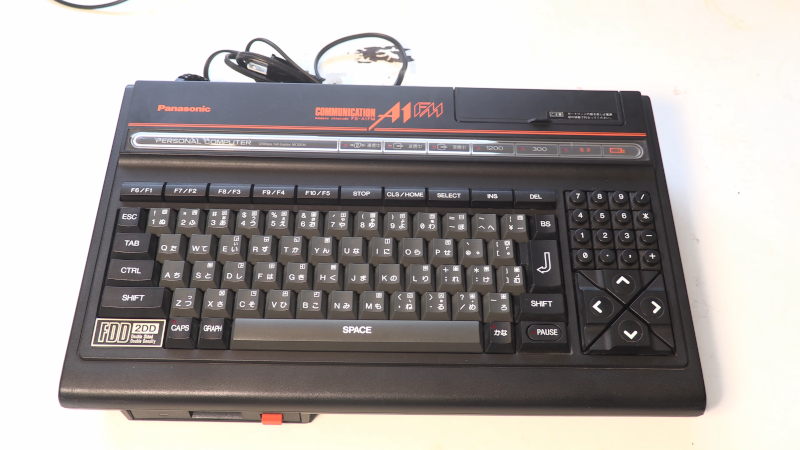
The Panasonic FS-A1FM is one of those vintage computers that makes retro fans stop scrolling, lean forward, and say, “Wait, it had a modem built in?” Released for the Japanese market in 1988, this MSX2 machine sits in a fascinating corner of home-computer history: powerful enough to feel serious, quirky enough to feel collectible, and connected enough to remind us that people were going online long before Wi-Fi routers began blinking judgmentally from living-room shelves.
At first glance, the Panasonic FS-A1FM looks like a polished late-1980s Japanese MSX computer: a compact black body, integrated 3.5-inch floppy drive, cartridge support, a full keyboard with a numeric keypad, and the elegant “do everything from one box” design philosophy that made MSX hardware so appealing. But the FS-A1FM is not just another MSX2 with a disk drive. Its built-in 300/1200 bps modem, modem-focused DESKPAC firmware, MSX-Modem BASIC support, and access features for Japanese network services make it a small time capsule from the era when “logging on” sounded like a tiny robot singing through a telephone line.
What Is the Panasonic FS-A1FM?
The Panasonic FS-A1FM is a Japan-market MSX2 home computer manufactured by Panasonic, then closely associated with Matsushita. It belongs to Panasonic’s well-known FS-A1 family, a line that includes machines such as the FS-A1, FS-A1F, FS-A1FX, FS-A1WX, FS-A1WSX, and later turbo R models. The FS-A1FM is especially interesting because it is closely related to the Panasonic FS-A1F but adds one major feature: a built-in modem.
That modem is the heart of the machine’s personality. While many MSX systems were designed mainly for games, BASIC programming, disk software, productivity tools, and education, the FS-A1FM clearly leaned into communications. In 1988, when many computer owners still treated telecommunications as exotic wizardry, Panasonic built a computer that could boot into a communication-friendly environment with a phone book, modem settings, and network-access tools. Today, that feels both charming and ambitiouslike finding out your grandfather’s typewriter had Bluetooth, except louder and far more analog.
Key Panasonic FS-A1FM Specifications
Under the hood, the Panasonic FS-A1FM is a solid MSX2 computer. Its core CPU is a Z80A-compatible processor integrated into the Toshiba T9769 MSX-Engine. That chipset is notable because versions of the T9769 later appeared in several Panasonic MSX2+, MSX turbo R, and related machines. The FS-A1FM also uses the Yamaha V9938 video display processor, one of the defining chips of the MSX2 standard.
Main Hardware Features
- Computer standard: MSX2
- Release year: 1988
- Market: Japan
- CPU: Z80A-compatible processor integrated in Toshiba T9769 MSX-Engine
- RAM: 64 KB standard
- VRAM: 128 KB
- Video: Yamaha V9938 MSX-Video
- Audio: PSG sound compatible with AY-3-8910-style audio
- Storage: Built-in 720 KB 3.5-inch double-sided, double-density floppy disk drive
- Expansion: Two cartridge slots
- Connectivity: Built-in 300/1200 bps modem with RJ11 line connections
- Firmware: Special DESKPAC edition with modem functions
- Japanese support: JIS Level 1 Kanji ROM and 12×12 dot Kanji ROM
These specifications place the FS-A1FM in a sweet spot for late MSX2 computing. The 128 KB of VRAM allows it to take advantage of MSX2 graphics modes, including higher-resolution and richer-color screens than the original MSX standard. The built-in disk drive makes it far more practical than cartridge-only systems, especially for productivity tools, disk-based games, and MSX-DOS workflows.
The Built-In Modem: The Feature That Makes It Famous
The “FM” in Panasonic FS-A1FM is easy to misunderstand. Modern readers may assume it points to FM synthesis or built-in MSX-MUSIC. It does not. The FS-A1FM’s standout feature is communication, not fancy music. Its built-in modem supports 300 and 1200 bps speeds, which sounds painfully slow today but was meaningful in its period. At 1200 bps, patience was not optional; it was practically an accessory.
The machine includes two RJ11 modular connectors for modem use: one for the telephone line and another for telephone output. This meant the computer could participate in the dial-up communication culture of the late 1980s, especially Japanese services such as The LINKS. The firmware includes modem settings, a phone book, and communication utilities, turning the FS-A1FM into more than a game machine or programming box. It was a home terminal for a connected world that was still stretching its legs.
From MSX-BASIC, users could access telecom-related functions through commands such as CALL TELCOM. The machine also had hidden and specialized communication features, including automatic awakening and special connection support related to BT Japan services. For collectors and historians, these details matter because they show Panasonic was not simply adding a modem as a marketing sticker. The modem was woven into the system’s firmware experience.
DESKPAC Firmware: A Tiny Office With a Telephone Line
When the Panasonic FS-A1FM boots, it can launch a special version of Panasonic’s DESKPAC firmware. This interface includes practical options such as clock settings, screen adjustment, clock, calendar, modem settings and phone book, access to The LINKS network, document management, and MSX-BASIC. That combination tells us exactly what Panasonic imagined: a computer that could sit on a desk, manage documents, help with contacts, and connect to online services.
There is also a firmware switch on the back of the computer. Users could skip the DESKPAC startup without necessarily disabling the modem. Pressing the DEL key during boot could bypass the firmware and deactivate the modem. That sounds like a tiny detail, but on real vintage hardware, these tiny details are the difference between a smooth afternoon and three hours of muttering at a CRT monitor.
The included utility disk added even more productivity flavor. It offered disk utilities, word processing, address book tools, business card creation, cassette label tools, and a video graphics application. The FS-A1FM was not just trying to impress gamers; it was trying to be useful in a small office, study room, or household where a computer could handle writing, storing, dialing, printing, and organizing.
Graphics and Sound: Classic MSX2 Strengths
The Yamaha V9938 gives the Panasonic FS-A1FM its MSX2 graphics identity. Compared with original MSX machines, MSX2 systems could display more advanced graphics, including higher resolutions and richer color modes. The FS-A1FM’s 128 KB of VRAM is important because it supports the expected MSX2 visual experience, making the machine suitable for many MSX2 games, graphics tools, and software demonstrations.
Sound is more modest. The FS-A1FM uses PSG audio compatible with the familiar AY-3-8910 style. That means classic square-wave bleeps, bloops, melodies, and effectsthe musical vocabulary of many 8-bit systems. It does not include built-in MSX-MUSIC FM synthesis, so anyone seeking richer FM audio would need compatible expansion hardware or a different Panasonic model such as certain later MSX2+ machines.
This limitation is not a deal-breaker. In fact, it helps define the FS-A1FM’s character. It is not the flashiest sound machine in the MSX universe. It is the communications-minded MSX2 with a practical disk drive, strong video capability, and enough expansion potential to keep enthusiasts busy.
Ports, Slots, and Expansion
Like many MSX computers, the Panasonic FS-A1FM is generous with physical connections. It includes RF output, composite video with analog sound, RGB output, a data recorder connector, a Centronics-compatible printer port, two general controller ports, two cartridge slots, and the RJ11 modem connectors. For a compact home computer, that is a lot of invitation.
The two cartridge slots are especially useful. MSX users often relied on cartridges for games, memory expansions, sound cartridges, storage interfaces, and specialty hardware. Having one cartridge slot on top and another at the back gives the FS-A1FM flexibility. A user could load a game cartridge, add a utility cartridge, or connect hardware that expands the machine well beyond its stock configuration.
The printer port also supports the machine’s productivity angle. Pair it with the DESKPAC document tools and address book features, and the FS-A1FM begins to look like a compact communication workstation rather than a toy. Of course, it is still absolutely capable of playing games, because even serious computers deserve a lunch break.
How the FS-A1FM Compares With Other Panasonic MSX Models
The Panasonic FS-A1FM is best understood as part of a family. The earlier FS-A1 helped establish Panasonic’s stylish MSX2 identity. The FS-A1F added a built-in floppy drive and practical features. The FS-A1FM built on that foundation with modem communication. Later machines such as the FS-A1FX and FS-A1WX moved into MSX2+ territory, adding features such as improved graphics support, MSX-MUSIC in some models, firmware enhancements, and faster CPU modes through later T9769 variants.
That makes the FS-A1FM a transitional machine. It is not a later MSX2+ powerhouse, and it is not a bare-bones MSX2. It is a specialized 1988 MSX2 computer with a communications mission. For collectors, that specialization is part of the appeal. Plenty of computers can run software; fewer can tell the story of dial-up culture, Japanese home networking, and Panasonic’s all-in-one design thinking in one compact black case.
Gaming on the Panasonic FS-A1FM
Can the Panasonic FS-A1FM play games? Absolutely. As an MSX2 computer with 64 KB RAM and 128 KB VRAM, it can run a large library of MSX and MSX2 software, including many cartridge and disk titles. The built-in floppy drive makes disk-based games easier to use than on systems that require an external drive.
However, expectations should be realistic. Some later MSX software benefits from more RAM, enhanced audio, or MSX2+ features. The FS-A1FM is not the ideal machine for every late-era title, and collectors often consider RAM upgrades or external expansions depending on what they want to run. Still, for classic MSX2 gaming, programming, utilities, and disk software, the FS-A1FM remains a capable and attractive platform.
One underrated benefit is the keyboard. The FS-A1FM has a QWERTY/JIS layout with a numeric keypad, which makes BASIC programming, productivity tools, and menu-driven software more comfortable. Many vintage computers are charming until you try typing on them for more than seven minutes. The FS-A1FM at least behaves like it expects you to write something longer than “10 PRINT HELLO.”
Collectibility and Maintenance
Today, the Panasonic FS-A1FM is valued by retro-computing enthusiasts because it combines rarity, distinctive features, and historical personality. It is not the most common MSX system outside Japan, and complete examples with manuals, disks, packaging, and working drives are especially interesting to collectors.
Maintenance is part of the hobby. The internal floppy drive can suffer from belt issues, a common problem in vintage disk systems. Replacement belts are often discussed among MSX repair communities, and the FS-A1FM drive uses a small rubber belt. Capacitors, old batteries, oxidized connectors, and fragile plastics can also become concerns. Anyone buying one should assume it may need careful cleaning, voltage-safe power checks, and patient troubleshooting before regular use.
A RAM upgrade to 128 KB is possible, though it involves specific memory chips, capacitors, and jumper changes. This is not a casual “plug in a USB stick and call it a day” project. It is a soldering job for someone comfortable working on vintage electronics. Still, the upgrade can make the machine more useful for certain software and modern MSX storage solutions.
Emulation and Modern Access
The Panasonic FS-A1FM is represented in modern MSX emulation circles, though its modem functionality is not always fully supported. Emulators may reproduce the computer’s ROM environment, mapper behavior, and firmware switching, while the original modem behavior remains more difficult to recreate meaningfully. That makes sense: emulating a CPU is one thing; emulating the feeling of a 1988 telephone-network service is another. The modem wants a world that no longer exists in the same form.
For enthusiasts, emulation still matters. It allows people to study the firmware, examine software compatibility, and experience the system’s interface without needing rare hardware. But the physical FS-A1FM remains special because its appeal is partly tactile: the case, the keys, the disk drive, the rear switch, and the idea that a telephone cable once turned this machine into a communications terminal.
Why the Panasonic FS-A1FM Still Matters
The Panasonic FS-A1FM matters because it captures a moment when personal computing was becoming more connected, more practical, and more ambitious. It was not enough for a home computer to play games or teach BASIC. Manufacturers were experimenting with productivity suites, communication tools, online services, address books, and integrated firmware environments. The FS-A1FM belongs to that experimental wave.
It also reminds us that the internet did not appear out of nowhere. Before browsers, broadband, social media, and cloud storage, there were modems, phone books, terminal utilities, and patient users listening to digital chirps over copper lines. The FS-A1FM was built for that world. It is a beautiful reminder that connectivity once felt like an event.
Experience: What It Feels Like to Approach the Panasonic FS-A1FM Today
Experiencing the Panasonic FS-A1FM today is less like using an old computer and more like opening a carefully packed artifact from an alternate timeline where the home office arrived through a telephone jack. The first impression is visual. The black Panasonic case looks serious, but not dull. It has that late-1980s Japanese electronics confidence: compact, purposeful, and slightly futuristic in a way that makes modern gray laptops look like tax forms with keyboards.
The keyboard is one of the first things you notice. It is not just there for launching games; it invites typing. The numeric keypad makes the machine feel more professional, and the Japanese layout details remind you that this was not designed as a generic global box. It had a real market, real users, and real assumptions about how people would work, write, connect, and manage information.
Booting into the firmware environment is where the FS-A1FM becomes memorable. Instead of dropping you straight into a blank BASIC prompt, it can present a DESKPAC-style menu with practical tools. The clock, calendar, screen settings, documents, modem settings, phone book, and network access options make it feel like a small electronic desk. It is not fast by modern standards, but it has intention. Every option says, “This machine is here to help you do something.” That is refreshing in a world where many devices mostly help you dismiss notifications.
The modem features are the emotional center, even when they are no longer easy to use authentically. Seeing phone-book and telecom options on an MSX2 computer gives the machine a different personality from a pure gaming system. It makes you imagine someone in 1988 sitting beside a landline, dialing into a service, waiting through tones, and watching text appear with the kind of excitement we now waste on loading bars. The 1200 bps speed sounds tiny today, but that tiny speed represented possibility: messages, data, services, and a sense of reaching beyond the room.
Using the disk drive adds another layer of nostalgia. The mechanical sound of a 3.5-inch disk system is a reminder that storage once had rhythm. Software felt physical. A utility disk was not an invisible download; it was an object you protected, labeled, and probably scolded other people for touching. The FS-A1FM’s disk tools, word processor features, address book, and graphics utilities give it a practical personality that goes beyond “retro game machine.”
Of course, owning or restoring one today requires patience. The floppy belt may need replacement. Connectors may need cleaning. Expansion choices require research. The modem is historically fascinating but not as instantly useful as an Ethernet adapter or flash cartridge. Yet that is exactly why the FS-A1FM is rewarding. It asks you to slow down and understand the machine on its own terms.
The best experience related to the Panasonic FS-A1FM is not pretending it can compete with modern devices. It cannot, and it should not have to. Its joy comes from context: seeing how Panasonic blended MSX2 computing, Japanese productivity software, floppy storage, Kanji support, and dial-up communication into one elegant package. It is a reminder that innovation is not always about raw speed. Sometimes innovation is a black MSX2 computer with a modem, a disk drive, a phone book, and enough retro charm to make a room full of collectors grin like they just found buried treasure.
Conclusion
The Panasonic FS-A1FM is one of the more distinctive machines in the MSX2 family. It offers the expected strengths of a solid Panasonic MSX computergood video capability, cartridge expansion, a built-in floppy drive, practical ports, and Japanese productivity supportbut its built-in modem and DESKPAC communication firmware make it stand apart. It is not merely a computer from 1988. It is a snapshot of the moment when home computers were learning to reach outward, dial numbers, store contacts, access services, and behave like communication hubs.
For gamers, it is a capable MSX2 system. For collectors, it is a rare and character-rich Panasonic model. For historians, it is a reminder that connected computing has deep roots. And for anyone who loves retro technology with a story, the FS-A1FM delivers exactly that: a smart, stylish, modem-equipped MSX2 machine from an era when going online required a phone line, patience, and perhaps a little bit of courage.