Video meetings used to be simple: click a link, say “Can you hear me?”, wave awkwardly at a frozen coworker, and pretend the dog barking in the background is part of the agenda. But as remote work, online interviews, private communities, and digital collaboration have matured, people have started asking a more serious question: who can actually see or access what happens in our calls?
That question is why Signal deserves a fresh look. Long known as one of the most trusted encrypted messaging apps, Signal has grown beyond private texts and one-on-one calls. With call links, a dedicated Calls tab, emoji reactions, raise-hand controls, desktop screen sharing, and encrypted group video calls, Signal is no longer just the app you open when you want to send a message that does not need a billboard. It is now a practical, privacy-first alternative to Zoom and Google Meet for many everyday meetings.
Does Signal replace every corporate video conferencing platform overnight? Not quite. Zoom and Google Meet still dominate large webinars, enterprise scheduling, admin controls, cloud recordings, AI summaries, and deep workplace integrations. But for people who care about private video conferencing, encrypted voice calls, small-team meetings, confidential discussions, family calls, activist organizing, journalist-source conversations, or simple “let’s talk without inviting the entire internet” moments, Signal has become a seriously useful option.
Why Signal Suddenly Feels Like a Real Meeting App
The biggest change is convenience. For years, Signal was excellent for secure messaging and private calls, but group calling could feel more like a feature attached to a chat than a true meeting tool. If you wanted to bring people together, you often needed a group chat first. That worked for close friends and teams, but it was clunky for casual meetings, recurring check-ins, interviews, or temporary collaboration.
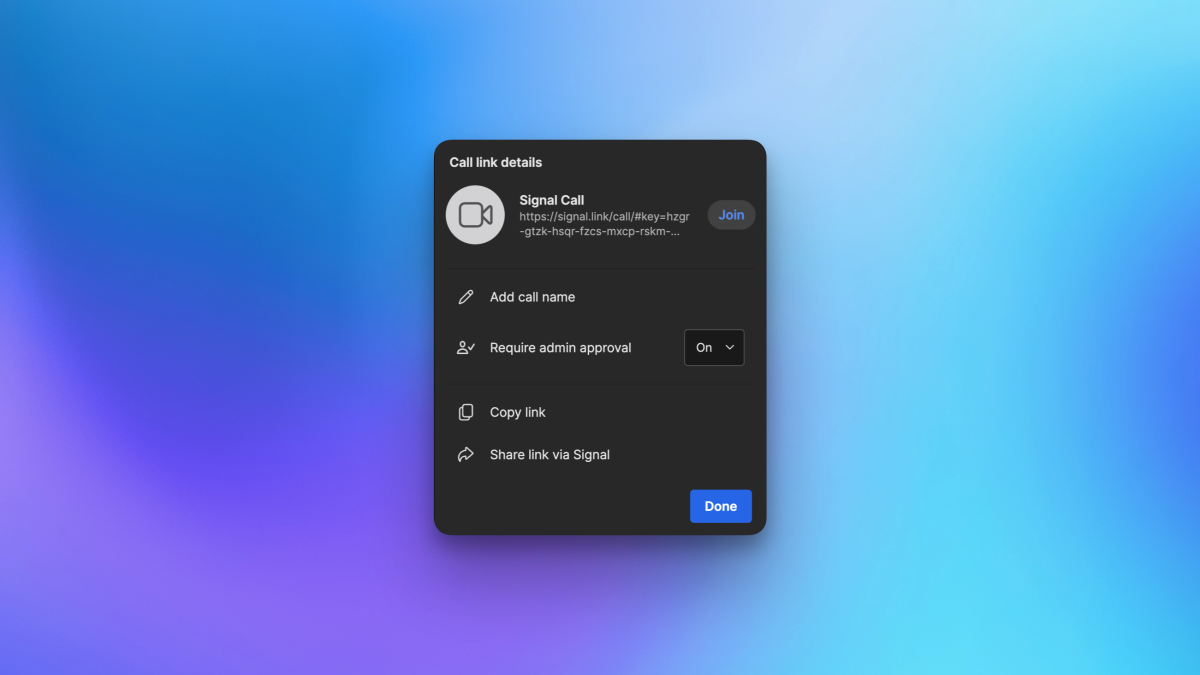
Signal’s newer calling features changed that equation. Users can now create Signal call links, share them with people who use Signal, and let invitees join with a tap or click. That sounds simple, but it is the exact kind of simple that made Zoom and Google Meet famous. Nobody wants a twelve-step ritual before a meeting. We already spend enough time hunting for the mute button like it is a secret level in a video game.
Call links can be reused for recurring conversations, and the creator can delete them when they are no longer needed. Signal also allows approval settings for who can join, which helps reduce the “surprise guest in the lobby” problem. This makes Signal feel less like a secure chat app that happens to call people and more like a lightweight encrypted meeting app.
What Makes Signal Different from Zoom and Google Meet?
The main difference is Signal’s default privacy model. Signal is built around end-to-end encryption, meaning the content of messages and calls is designed to be accessible only to the people participating. Signal says it cannot access message or call content, and its nonprofit model means the app is not built around advertising, tracking, or monetizing user behavior.
Zoom and Google Meet are powerful platforms, but they were built primarily for scalable business communication. Their standard meeting experiences are secure in the conventional enterprise sense: data is encrypted in transit, platforms offer account protections, and admins can manage organizational settings. However, full end-to-end encryption is not always the default experience, and enabling stronger encryption modes can limit certain features.
For example, Zoom offers end-to-end encryption for meetings, but enabling it can disable tools such as cloud recording, live transcription, polling, AI features, streaming, and some collaboration options. Google Meet encrypts meeting data and offers additional security options, including client-side encryption for eligible users and organizations, but many of its advanced features rely on cloud processing. That is not automatically bad; it is simply a trade-off.
Signal takes a different path. It is not trying to be the Swiss Army knife of corporate meetings. It is trying to be the private room where the conversation itself stays private. Sometimes you need a giant conference hall with name badges, breakout rooms, and a snack table. Sometimes you need a locked door.
Signal’s Best Video Meeting Features
1. End-to-End Encrypted Voice and Video Calls
Signal’s strongest selling point is encrypted communication by design. Voice and video calls are protected with the same privacy-first philosophy that made Signal popular among journalists, security professionals, activists, researchers, and regular people who simply prefer not to turn their personal lives into data confetti.
For sensitive calls, that matters. A legal consultation, a medical-adjacent conversation, a nonprofit planning session, a source meeting, a small business strategy discussion, or a private family matter may not require a full enterprise platform. It may require a secure, simple call where the app provider is not part of the audience.
2. Reusable Call Links
Signal call links make the app much more practical for meetings. You can create a link, send it to the right people, and use it again for recurring calls. That puts Signal closer to the everyday workflow people already know from Zoom and Google Meet.
Imagine a weekly editorial meeting, a study group, a therapy peer-support circle, or a small remote team standup. Instead of building a new group chat every time, you can share one link and keep the routine clean. It is the kind of feature that sounds boring until you use it twice and wonder why it was not always there.
3. A Dedicated Calls Tab
The Calls tab helps users manage call history and call links in one place. This is a small interface change with a big usability impact. In older versions of many messaging apps, calling features can feel buried under chat threads, buttons, and mysterious icons that look like they were designed during a caffeine emergency.
By giving calls their own space, Signal signalsyes, we are doing that pun once and then behaving ourselvesthat it wants calling to be a central feature, not a side quest.
4. Raise Hand and Emoji Reactions
Meetings need structure, even small ones. The raise-hand button helps prevent everyone from talking at once, which is useful because “No, you go ahead” repeated six times is not collaboration; it is audio ping-pong.
Emoji reactions also make group calls feel more natural. A quick thumbs-up, laugh, heart, or clapping reaction can replace unnecessary interruptions. For remote teams and communities, that tiny layer of expression helps keep meetings human without turning every comment into a speech.
5. Desktop Screen Sharing
Signal Desktop supports screen sharing during calls, allowing users to present a screen or window. This is essential for practical meetings. A secure video call becomes much more useful when someone can walk through a document, review a design, troubleshoot a setting, or show a slide without switching platforms.
Screen sharing is one of the reasons Zoom and Google Meet became workplace staples. Signal’s version is simpler, but for many users, simple is enough. If your meeting involves reviewing a contract draft, showing a mockup, explaining a spreadsheet, or helping a relative find the browser tab they accidentally opened in 2019, Signal can handle it.
Where Signal Beats Zoom and Google Meet
Privacy Comes First, Not Later
Signal’s biggest advantage is that privacy is not an add-on. You do not need to dig through an admin console, toggle an advanced setting, or sacrifice half the app’s features to get a more private communication experience. Signal’s identity is built around end-to-end encryption, minimal data collection, and open-source security technology.
That makes it appealing for people and organizations that do not want their communication platform to double as a data ecosystem. Signal does not run ads, does not track users for marketing, and does not have the same incentive structure as advertising-supported platforms. In plain English: the app is not standing behind you with a clipboard while you talk.
It Is Simple Enough for Real People
Security tools often fail because they are too complicated. The most secure app in the world is useless if your team refuses to use it because joining a call feels like assembling furniture without the little hex key.
Signal’s advantage is that it is familiar. People already use it to message, send files, share photos, make calls, and manage group chats. Adding video meeting features to an app people already trust lowers friction. That is especially helpful for community groups, volunteers, families, freelancers, and small teams that need privacy without a dedicated IT department.
It Is Free and Nonprofit-Backed
Signal is free to use and supported by a nonprofit structure. That matters because privacy tools often become expensive, confusing, or limited behind subscription tiers. Zoom and Google Meet both offer free options, but their most powerful business features are tied to paid plans. Signal’s core value proposition is different: private communication available to everyone.
Of course, free does not mean costless. Signal still pays for servers, bandwidth, engineering, and security work. But its funding model is based on donations rather than ads or behavioral profiling, which aligns better with users who choose the app for privacy in the first place.
Where Zoom and Google Meet Still Win
Signal is impressive, but let’s not pretend it has suddenly swallowed the entire video conferencing industry like a privacy-conscious whale. Zoom and Google Meet still have clear advantages for many business use cases.
Zoom is excellent for large meetings, webinars, breakout rooms, meeting management, recording, transcripts, integrations, and polished enterprise workflows. Google Meet is deeply integrated with Google Calendar, Gmail, Google Workspace, Docs, Drive, and organization-wide admin tools. For schools, corporations, agencies, and large distributed teams, those integrations are not decorative; they are operational glue.
Signal also requires participants to use Signal. That is fine when your circle already uses the app, but it can be a barrier for external meetings. Google Meet can run in a browser with a Google account or meeting access, and Zoom is widely recognized even by people who still call every video meeting “a Zoom.” Signal is catching up in usability, but it does not yet have the universal business familiarity of those platforms.
Signal is also not designed for cloud recordings, AI meeting notes, attendance reports, webinar registration pages, enterprise compliance dashboards, or deep calendar automation. For some users, that is a limitation. For others, it is exactly the point.
Best Use Cases for Signal Video Calls
Private Small-Team Meetings
Small teams that discuss sensitive topics can benefit from Signal’s encrypted calls. This includes journalists, legal researchers, nonprofit workers, political organizers, startup founders, consultants, and independent professionals. If the meeting does not need a full corporate suite, Signal may be the cleaner choice.
Family and Friend Calls
Signal is also great for personal conversations. A family planning call, a private financial discussion, a health update, or a sensitive relationship conversation does not need to pass through a platform built for enterprise analytics. Sometimes Grandma’s birthday call deserves encryption too. Grandma may not know what end-to-end encryption is, but she absolutely knows when someone is being nosy.
Recurring Community Check-Ins
Reusable Signal call links are useful for community groups, book clubs, study circles, mutual aid teams, and neighborhood associations. These groups often do not need a paid meeting platform, but they do need trust, consistency, and ease of use.
Confidential One-on-One Conversations
Signal shines when the meeting is personal, sensitive, or direct. A freelancer talking to a client, a reporter checking in with a source, a mentor speaking with a student, or a founder discussing an idea with an advisor can use Signal for a more private conversation without unnecessary platform complexity.
Security Is Not Magic: Good Habits Still Matter
Signal is secure, but no app can protect against every human mistake. If you invite the wrong person to a call, share a link too widely, use a compromised device, ignore identity verification, or let notifications appear on a locked screen in a crowded room, encryption will not swoop in wearing a cape.
For better security, users should keep Signal updated, protect devices with strong passcodes, enable disappearing messages when appropriate, verify contacts for sensitive conversations, delete call links that are no longer needed, and avoid sharing confidential information in groups with unclear membership. In other words, use the locked door, but also stop taping the key under the welcome mat.
Signal vs. Zoom vs. Google Meet: The Practical Comparison
If your priority is privacy-first communication, Signal is the strongest choice. If your priority is enterprise collaboration, Zoom or Google Meet may still be better. If your priority is convenience for people who already use Google Calendar, Meet is hard to beat. If you need webinars, recordings, transcripts, and large meeting controls, Zoom remains a heavyweight. But if you want encrypted video calls with simple links, basic meeting controls, and minimal data collection, Signal is now a compelling alternative.
The best way to think about it is this: Zoom and Google Meet are conference centers. Signal is a private room with a very good lock. You would not host a 5,000-person product launch in that private room, but you might absolutely choose it for the conversation that matters most.
Extra Experience-Based Insights: Using Signal as a Zoom or Google Meet Alternative
In real-world use, Signal works best when expectations are clear before the meeting starts. The first step is making sure every participant has Signal installed and updated. That may sound obvious, but it is the video-call equivalent of checking that the restaurant is open before inviting ten people to dinner. For teams already using Signal, this is easy. For mixed groups, a short onboarding message helps: “Install Signal, tap the call link, and join from your phone or desktop.” Simple instructions reduce confusion.
The second practical lesson is that Signal is excellent for meetings where privacy is more important than production polish. A confidential planning call, private interview, small group discussion, or sensitive client conversation feels natural on Signal. The interface stays out of the way, which is refreshing. There are no giant menus shouting about AI summaries, no suspiciously enthusiastic pop-ups, and no feeling that the app wants to become your entire office ecosystem by Friday.
For recurring meetings, reusable call links are especially helpful. A small team can keep one link for a weekly check-in, while the host can delete it when the project ends. That is cleaner than constantly creating new links and safer than letting old meeting URLs float around forever like digital leftovers in the back of the fridge.
Desktop screen sharing is the feature that makes Signal feel genuinely meeting-ready. During a private work call, being able to share a screen changes the conversation from “Let me describe the thing” to “Here is the thing.” That saves time and reduces misunderstanding. For designers, writers, consultants, developers, teachers, and support helpers, screen sharing turns Signal from a calling app into a lightweight collaboration tool.
However, Signal users should be honest about its limits. If a meeting needs automatic transcripts, cloud recordings, breakout rooms, corporate attendance logs, calendar-room hardware, or hundreds of external participants, Zoom or Google Meet will likely be smoother. Signal is not trying to replace the entire workplace stack. Its value is focus: private calls, simple links, and fewer data concerns.
One useful habit is to choose the meeting platform based on the sensitivity of the conversation. For a public webinar, Zoom may be the obvious choice. For a routine team sync tied to Google Workspace, Google Meet may be easiest. For a confidential strategy conversation, a private source call, or a sensitive family discussion, Signal may be the smarter option. That platform-switching mindset is more realistic than declaring one app the winner of all human communication forever.
Another experience-based tip is to treat Signal call links like keys, not flyers. Share them only with intended participants, use approval settings when needed, and delete old links when they are no longer useful. Signal gives users privacy-respecting tools, but people still need to use them thoughtfully.
Overall, Signal now occupies a valuable middle ground. It is simpler than enterprise conferencing software, more private by default than mainstream meeting tools, and familiar enough for everyday use. For many people, that is exactly the combination they have been waiting for.
Conclusion: Signal Is Ready for More Than Private Texts
Signal has become a strong encrypted alternative to Zoom and Google Meet for users who want private video calls without unnecessary complexity. Its new call links, Calls tab, raise-hand controls, emoji reactions, group video support, and desktop screen sharing make it practical for small meetings, recurring check-ins, personal conversations, and privacy-sensitive collaboration.
Zoom and Google Meet are not going away, and they should not. They remain excellent tools for large organizations, schools, webinars, and feature-heavy collaboration. But Signal now gives users another choice: a secure meeting space that puts encryption, minimal data collection, and user trust at the center.
For anyone tired of choosing between convenience and privacy, Signal is finally making that trade-off less painful. It may not bring virtual confetti, AI-generated meeting summaries, or a button that automatically tells everyone “Sorry, I was on mute.” But it does offer something increasingly rare online: a conversation that feels like it belongs to the people having it.
Note: This article is based on current public information from official Signal, Zoom, and Google Meet documentation, along with reputable technology and security reporting. Feature availability may vary by app version, device, account type, and organization settings.