The guide below is grounded in the original game’s documented mechanics and cross-checked against official descriptions, established walkthroughs, and strategy analyses.
Nintendo
+4
GameFAQs
+4
freddy-fazbears-pizza.fandom.com
+4
article>
Night 1 of Five Nights at Freddy’s is supposed to be the easy shift. That description feels reasonable until a purple rabbit disappears from the stage, the hallway light flickers, and you suddenly forget how doors work.
The original Five Nights at Freddy’s places you inside a small security office at Freddy Fazbear’s Pizza. You cannot walk around, fight the animatronics, or call a competent maintenance department. Your available tools are a camera monitor, two hallway lights, two security doors, a clock, and a limited supply of electricity. To survive, you must remain in the office from 12 AM until 6 AM without allowing an animatronic to enter.
Fortunately, the first night is designed to introduce these systems gradually. Bonnie is usually the most important threat, while Chica and Foxy become relevant later in the shift. Freddy normally stays out of the spotlight unless your power reaches zero. By following a calm routine instead of treating every noise like a mechanical apocalypse, you can beat FNAF Night 1 without sacrificing your remaining sanity.
Understanding the Night 1 Challenge
Your real opponent is not simply Bonnie, Chica, Foxy, or Freddy. It is inefficient decision-making. Every time you activate a light, lower a door, or use the camera monitor, you increase power consumption. Even when you do nothing, the building still consumes a small amount of electricity, so the power meter will steadily fall throughout the night.
The objective is therefore not to keep every possible defense active. You need to use each tool only when it provides useful information or prevents an immediate attack. Think of the doors as emergency shields, not decorative walls. Keeping both doors closed may feel safe, but it is roughly equivalent to protecting your lunch by setting the entire refrigerator on fire.
Who Is Active on Night 1?
Bonnie is generally your primary concern. He leaves the Show Stage after the opening portion of the night and approaches through the left side of the building. Chica travels toward the office from the right, but she usually becomes active later and moves less aggressively during this introductory shift.
Foxy waits behind the curtain in Pirate Cove. He is unlikely to be a major problem if you raise the camera monitor periodically. Freddy usually remains on the stage during Night 1, although running out of power can still trigger his famous blackout sequence. In other words, Freddy may not be hunting you yet, but he is perfectly willing to perform an unpleasant closing ceremony.
Step 1: Learn the Office Controls Before Panicking
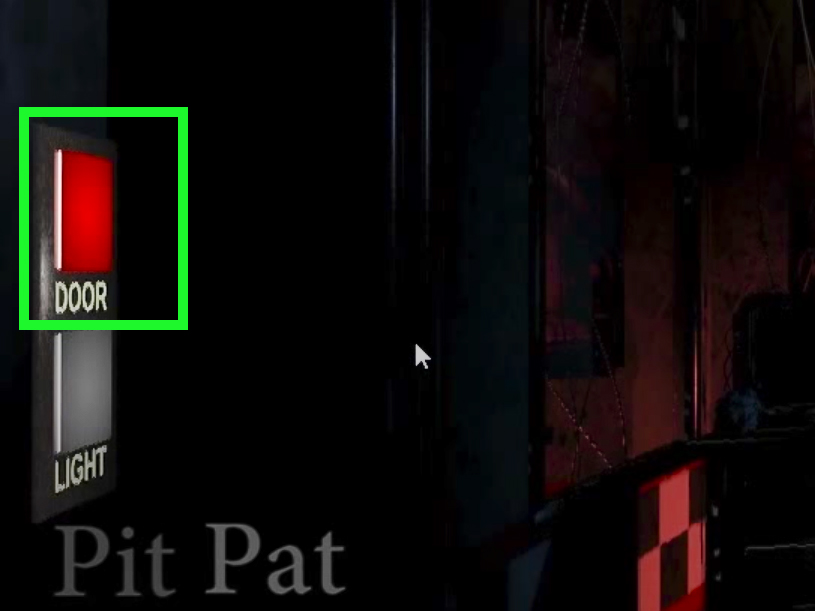
At the beginning of the shift, familiarize yourself with the office. Move your view left and right and identify the door and light controls on both walls. The left controls defend against Bonnie and Foxy. The right controls defend against Chica.
Each side has two buttons:
- The upper button operates the security door.
- The lower button activates the hallway light.
The camera monitor is opened from the control area near the bottom of the screen. When raised, it displays a map of the restaurant and lets you select different camera feeds. While Night 1 gives you enough breathing room to explore, avoid clicking through every room repeatedly. You are a security guard, not a late-night virtual tourist.
The most important cameras for a beginner are the Show Stage, where Freddy, Bonnie, and Chica begin, and Pirate Cove, where Foxy waits. You can also use hallway cameras to understand an animatronic’s route, but the doorway lights provide the final confirmation that an enemy has reached your office.
Listen to the Phone Call
The introductory phone message explains the basic premise and gives you time to become comfortable with the controls. You do not need to stare at the Show Stage for the entire call. Check the cameras briefly, examine the map, and notice how the power-use indicator changes when you activate equipment.
This quiet opening is your practice period. Learn how quickly you can check a light, raise the monitor, view a camera, and return to the office. Smooth movements save both time and power later.
Step 2: Keep Both Doors Open by Default
The most important rule for beating Night 1 is simple: leave the security doors open unless an animatronic is actually standing outside.
A closed door continuously increases your power usage. Closing both doors because Bonnie has left the stage is unnecessary. He may still be several rooms away, wandering through the restaurant like a confused musician looking for the employee break room.
Use the hallway lights to determine whether you need protection. If the doorway is empty, the door should remain open. If Bonnie appears at the left entrance, close the left door. If Chica appears at the right entrance, close the right door.
Do not immediately reopen a door after closing it. Wait several seconds, tap the appropriate hallway light, and confirm that the animatronic has left. When the doorway is empty again, reopen the door to conserve power.
Avoid Closing Doors Based Only on Camera Positions
An animatronic appearing in a nearby hallway camera does not always mean it is standing at your door. Camera feeds help you track general movement, but your hallway lights reveal the blind spots immediately outside the office.
Closing a door whenever Bonnie appears anywhere on the west side wastes electricity. Wait for visual confirmation at the entrance. Efficient FNAF power management depends on responding to immediate danger rather than possible danger.
Step 3: Use a Simple Light-Checking Routine
Once Bonnie begins moving, establish a calm rhythm. Tap the left hallway light, switch it off, glance toward the right side, tap the right light, and switch it off. Then return to the center.
You do not need to press both light buttons every second. Checking approximately every several seconds is normally sufficient on Night 1. The exact interval matters less than consistency. A steady routine keeps you informed without turning the office into a low-budget nightclub.
Keep each light activation brief. Hold it only long enough to inspect the doorway. Lights consume power while active, so leaving one illuminated provides no benefit after you have confirmed that the entrance is empty.
What Bonnie Looks Like at the Left Door
Bonnie can appear very close to the left entrance, filling much of the illuminated doorway. If you see him, switch off the light and close the left door immediately. After a brief wait, use the light again. If Bonnie is gone, raise the door.
What Chica Looks Like at the Right Door
Chica approaches from the right and may be visible through the illuminated doorway. Her presence requires the same response: close the right door, wait, check again, and reopen it as soon as the entrance is clear.
The game punishes players who raise the camera monitor while an animatronic is already waiting unnoticed at an open doorway. Checking the lights before beginning a longer camera inspection is therefore a useful habit, especially as you prepare for later nights.
Step 4: Check the Cameras Briefly and Purposefully
The camera system exists to provide information, not to become your permanent home. Raise the monitor for short inspections, check one or two important feeds, and lower it again.
During the early hours, occasionally view the Show Stage. If Bonnie has disappeared, begin paying closer attention to the left hallway light. If Chica has also left, add regular right-side checks to your routine.
Starting around the later part of the shift, glance at Pirate Cove periodically. Raising the camera monitor helps keep Foxy’s behavior under control, and checking his location lets you know whether he is still behind the curtain. You do not need to stare at Pirate Cove continuously or perform a full camera tour every few seconds.
A practical cycle looks like this:
- Check the left hallway light.
- Check the right hallway light.
- Raise the camera monitor briefly.
- View the Show Stage or Pirate Cove.
- Lower the monitor and repeat after a short pause.
This rhythm provides enough information for Night 1 while preserving electricity. Fast camera checks are also valuable training for the harder nights, when several animatronics may move almost simultaneously.
Do Not Chase Bonnie Through Every Camera
Beginners often try to locate Bonnie every time he changes rooms. That is understandable, but unnecessary. Once he leaves the stage, the left doorway light becomes your most dependable defensive tool.
You can watch his route for educational purposes, but you do not need to identify his exact position at every moment. If Bonnie is not at the left entrance, you are safe from him at that instant. Save your power and continue the routine.
Step 5: Monitor Power Without Becoming Obsessed
Your remaining power appears as a percentage, accompanied by a usage indicator. The more equipment you operate, the more bars appear on that indicator and the faster your electricity drains.
One usage bar represents the building’s basic consumption. Activating lights, closing doors, or raising the camera monitor increases the rate. The goal is not to preserve 100 percent forever; that is impossible. Instead, make sure your remaining power is appropriate for the time displayed.
There is no single perfect percentage because platforms and versions may have minor timing differences. As a general rule, you should still have a comfortable reserve when the clock reaches the middle of the shift. If your power is disappearing rapidly before 3 AM, you are probably keeping doors closed too long, holding lights on, or spending excessive time on the cameras.
What Happens When the Power Reaches Zero?
At zero power, the doors open, the lights stop working, and the camera system becomes unavailable. Freddy may then appear in the dark while his music plays. There is a small possibility that the clock reaches 6 AM before the final attack, but relying on that outcome is not a strategy. It is an electrical version of crossing your fingers and hoping the bear respects office hours.
If you notice that power is running low, reduce unnecessary camera checks and use only quick light taps. Never close both doors simply because the percentage looks frightening. Doing so accelerates the problem.
Step 6: Stay Calm Through the Final Hours
The final portion of Night 1 feels more stressful because Bonnie and Chica may be closer to the office, Foxy is potentially active, and your power percentage is lower. This is exactly when players begin overreacting.
Do not abandon the routine. Check the left light, check the right light, make a brief camera visit, and keep the doors open unless someone is present. The clock will continue advancing even when nothing dramatic happens.
If Bonnie appears, close only the left door. If Chica appears, close only the right door. If both arrive at once, close both doors temporarily, but continue checking so you can reopen each side as soon as it becomes safe.
When 5 AM appears, resist the urge to seal the office. One in-game hour still remains, and maintaining two closed doors can destroy an otherwise excellent power reserve. Continue playing correctly until the screen changes to 6 AM.
A Compact Night 1 Routine
For players who want an easy sequence to remember, use this condensed pattern:
- Leave both doors open.
- Check the left light briefly.
- Check the right light briefly.
- Raise the monitor for a quick Show Stage or Pirate Cove check.
- Close only the door corresponding to a confirmed visitor.
- Reopen that door once the animatronic leaves.
Repeat this process patiently until 6 AM. Night 1 does not demand lightning-fast reflexes. It demands that you avoid creating your own emergency.
Common Mistakes That Cause Night 1 Losses
Keeping a Door Closed “Just in Case”
A closed door feels comforting, but comfort has an electricity bill. Keeping the left door down for several hours may sometimes work as an unconventional shortcut, but it teaches poor habits and becomes less reliable on later nights. Learning the normal defensive rhythm is more useful.
Holding the Lights On
The hallway lights are inspection tools, not porch lights. Tap, look, and release. Holding them on while deciding what to do wastes power and does not force an animatronic to leave.
Watching Every Camera Feed
You do not receive bonus points for completing a documentary about the dining area. Focus on feeds that answer a specific question: Has someone left the stage? Is Foxy still in Pirate Cove? Is an animatronic progressing toward the office?
Ignoring the Cameras Completely
The opposite mistake is never raising the monitor. Although the first night is forgiving, ignoring the cameras for long periods can allow Foxy to become a threat. Periodic, short checks are safer than either constant surveillance or complete neglect.
Reopening a Door Without Checking
After closing a door on Bonnie or Chica, confirm that the animatronic has left before raising it. Reopening too quickly can turn a successful defense into a jumpscare with impressive efficiency.
Practical Player Experiences and Lessons From Night 1
A typical first attempt begins with confidence. The phone message plays, the animatronics remain on the stage, and the player wonders why everyone described the game as terrifying. A few camera clicks later, Bonnie disappears. The relaxed security guard immediately becomes an unpaid air-traffic controller, switching through every camera while whispering, “Where did the rabbit go?”
This reaction reveals the first major lesson: losing visual contact does not mean an attack is happening. Bonnie moves through several possible locations before reaching the office. Instead of burning power on a frantic search, an experienced player begins checking the left doorway light at steady intervals. The light provides the only information that truly matterswhether the entrance must be closed now.
Another common experience occurs when Bonnie finally appears at the door. Many first-time players close the left door successfully but are too nervous to reopen it. They leave it down for the rest of the night, watch their power percentage collapse, and discover that the greatest danger was not the rabbit but their electricity budget. The better response is to wait briefly, check the doorway, and raise the door as soon as Bonnie leaves.
Players also tend to overuse the camera monitor because it feels like the game’s main feature. They scan the dining area, backstage room, restrooms, kitchen, hallways, and supply closet in a repeated loop. This creates the illusion of control while consuming power and reducing awareness of the office entrances. After several attempts, most players discover that efficient surveillance is selective. The Show Stage, Pirate Cove, and doorway lights provide nearly everything needed on Night 1.
The sound design produces another memorable lesson. Mechanical noises, footsteps, and kitchen sounds may make a player slam a door immediately. Yet sounds should encourage a quick investigation, not automatic lockdown. A short hallway-light check costs less than closing a door based on suspicion. Headphones can help identify directional sounds, but visual confirmation remains the safest reason to use a door.
Power anxiety becomes especially strong around 4 AM or 5 AM. Seeing the percentage drop into a lower range can trigger rapid camera flipping, repeated light checks, or both doors closing. Ironically, the player’s attempt to protect the remaining power causes it to disappear faster. The winning experience feels almost boring by comparison: one brief check, a pause, another brief check, and no unnecessary movement.
The final lesson usually arrives at 5 AM. New players assume victory is seconds away and either relax completely or close both doors. Neither approach is ideal. The last hour still requires attention, but it does not require panic. Maintaining the same rhythm used earlier is the most dependable way to reach 6 AM.
Once the victory screen appears, Night 1 seems far simpler than it felt during the first attempt. That transformation is the point of the level. It teaches that Five Nights at Freddy’s is not primarily about fast clicking. It is about gathering limited information, responding only when necessary, and remaining calm while an animatronic rabbit stares through the doorway like he would like to discuss your extended warranty.
Conclusion
To beat Night 1 of Five Nights at Freddy’s, keep both doors open by default, check the hallway lights in a steady rhythm, use the cameras in short bursts, and watch Pirate Cove periodically. Bonnie is usually your main threat, Chica becomes relevant later, and Foxy can be controlled through regular monitor use. Freddy is unlikely to cause trouble unless your power fails.
The first night is less about surviving aggressive animatronics and more about learning disciplined habits. Close a door only when danger is confirmed, reopen it when the doorway is clear, and do not waste electricity trying to eliminate every uncertainty. Stay calm until 6 AM, and your first shift at Freddy Fazbear’s Pizza will end with a victory rather than a very loud employee evaluation.
Note: Timing and controls may vary slightly between the PC, mobile, PlayStation, Xbox, and Nintendo Switch versions, but the core strategy of brief checks, selective door use, and careful power management remains the same.
:::