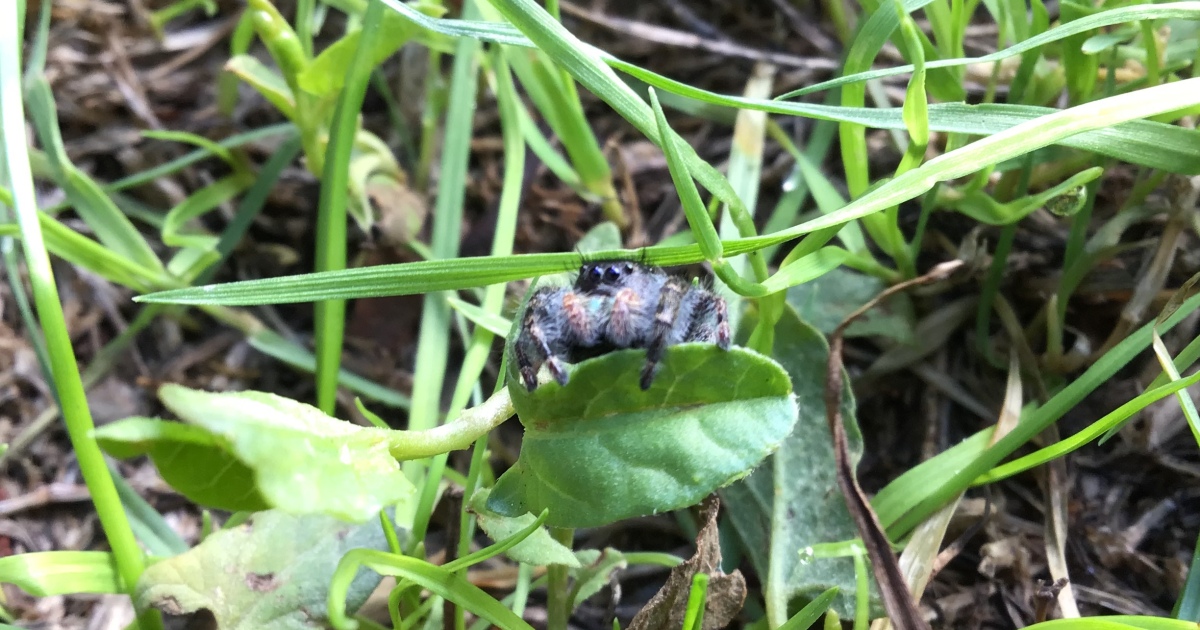
Note: “Spood” is an affectionate internet nickname for a spiderusually one whose enormous eyes, fuzzy legs, or dramatic pose make it look ready for its own movie poster.
Some photographs politely ask to be admired. Others kick open the door, point at your editing software, and demand to be turned into a tiny astronaut, an eight-legged CEO, or the final boss in a low-budget fantasy movie.
The image behind “Hey Pandas, Photoshop The Spood” belongs firmly in the second category. The original Bored Panda community challenge, published in November 2021 under Evie Grove’s name, came with an admirably uncomplicated invitation: take the spider and do something ridiculous with it. No lengthy creative brief. No brand guidelines. No client asking whether the spider could look “more premium.” Just a spood and unlimited possibilities.
That simplicity is precisely what makes a Photoshop challenge so entertaining. Everyone begins with the same subject, but each participant notices a different visual joke. One person sees a superhero. Another sees a nervous employee arriving late for a meeting. A third sees an ancient creature awakening beneath Cleveland. The source image becomes less important than the imagination attached to it.
What Does “Photoshop The Spood” Mean?
In internet language, a “spood” is simply a spider with better public relations. The nickname removes some of the horror associated with eight-legged houseguests and replaces it with playful affection. A spider may lurk behind your curtain. A spood has a name, a tiny hat, and strong opinions about the household Wi-Fi.
The term appears frequently around photos of jumping spiders, which are particularly well suited to cute memes. Jumping spiders have compact bodies, active daytime behavior, quick movements, and unusually prominent forward-facing eyes. Those eyes give them a surprisingly expressive appearance, even though the spider is not actually rehearsing an emotional monologue about being left on read. University of Minnesota Extension notes that jumping spiders possess exceptionally good vision and can move forward, backward, and sideways while actively hunting.
Smithsonian sources similarly describe jumping spiders as visual hunters with large eyes, excellent eyesight, and the ability to detect portions of the ultraviolet spectrum that humans cannot see. In other words, the spood may be tiny, but it has better peripheral awareness than most drivers in a supermarket parking lot.
Bored Panda has also featured entire collections of spiders presented as unexpectedly adorable, including jumping spiders photographed on fingers, office equipment, fences, and other everyday objects. That visual contrastan animal many people fear behaving like a miniature curious petis excellent material for humorous photo manipulation.
Why This Photoshop Challenge Works So Well
The Subject Already Has a Personality
The best Photoshop battle images contain a strong pose, recognizable silhouette, or accidental expression. A spider with its front legs raised might look like it is celebrating, surrendering, conducting an orchestra, or demanding to speak with the manager.
Because the audience can immediately recognize the subject, editors do not need to explain the joke. Place the spood behind a presidential podium, and it becomes a politician. Put it in a boxing ring, and it becomes an undefeated champion in the extremely competitive flyweight division. Add a briefcase and a commuter train, and it becomes every office worker on Monday morning.
Scale Creates Instant Comedy
Spiders are normally small, so changing their scale produces immediate absurdity. A giant spood climbing a skyscraper references monster movies. A microscopic spood operating a control panel suggests an entire civilization hidden inside a kitchen cabinet.
Scale also controls the emotional tone. A giant spider can be frightening, heroic, or majestically ridiculous. A tiny spider standing beside a coffee mug feels vulnerable and charming. The editor’s job is to decide whether the audience should say “Aww,” “Run,” or “Why is it wearing Crocs?”
The Silhouette Is Easy to Read
Eight legs provide a visually distinctive outline. Even when the spider is reduced in size, partially hidden, or placed against a dramatic background, viewers can usually identify it quickly. That makes the subject useful for posters, memes, movie parodies, fantasy scenes, fake advertisements, and visual puns.
Funny Photoshop Ideas for the Spood
1. Turn It Into a Blockbuster Movie Star
Give the spood a cinematic background with smoke, sparks, dramatic clouds, and a city that is apparently having a terrible afternoon. Add a title such as Spoodzilla, Eight Legs Later, or The Arachnid Ultimatum.
For a more heroic interpretation, place it on a rooftop overlooking the city. Add a cape that is wildly impractical for a creature with eight limbs. Finish the poster with a serious tagline: “With great power comes an unreasonable number of shoes.”
2. Give the Spood a Normal Job
Ordinary settings become funnier when occupied by an extraordinary employee. Place the spider in a cubicle with eight keyboards, each displaying a different spreadsheet. Make it a barista handling four coffee orders while simultaneously cleaning the counter and updating the loyalty app.
The spood could also become a drummer, surgeon, air-traffic controller, hairstylist, chef, or customer-service representative. Eight arms should theoretically improve productivity, although the spider will still spend 40 minutes deciding what to write in one email.
3. Build a Tiny Fantasy World
Transform a pile of moss into an enchanted forest. Turn a thimble into a castle tower, a spoon into a silver bridge, and a houseplant into an ancient jungle. The spider can become a forest guardian, village wizard, traveling merchant, or creature that offers suspiciously complicated side quests.
Small household objects are especially useful because their familiar dimensions establish scale. A bottle cap becomes a shield. A sewing needle becomes a sword. A cereal box becomes an apartment building with terrible insulation but excellent access to breakfast.
4. Recreate a Famous Scene Without Copying It Exactly
Instead of reproducing a recognizable movie poster pixel for pixel, borrow a general visual structure. Place the spood on the bow of a ship, inside a glowing science-fiction corridor, or at a table surrounded by suspicious woodland creatures.
The strongest parody changes the original idea rather than merely replacing one character. A spider-centered version should contain new jokes related to webs, flies, molting, tiny shoes, or the logistical challenges of sleeve shopping.
5. Make a Fake Advertisement
Create a luxury perfume campaign called Eau de Basement. Design an athletic-shoe ad promoting the first sneaker sold in packs of eight. Advertise a web-hosting company with the slogan “We Actually Understand Web Development.”
Fake ads work because viewers recognize the polished visual language of commercial photography. The cleaner and more professional the design looks, the funnier the absurd product becomes.
How to Create a Convincing Spood Composite
Start With a Clear Story
Before opening twenty-seven stock-image tabs, complete this sentence: “The joke is that the spood is ______.” Perhaps it is enormous, underqualified, unexpectedly sophisticated, or trapped in an awkward human situation.
A simple idea usually creates a stronger image than a crowded collage. If the main joke is “spider at a job interview,” you probably do not also need UFOs, a pirate ship, three explosions, and a judgmental llama. Save something for the sequel.
Separate the Spider From Its Background
Modern Photoshop versions include automatic subject-selection tools that can identify prominent animals and objects. Select Subject can provide a useful starting point, after which the selection can be refined manually.
Do not immediately erase the original background. Add a layer mask instead. A mask hides unwanted pixels while preserving the source layer, allowing you to repair missing legs, soften rough edges, or completely change direction without starting over. Adobe’s masking guidance recommends painting on the mask to reveal or conceal portions of a layer.
Match Perspective and Scale
Ask where the camera was positioned in the new background. If the scene was photographed from ground level, the spider should not appear as though viewed from directly above. Compare the horizon, surface angles, and nearby objects.
Convert the spider layer into a Smart Object before making major transformations. This preserves image information and keeps resizing or perspective adjustments reversible. Photoshop’s Perspective Warp workflow specifically recommends Smart Objects for nondestructive editing.
Build Believable Shadows
A pasted object without a shadow appears to float. Begin with a dark shape beneath the spider, transform it to follow the ground plane, reduce its opacity, and apply blur based on the scene’s lighting.
Add a darker contact shadow where the feet touch the surface. This small detail is often more convincing than a large dramatic shadow. Study the existing scene: Are other shadows long or short? Hard or soft? Warm or cool? Adobe’s compositing guidance emphasizes matching lighting direction, shadow behavior, perspective, scale, and framing across all elements.
Match Color and Image Quality
If the background is cool and desaturated while the spider is warm and vivid, they will look like strangers forced into the same group photograph. Use clipped adjustment layers to modify brightness, contrast, color balance, saturation, or curves without changing the entire composition.
Sharpness also matters. A perfectly crisp spider pasted into a blurry phone photograph will immediately reveal the trick. Match grain, compression, depth of field, and edge softness. Sometimes making the inserted subject slightly worse is what makes the overall image better. Digital art is humbling that way.
How to Make the Joke Land
Technical realism supports the idea, but realism is not the idea itself. A flawless mask cannot rescue a joke that requires three paragraphs of explanation.
Use visual contrast. Put a frightening subject in a gentle environment or a tiny subject in an epic setting. Give the spider a serious responsibility, such as controlling a nuclear power station, while allowing it to remain obviously distracted by a fly.
Small details reward viewers who look twice. A name badge reading “Spood Johnson,” a coffee cup labeled “World’s Best Web Developer,” or a calendar marked “Molting Day” can turn a decent edit into a memorable one.
Captions should add information rather than narrate the obvious. “Spider in office” explains the picture. “Management hired another web specialist” completes the joke.
Common Photoshop Mistakes to Avoid
- Ignoring the light source: The spider is lit from the left while every object in the room is lit from the right.
- Using a perfectly black shadow: Real shadows often retain environmental color and reflected light.
- Leaving bright edge halos: Fragments of the original background can remain around legs and hairs.
- Overloading the composition: More objects do not automatically create more comedy.
- Stretching the spider carelessly: Resize proportionally unless the distorted anatomy is intentionally part of the joke.
- Forgetting depth: Some legs should overlap nearby objects or disappear behind foreground elements.
- Applying effects globally: Fog, grain, blur, and color changes should respond to the physical space of the scene.
Respect the Original Images
A community Photoshop challenge encourages transformation, but it does not automatically erase copyright. In the United States, fair use depends on multiple factors, including purpose, the nature and amount of material used, and potential effects on the original work’s market. Adding a new joke or visual style may support a transformative argument, but transformation is not an automatic permission slip.
The safest approach is to use your own photographs, assets supplied for the challenge, clearly licensed stock, or public-domain material. The Library of Congress maintains collections identified as free to use and reuse, while Creative Commons recommends recording the title, author, source, and license when reusing licensed work.
Keep a simple asset log while editing. Record where each photograph came from and what its license permits. This takes less time than trying to reconstruct the information after your eight-legged masterpiece unexpectedly goes viral.
A reverse-image search can also help locate the likely source of an image before publication. It is not a substitute for permission, but it can reveal earlier versions, creator pages, or licensing information that disappeared during repeated reposting.
Publishing the Finished Spood Online
Write Descriptive Alt Text
Alt text should communicate the important visual information and the joke to someone who cannot see the image. For example: “A jumping spider wearing a tie sits at a desk with eight keyboards beneath a sign reading Web Development Department.”
Avoid stuffing search keywords into the description. Google uses alt text, surrounding page content, and visual-analysis systems to understand images, so accurate descriptions are more useful than repetitive phrases. WebAIM similarly recommends asking what relevant information a reader would miss if the image were unavailable.
Use Useful File Names and Captions
Rename the export before uploading it. A file such as jumping-spider-office-photoshop-challenge.webp provides more context than final_FINAL_v9_reallyfinal.jpg, although the second name is emotionally honest.
Add a short caption identifying the concept and crediting creators where appropriate. Captions can improve comprehension, establish context, and make a gallery easier to browse.
Optimize Without Destroying the Details
Export an appropriately sized image rather than uploading a massive editing file. Use a modern web format when supported, preserve enough quality for the spider’s edges and tiny details, and check the result on both desktop and mobile screens.
Experiences From the Spood Editing Desk
Creators tackling a challenge like Photoshop The Spood often begin with complete confidence. The plan sounds easy: cut out the spider, place it somewhere funny, add a caption, and collect imaginary internet trophies. Five minutes later, they are zoomed in to 1,600 percent, negotiating with a single translucent leg hair that refuses to cooperate.
The first useful experience is learning that perfection is not evenly distributed. Some parts of an image deserve careful masking; others will be hidden beneath shadow, motion blur, fog, or a strategically positioned coffee mug. Beginners often spend half an hour refining an edge that becomes three pixels wide in the final export. More experienced editors learn to check the composition at its intended viewing size. If the flaw is invisible at normal scale, it may not deserve a personal vendetta.
Another common experience is watching the concept change during production. The editor may start with “spider attacks the city” but notice that the spood looks less destructive than confused. The giant monster becomes a lost tourist holding a subway map. That willingness to follow the image often produces a more original result than forcing the initial idea.
Creators also discover that realistic and funny are not opposites. A ridiculous scene becomes even more effective when the lighting, reflections, and shadows are convincing. A spider badly pasted onto a conference-room table is merely an unfinished edit. A spider properly integrated into the room, wearing a laminated visitor badge and waiting beside a quarterly report, becomes a story.
There is usually a dangerous middle stage when the composition looks terrible. The background is in place, but the colors do not match. The shadow resembles a puddle. One leg appears to pass through the floor. At this point, closing the file and becoming a beekeeper may seem attractive. This stage is normal. Most composites improve through a series of small corrections rather than one magical filter.
Community feedback offers another lesson. Viewers frequently notice the story before the technique. They may forgive a rough mask if the joke is excellent, but flawless editing cannot guarantee a memorable image. The most helpful criticism is specific: the shadow angle is inconsistent, the subject needs more blur, the caption gives away the joke too early, or a foreground object could strengthen the depth.
People participating in playful challenges also become faster because the stakes are low. They experiment with techniques they might avoid in serious work: exaggerated color grading, fake product packaging, miniature scenes, hand-painted effects, absurd typography, or intentionally cheap movie-poster design. A failed attempt is not a failed campaign. It is simply a spider that did not receive its acting contract.
The final experience is surprisingly wholesome. A tiny source image can inspire dozens of unrelated interpretations, each revealing how differently people observe the same pose. One editor sees adventure. Another sees workplace satire. Someone else gives the spider a chef’s hat and opens an Italian restaurant called Pasta La Vista. The challenge becomes a reminder that creativity is not always about inventing new ingredients. Sometimes it is about looking at the same spood and cooking an entirely different meal.
Conclusion: Let the Spood Become Something Glorious
Hey Pandas, Photoshop The Spood is the kind of creative prompt that works because it leaves the door wide open. The spider can be cute, terrifying, heroic, exhausted, fashionable, or deeply concerned about quarterly revenue. There is no single correct interpretation.
Start with one clear visual joke. Isolate the subject with a reversible mask, match the perspective, study the lighting, create believable contact shadows, and adjust the color until every element appears to belong in the same world. Then add one tiny detail that makes the audience look again.
Use photographs responsibly, credit creators, describe the finished image with useful alt text, and remember that technical polish should support the humor rather than smother it. Most importantly, enjoy the experiment. The internet already has enough serious spiders. This one deserves a briefcase, a spaceship, or at least a very small cowboy hat.