Finding someone’s Amazon Wish List sounds like it should be as easy as finding socks in a dryer: possible, but mysteriously more complicated than expected. Amazon has changed the way personal lists work over the years, and privacy now matters more than old-school “type a name and snoop around” methods. That is good news for people who do not want their late-night air fryer dreams publicly searchable. It is slightly less convenient for gift givers who just want to avoid buying another candle called “Ocean Rain Forest Vanilla Thunder.”
The good news? You still have several easy, respectful ways to find someone’s Wish List, Gift List, or Amazon Registry. The best method depends on what kind of list you are looking for: a personal Wish List shared by a friend, a public Gift List, a wedding registry, a baby registry, or a direct list link sent by text, email, or social media.
This guide explains how to find someone’s Amazon Wish List on desktop and mobile, how to request access when a list is private, how to search registries, and how to buy from a list without ruining the surprise. We will also cover privacy settings, troubleshooting tips, and real-world gifting experiences so you can shop like a thoughtful human instead of a panicked raccoon with a credit card.
Can You Still Search for Someone’s Amazon Wish List?
The answer is: sometimes. Personal Amazon Wish Lists are not always publicly searchable the way many shoppers remember from years ago. In many cases, the person must share the list with you directly, or you may need to send a request through Amazon’s “Your Friends” area. Public registries and certain gift lists, however, can still be found through Amazon’s Registry & Gifting section if the list owner has made them searchable.
That distinction matters. A wedding registry is usually meant to be found by guests. A baby registry often has public or shared visibility options. A personal Wish List full of headphones, dog toys, mystery novels, and one suspiciously expensive espresso machine may be private unless the owner shares it.
The Three Main Types of Amazon Lists
Personal Wish Lists are everyday lists people create for birthdays, holidays, shopping ideas, or “I deserve this but my wallet disagrees” moments. These lists may be private, shared by link, or visible only to invited people.
Gift Lists are designed around occasions such as birthdays, housewarmings, graduations, or other events. Depending on the privacy setting, they may be public, shareable, or private.
Registries are event-specific lists, commonly used for weddings, babies, and other milestones. These are often easier to search because they are built for guests who need to find and buy gifts.
Method 1: Find a Wish List Through “Find a List or Registry”
The most straightforward place to start is Amazon’s own Registry & Gifting area. This is where Amazon groups public registries, gift lists, and list-search features.
How to Search on Desktop
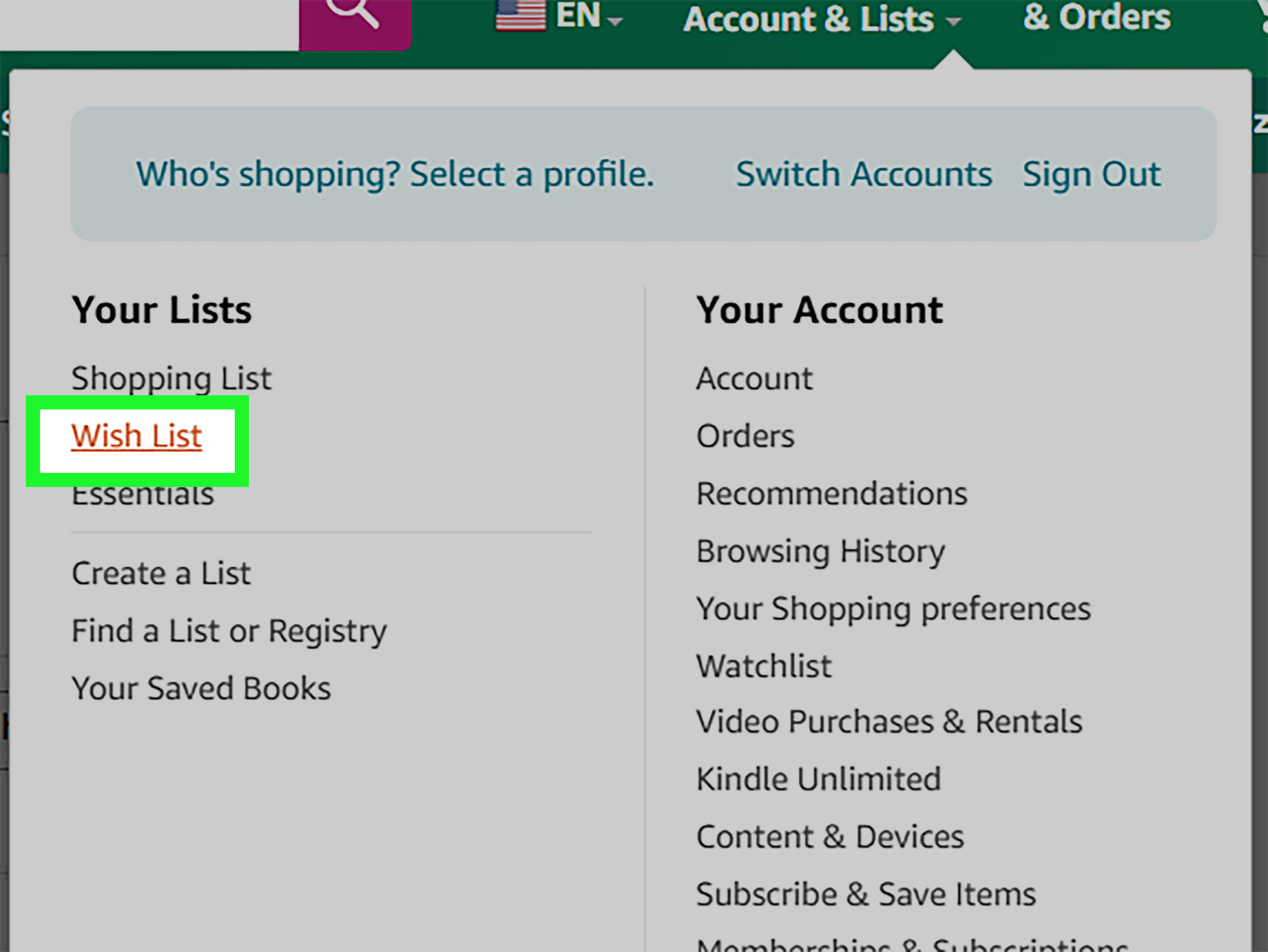
Open Amazon and sign in to your account. Hover over Account & Lists near the top-right corner of the page. Under the lists area, select Find a List or Registry. From there, you can search by the person’s name and choose the appropriate list type, such as Gift List, Wedding Registry, or Baby Registry.
For best results, use the person’s full name rather than a nickname. Searching “Mike” may deliver enough results to make you question how many Mikes the internet can legally hold. Searching “Michael Anderson” plus a city, state, or event type is much more useful.
How to Search on the Amazon App
In the Amazon Shopping app, open the menu and look for lists, registries, or gifting options. Amazon’s app layout can change, but the general path is usually through your account or list menu. Search for the person’s name and narrow the results by event type if available.
If you cannot find the list in the app, try the desktop website. Some shoppers find that Amazon’s browser experience makes list and registry search tools easier to locate, especially when filtering results.
Method 2: Ask the Person to Share Their Wish List
This is the least sneaky method, which is exactly why it works. If the person’s personal Wish List is private or not searchable, ask them to share it. Amazon lets list owners send a list by link, email, or invitation. They can usually choose whether you can only view the list or view and edit it.
Here is a simple message you can send:
“Hey! I’m doing some gift planning and wanted to make sure I get something you actually want. Can you send me your Amazon Wish List if you have one?”
That sentence is polite, practical, and less awkward than buying a novelty mug that says “World’s Okayest Cousin” for someone who is not your cousin.
Why Sharing Is Often Required
Amazon gives list owners control over visibility. A list can be private, shared only with people who have the link, or public/searchable depending on the list type and settings. If a list is private, you will not be able to magically find it by typing the person’s name into Amazon. That is not a bug; it is privacy doing its job.
Method 3: Use the “Your Friends” List Request Feature
Amazon has a feature that allows you to request access to a friend’s list. On desktop, go to Account & Lists, then find the area for lists or registries. Look for a tab or section labeled something like Your Friends. If no list has been shared with you, Amazon may let you send a request message by email.
This works best when you already know the person’s email address. Amazon may provide a default message, but you can personalize it. A little warmth helps. “Share your list or face the consequences” is memorable, but perhaps not ideal for Grandma.
What Happens After You Request a List?
If the person approves or sends you the list, it should appear in your shared lists area. Once shared, you can open the list, browse items, and purchase directly from it. If they ignore the request, take the hint gently. They may not have a list, may prefer surprises, or may simply be protecting a private collection of 47 different tea infusers.
Method 4: Search for an Amazon Wedding Registry
Wedding registries are among the easiest Amazon lists to find because they are meant for guests. Go to Amazon’s Registry & Gifting page, choose Wedding Registry, and search by one or both names. If there are too many results, narrow by location, wedding date, or the couple’s full names.
When you find the correct registry, check the names, event date, and location before buying. There may be more than one couple with similar names. Sending a blender to the wrong Emma and Jake is generous, but it will not make you look organized.
Tips for Wedding Registry Searches
Use both partners’ names if possible. Add the state or city if Amazon offers filters. If the couple has a wedding website, check it for a direct Amazon registry link. Many couples share registry links on sites like The Knot, Zola, or their own wedding page.
Method 5: Search for an Amazon Baby Registry
Baby registries are also commonly searchable. From Amazon’s Registry & Gifting page, choose Baby Registry and enter the parent’s name. You may be able to refine results by city, state, or expected arrival date.
Before purchasing, confirm that the registry belongs to the correct person. Baby registries often include common names, and many people move, use nicknames, or list a co-registrant. Check every visible clue before you send a mountain of tiny socks into the universe.
What to Buy From a Baby Registry
Practical items are often best: diapers, wipes, bottles, swaddles, baby monitors, bath supplies, and gift cards. If the registry has priority labels or “must-have” notes, pay attention. The parents may need a car seat more than another stuffed giraffe, even if the giraffe has excellent vibes.
Method 6: Use a Direct Wish List Link
A direct link is the fastest way to access someone’s Amazon Wish List. People often share these links through email, text messages, group chats, social media bios, invitations, or fundraising pages.
If someone sent you a link, open it while signed in to your Amazon account. You should be able to view the list if the owner has set it to shared or public. If the link does not work, ask them to resend it or check their list privacy settings.
Where People Commonly Share Amazon Wish Lists
You may find direct list links in birthday invitations, baby shower emails, wedding websites, teacher wish list pages, classroom newsletters, nonprofit donation posts, influencer bios, or holiday family group chats. If the list is for a teacher, shelter, creator, or charity, check their official page first to avoid fake or outdated links.
Method 7: Search Email and Messages for an Old Wish List Link
If someone shared a Wish List with you in the past, you may already have access. Search your email inbox for phrases like “Amazon Wish List,” “Amazon Registry,” “shared a list,” “gift list,” “birthday list,” or the person’s name plus “Amazon.”
Also check text messages, Facebook Messenger, WhatsApp, Slack, Discord, or family group chats. Gift links have a strange way of being buried between vacation photos, dinner plans, and someone’s passionate opinion about cranberry sauce.
How to Buy From Someone’s Amazon Wish List
Once you find the list, buy directly from the list page whenever possible. This helps Amazon mark the item as purchased or manage quantity updates. If you simply use the list as inspiration and buy the item separately, the list may not update, which can lead to duplicate gifts.
Step-by-Step Purchase Process
Open the list, choose an item, and add it to your cart from the list page. During checkout, select the recipient’s gift address if Amazon offers it. Amazon typically protects the recipient’s full address from the buyer, though you may see limited location information depending on the list and shipping setup.
Mark the order as a gift when available. This can hide prices on the packing slip, allow a gift message, and make returns easier for the recipient. If gift wrap is available, you can choose it during checkout. If not, the package will arrive in Amazon’s usual style: practical, brown, and emotionally neutral.
Will the Person Know You Bought Something?
Usually, Amazon tries to preserve the surprise. Many lists have surprise settings that hide purchased items from the list owner for a period of time. However, the exact experience can depend on the list type, settings, item, seller, and whether the recipient checks certain list areas.
If you are buying for a surprise event, avoid texting “You’ll never guess what arrives Tuesday.” That is less of a surprise and more of a shipping spoiler with confetti.
How to Avoid Duplicate Gifts
Always purchase from the list itself. If you buy elsewhere, Amazon may not know the gift was purchased. For registries, use the registry checkout flow so the item can be marked correctly. If you are coordinating with a group, tell the organizer what you purchased, especially for big-ticket gifts.
Privacy Tips When Using Amazon Wish Lists
Respect privacy first. If a list is not public or shared, do not try to dig around for it through questionable websites or personal data searches. A Wish List is a convenience tool, not a treasure map to someone’s private life.
If you are creating your own list, review your privacy settings before sharing. Choose private if the list is just for you, shareable if you only want people with the link to access it, or public if you want it searchable. Also review your shipping address settings and recipient name. Amazon has tools intended to protect street addresses, but it is smart to double-check how your list appears before sending it widely.
Best Practices for List Owners
Use a clear list name, such as “Sarah’s Birthday Wish List 2026” or “Baby Registry for Taylor and Jordan.” Add notes to items when size, color, model, or quantity matters. Keep the list updated and remove items you no longer want. If you share the list publicly, avoid adding anything too personal, sensitive, or likely to create family group-chat chaos.
Why You Might Not Find Someone’s Amazon Wish List
If your search comes up empty, do not panic. The list may be private. The person may have changed their name, used a nickname, or created the list under a different account. They may have deleted it, renamed it, or never made one in the first place.
For registries, the event may be over, hidden, or set to private. For personal lists, the owner may need to invite you manually. The simplest fix is often the most human one: ask.
Troubleshooting Checklist
- Search the person’s full legal name and common nickname.
- Try the spouse’s, partner’s, or co-registrant’s name for wedding and baby registries.
- Filter by city, state, or event type when available.
- Use desktop Amazon if the app is hard to navigate.
- Ask for a direct link if the list is private or shareable only.
- Check old emails and messages for a previously shared link.
Smart Gift-Giving Tips After You Find the List
A Wish List is a helpful guide, but it still pays to think like a human. If the list has both practical and fun items, choose based on your relationship. A close friend may appreciate the quirky board game. A coworker may prefer the safe coffee gift set. A new parent may love anything that saves time, sleep, or sanity.
Pay attention to item notes. If someone lists a specific size, color, or model, do not freestyle unless you are certain. “Close enough” is how people end up with phone cases for phones they do not own.
When a Gift Card Is the Best Choice
If the list is almost empty, everything is too expensive, or shipping dates are a mess, an Amazon gift card can be a smart fallback. It is not lazy if it solves the problem. Add a thoughtful message so it feels personal rather than “I met this deadline in the parking lot.”
Common Mistakes to Avoid
Do not assume the first search result is the right person. Do not buy from a screenshot if you can buy directly from the list. Do not ignore shipping dates before birthdays, showers, or holidays. Do not send a large or delicate item without checking whether the recipient can receive it.
Also, do not wait until the night before the event unless you enjoy paying extra for shipping and emotional consequences. Amazon is fast, but it is not a wizard with a warehouse wand.
Real-World Experiences: What Actually Works When Finding Amazon Wish Lists
In real life, finding someone’s Amazon Wish List usually falls into one of three stories: the easy win, the polite request, or the “why are there 900 people with this name?” adventure.
The easy win happens when someone sends a direct link. This is common for birthdays, classroom supply lists, baby showers, and office gift exchanges. You click the link, open the list, buy the item, and feel like a gifting genius. The key experience here is speed. A direct link removes confusion, especially when the recipient has a common name. If you are organizing an event, sharing the exact link is the kindest thing you can do for your guests. It saves them from search-result archaeology.
The polite request is the most common experience for personal Wish Lists. You may know someone has a list, but it does not show up publicly. Instead of guessing, you ask them to share it. Most people do not find this rude. In fact, many appreciate it because it means you want to buy something useful. The trick is tone. Say you are planning ahead and would love their list if they are comfortable sharing it. That small phrase, “if you’re comfortable,” keeps the request respectful.
The registry search experience is usually smoother but still requires attention. For example, if you are searching for a wedding registry for “Emily Johnson,” you may see several similar results. The best approach is to compare the partner’s name, city, and event date. This prevents the classic gifting disaster of sending a toaster to a couple you have never met. For baby registries, co-registrants and locations can help confirm the right match.
Another common experience involves group gifting. Suppose five coworkers want to buy a manager something from an Amazon Wish List. One person finds the list, but everyone shops separately. If they do not buy directly from the list, duplicate gifts can happen. The better method is to have each person purchase from the list page or coordinate in a shared chat. For expensive items, one person can buy the gift and others can contribute. This keeps the registry clean and prevents three identical coffee grinders from arriving like a caffeinated prank.
Holiday shopping adds another lesson: check delivery dates before falling in love with an item. A perfect gift that arrives two weeks late becomes a New Year’s apology package. Lists are useful, but shipping speed, seller reliability, return options, and gift receipt availability still matter. Before checkout, confirm the delivery address, gift options, and whether the item is sold by Amazon or a third-party seller.
Finally, many people learn that Wish Lists are not just for gifts. They are also excellent for planning. Families use them for holiday ideas. Teachers use them for classroom supplies. Couples use them for home projects. Friends use them to avoid awkward guessing. The best experience comes when everyone treats the list as a helpful shortcut, not a demand. A Wish List says, “Here are things I like.” A thoughtful gift giver says, “Great, I will choose one that fits the moment.” That is how Amazon lists become less transactional and more personal.
Conclusion
Finding someone’s Amazon Wish List is easy when you know where to look and respect how Amazon’s privacy settings work. Start with Find a List or Registry for public gift lists, wedding registries, and baby registries. For personal Wish Lists, use shared links, check your messages, or ask the person to invite you. Once you find the list, buy directly from it, use gift options when available, and double-check the recipient before placing the order.
The big takeaway is simple: Amazon Wish Lists are designed to make gifting easier, not to turn you into a detective with free shipping. Search smart, ask politely, and choose gifts that match the person’s actual needs. That is how you avoid duplicate presents, protect privacy, and become the rare gift giver who gets it right without needing a gift receipt and a backup apology.
Note: Amazon menu names, list visibility options, and registry tools may change over time. Before publishing, review the live Amazon interface for any updated labels or regional differences.