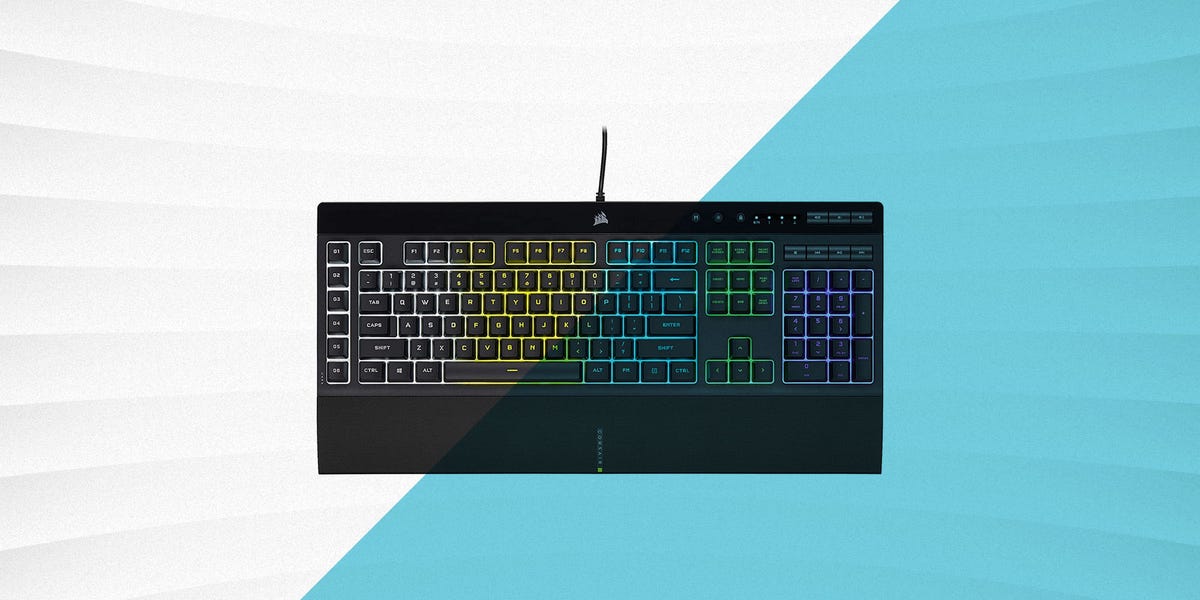
Buying a gaming keyboard in 2023 does not have to feel like applying for a small personal loan. Yes, the internet is full of glowing keyboards with aircraft-grade aluminum, wireless wizardry, and switches so fancy they sound like espresso machines. But the truth is simple: plenty of cheap gaming keyboards can deliver fast response, reliable key presses, RGB lighting, and a better gaming experience than the dusty office keyboard currently fighting for its life on your desk.
The best cheap gaming keyboards for 2023 sit in that sweet spot between “actually useful” and “still affordable.” Some are mechanical. Some are membrane. Some are compact enough to give your mouse room to breathe, while others keep the number pad because spreadsheets and strategy games both deserve respect. The trick is knowing what matters before you buy: switch feel, layout, anti-ghosting, build quality, software, media controls, and whether the keyboard can survive a tragic soda incident.
This guide breaks down the top budget gaming keyboard options, what each one does well, and how to choose the right model for your setup without paying premium prices for features you may never use.
What Makes a Cheap Gaming Keyboard Worth Buying?
A cheap gaming keyboard is not automatically a bad keyboard. In fact, some budget models are surprisingly capable because manufacturers have figured out that gamers want practical performance first and luxury extras second. A good budget gaming keyboard should register inputs accurately, feel comfortable during long sessions, and offer enough durability to handle daily use.
The most important features to look for include anti-ghosting, key rollover, a responsive switch type, sturdy construction, and a layout that matches your play style. RGB lighting is fun, but it should not be the only reason you buy a keyboard. Pretty lights are nice; missing a crouch key in the final circle is not.
Mechanical vs. Membrane: Which Is Better on a Budget?
Mechanical keyboards use individual switches under each key. They typically feel more precise, last longer, and provide clearer feedback. Budget mechanical keyboards such as the Redragon K552, G.Skill KM250 RGB, Keychron C3 Pro, and Cooler Master CK552 prove that you do not need to spend $150 to get real mechanical switches.
Membrane keyboards use a rubber dome layer under the keys. They are usually quieter and cheaper, and many are spill resistant. Models like the Logitech G213 Prodigy, SteelSeries Apex 3, HyperX Alloy Core RGB, Corsair K55 RGB Pro, and EVGA Z12 are strong examples for gamers who want comfort, RGB, and extra controls without mechanical switch noise.
For competitive shooters, a mechanical keyboard is usually the better pick. For casual gaming, schoolwork, streaming, and shared rooms, a good membrane keyboard may be smarter. Your roommate may thank you for not buying the loudest blue-switch keyboard on Earth.
Best Cheap Gaming Keyboards for 2023
1. Redragon K552 Kumara: Best Ultra-Cheap Mechanical Keyboard
The Redragon K552 Kumara has become a budget gaming legend for a reason. It offers a tenkeyless layout, mechanical switches, full anti-ghosting, N-key rollover, and a compact frame that gives your mouse more room. For gamers moving from a basic office keyboard, the K552 feels like discovering that your bicycle had a hidden turbo button all along.
Its clicky Outemu Blue switches are tactile and loud. That is great if you enjoy crisp feedback, but not ideal if you share a room or game late at night. The build is sturdy for the price, and the compact 87-key layout works well for FPS players who want desk space. The trade-off is limited software support and a no-frills design. Still, for the money, this is one of the best cheap mechanical gaming keyboards of 2023.
2. G.Skill KM250 RGB: Best Compact Budget Mechanical Keyboard
The G.Skill KM250 RGB is one of the most impressive budget keyboards of 2023 because it brings enthusiast-style features into a very affordable package. It uses a compact 65% layout, hot-swappable switches, PBT pudding keycaps, RGB backlighting, a detachable USB-C cable, and even a volume knob. That last feature is rare at this price, and once you use a physical volume knob, keyboard shortcuts start to feel like sending a letter by horse.
This keyboard is best for gamers who want a compact board but still need arrow keys. The 65% layout saves space without feeling as extreme as a 60% keyboard. It is a strong pick for small desks, dorm rooms, travel setups, and anyone who wants mechanical feel without premium pricing. The typing sound and case quality are not luxury-grade, but the feature list is outstanding for a cheap gaming keyboard.
3. Keychron C3 Pro: Best Budget Keyboard for Gaming and Typing
The Keychron C3 Pro is a smart choice for people who want one keyboard for gaming, writing, work, and everyday use. Its tenkeyless layout keeps the function row and arrow keys while removing the number pad. It also offers QMK/VIA support, a 1000Hz polling rate, gasket-style construction, and compatibility with Mac, Windows, and Linux.
For budget buyers, the C3 Pro stands out because it feels more refined than many cheap mechanical keyboards. The sound and typing feel are smoother than expected, and the software flexibility is excellent for users who like custom layouts and shortcuts. It is not covered in flashy gamer styling, which can be a benefit if you want your keyboard to look normal during the day and perform well at night.
4. SteelSeries Apex 3: Best Quiet Cheap Gaming Keyboard
The SteelSeries Apex 3 is a membrane keyboard built for gamers who want a quieter experience. It features whisper-quiet switches, IP32 water resistance, 10-zone RGB lighting, dedicated media controls, and a comfortable magnetic wrist rest. It is especially good for shared spaces, late-night gaming, and people who want a full-size keyboard without clicky switch chaos.
The Apex 3 is not mechanical, so it will not feel as crisp as the Redragon K552 or Keychron C3 Pro. However, it is comfortable, practical, and polished for the price. The wrist rest is a major plus for long gaming sessions, and the media wheel makes volume control simple. For casual gamers, MMO players, and anyone who types a lot, this keyboard is easy to recommend.
5. Logitech G213 Prodigy: Best Full-Size Starter Gaming Keyboard
The Logitech G213 Prodigy is a reliable entry-level gaming keyboard with a full-size layout, dedicated media controls, customizable RGB lighting zones, an integrated palm rest, and spill resistance tested to 60 ml. It uses Logitech’s membrane-style key design, which is quieter than most mechanical boards but still tuned for gaming responsiveness.
This is a great option for first-time gaming keyboard buyers. It looks like a gaming keyboard, works well for everyday tasks, and includes useful extras without getting complicated. The built-in wrist rest is convenient, although it also makes the board large. If desk space is limited, a tenkeyless model may be better. But if you want a familiar full-size keyboard with gaming features, the G213 is a safe pick.
6. HyperX Alloy Core RGB: Best Spill-Resistant Budget Keyboard
The HyperX Alloy Core RGB is built for people who want durability and quiet keys more than mechanical switch feel. It has soft-touch membrane keys, gaming-grade anti-ghosting, key rollover, dedicated media controls, RGB lighting effects, and spill resistance tested to withstand 120 ml of liquid.
That makes it a practical keyboard for busy desks, younger gamers, family computers, and anyone who keeps drinks dangerously close to electronics. The Alloy Core RGB is comfortable, simple, and reliable. It does not feel as premium as a mechanical board, but it is a strong value if you want a cheap gaming keyboard that can survive real life.
7. Corsair K55 RGB Pro: Best Budget Keyboard for Macros
The Corsair K55 RGB Pro is a full-size membrane gaming keyboard with six dedicated macro keys, five-zone RGB lighting, dedicated media controls, a detachable palm rest, 1000Hz polling, and IP42 dust and spill resistance. Its biggest advantage is the macro row, which is useful for MMO players, streamers, productivity shortcuts, and anyone who likes pressing one button instead of performing finger gymnastics.
Because it uses rubber dome switches, it is quieter and softer than a mechanical keyboard. It is not the best choice for players who want sharp mechanical feedback, but it offers excellent utility for the price. If you play games with lots of abilities, use Discord shortcuts, or want quick commands for streaming software, the K55 RGB Pro is a practical budget winner.
8. Cooler Master CK552: Best Full-Size Budget Mechanical Keyboard
The Cooler Master CK552 is a full-size mechanical gaming keyboard with Gateron switches, RGB lighting, a brushed aluminum-style top plate, and on-the-fly controls for lighting and macros. It is a good pick for gamers who want a traditional full-size layout and mechanical switches without entering premium price territory.
The CK552 feels more substantial than many cheap keyboards, and the full layout is useful for simulation games, strategy titles, office work, and anyone who uses the number pad regularly. It takes up more room than compact keyboards, but not everyone wants to give up keys in the name of minimalism. Sometimes you want the number pad, and that is perfectly legal.
9. EVGA Z12: Best Cheap Keyboard With Extra Controls
The EVGA Z12 is a membrane gaming keyboard with five programmable macro keys, dedicated media keys, IP32 spill resistance, 5-zone RGB lighting, and a 1000Hz report rate. It is often priced aggressively, making it one of the better options for buyers who want gaming features at a very low cost.
The Z12 is best for gamers who care more about function than fancy switch feel. It gives you macro keys, RGB, media controls, and a full-size layout for less than many mechanical competitors. It is not the most premium-feeling keyboard, but it is practical, especially for budget builds where every dollar saved can go toward a better mouse, headset, or graphics card fund.
10. RK Royal Kludge RK61: Best Cheap Wireless Mechanical Keyboard
The RK61 is a compact 60% mechanical keyboard that appeals to gamers who want wireless flexibility, hot-swappable switch options, and a tiny footprint. Depending on the version, it can support Bluetooth, 2.4GHz wireless, and USB-C wired modes. The 61-key layout removes the function row, arrow cluster, and number pad, so it has a learning curve.
For FPS players with small desks, the RK61 can be fantastic because it frees up space for wide mouse movement. It is also portable and fun to customize. However, if you use arrow keys constantly or play games with many keybinds, the compact layout may feel cramped. The RK61 is best for minimalist setups, travel rigs, and players who value desk space above all else.
How to Choose the Best Budget Gaming Keyboard
Choose the Right Layout
Full-size keyboards include everything: letters, function keys, arrows, navigation keys, and a number pad. They are great for productivity and games with lots of controls. Tenkeyless keyboards remove the number pad, giving your mouse more space while keeping important keys. Compact 65% and 60% keyboards save even more room but require more shortcuts.
If you play competitive shooters, consider tenkeyless or compact. If you play MMOs, strategy games, or work on the same keyboard, full-size may be better. Your keyboard should fit your games, not just your Instagram desk photo.
Think About Switch Feel
Linear switches are smooth and fast, making them popular for gaming. Tactile switches have a noticeable bump, which many people like for typing. Clicky switches add sound and feedback, but they can annoy anyone within a three-room radius. Membrane keys are quieter and softer, though usually less precise than mechanical switches.
When possible, choose based on feel rather than marketing. A cheap mechanical keyboard with switches you dislike is still a bad keyboard for you. Comfort matters because gaming sessions have a funny habit of becoming “just one more match” for three hours.
Do Not Ignore Anti-Ghosting and Rollover
Anti-ghosting and key rollover help ensure your keyboard registers multiple simultaneous key presses. This matters when you are sprinting, crouching, reloading, strafing, and panic-jumping because someone appeared behind you like a horror movie villain.
For most players, 6-key rollover is enough. Competitive players may prefer N-key rollover, especially on mechanical keyboards. The good news is that many cheap gaming keyboards now include gaming-grade anti-ghosting, so you do not need to pay premium prices for reliable input.
Software Is Useful, but Not Everything
Some gaming keyboards offer software for RGB lighting, macros, remapping, and profiles. This is useful if you want custom controls for different games. Keychron’s QMK/VIA support is excellent for deep customization, while Corsair, Logitech, SteelSeries, and Razer offer more traditional gaming software ecosystems.
However, not everyone needs advanced software. If you just want to plug in a keyboard and play, on-board shortcuts and simple lighting controls may be enough. Simple is not bad. Simple means fewer things to update at 11:58 p.m. when your friends are already in the lobby.
Best Picks by Gamer Type
Best for FPS Players
Choose the Redragon K552, G.Skill KM250 RGB, Keychron C3 Pro, or RK61. These keyboards save desk space and provide responsive mechanical input. The RK61 is especially good if you want maximum mouse room, while the Keychron C3 Pro is better if you still want function keys and arrows.
Best for MMO and RPG Players
Choose the Corsair K55 RGB Pro or EVGA Z12. The dedicated macro keys are genuinely useful for abilities, shortcuts, push-to-talk, and stream controls. The full-size layouts also make them comfortable for games with many commands.
Best for Quiet Gaming
Choose the SteelSeries Apex 3, Logitech G213, or HyperX Alloy Core RGB. These membrane keyboards are quieter than clicky mechanical boards and better suited for shared spaces, late-night gaming, and households where peace treaties matter.
Best for Work and Play
Choose the Keychron C3 Pro or Logitech G213. The C3 Pro is compact, customizable, and pleasant for typing, while the G213 offers a familiar full-size layout with easy media controls. Both are practical for gaming and everyday tasks.
Common Mistakes When Buying a Cheap Gaming Keyboard
The first mistake is buying only for RGB. Lighting can make a setup look great, but it does not fix mushy keys, bad ergonomics, or a layout you hate. The second mistake is assuming mechanical automatically means better. A noisy, uncomfortable mechanical keyboard is not better than a comfortable membrane keyboard that fits your needs.
The third mistake is ignoring size. A full-size keyboard can crowd your mouse area, especially in FPS games. On the other hand, a 60% keyboard can frustrate you if you constantly need missing keys. Finally, do not forget build quality. Cheap does not have to mean flimsy. Look for keyboards with decent weight, stable feet, readable keycaps, and a cable that does not feel like it came from a toy box.
of Real-World Experience With Cheap Gaming Keyboards
After using several cheap gaming keyboards across different setups, one thing becomes obvious: the best one is not always the one with the loudest switches or the brightest RGB. It is the keyboard that disappears during gameplay. You stop thinking about the keys and focus on the match. That is the real test.
A compact mechanical keyboard like the Redragon K552 feels immediately more responsive than a basic office keyboard. In shooters, the shorter layout gives your mouse more space, which can make low-sensitivity aiming more comfortable. The clicky switches feel energetic, almost like the keyboard is cheering you on. The downside is sound. If you type quickly, it can turn a quiet room into a tiny plastic thunderstorm.
The G.Skill KM250 RGB feels more modern because of its 65% layout and volume knob. It is small enough for a clean desk but not so tiny that every shortcut feels like solving a puzzle. The hot-swappable design is also a big deal for budget buyers. Instead of replacing the whole keyboard later, you can experiment with different switches. That makes it feel less disposable and more like a keyboard you can grow with.
The Keychron C3 Pro is the one that feels most like a crossover keyboard. It is not screaming “gamer” from across the room, which is nice if your desk is also your work area. The typing feel is smoother than expected for the price, and the tenkeyless layout is easy to live with. It works well for gaming, writing, email, and general computer use. That balance matters if you do more than play games on your PC.
Membrane keyboards have their own advantages. The SteelSeries Apex 3 is comfortable and quiet, and the wrist rest makes long sessions easier. It does not have the crisp snap of a mechanical board, but it is pleasant in a way that many budget mechanical keyboards are not. The HyperX Alloy Core RGB also feels practical. It is the kind of keyboard you buy when you want RGB and gaming features, but you also know there may be coffee, soda, or snacks nearby. In other words, it understands real desks.
The Corsair K55 RGB Pro and EVGA Z12 show why macro keys still matter. If you play MMOs, simulation games, or use streaming shortcuts, dedicated macro keys are not just decorative extra buttons. They can simplify repeated actions and keep your main keys free. A macro row may not help much in a simple shooter, but in complex games, it can be surprisingly handy.
The biggest lesson is that budget keyboards require honest priorities. If you want the fastest feel, go mechanical. If you want quiet comfort, go membrane. If you need space, choose tenkeyless, 65%, or 60%. If you need shortcuts, choose a full-size board with macro keys. Cheap gaming keyboards in 2023 are good enough that you can be picky. Your wallet can relax now.
Conclusion: Which Cheap Gaming Keyboard Should You Buy?
The best cheap gaming keyboard for 2023 depends on how you play. The Redragon K552 is a great entry into mechanical gaming. The G.Skill KM250 RGB offers excellent compact value with enthusiast-style features. The Keychron C3 Pro is ideal for gamers who also type a lot. The SteelSeries Apex 3, Logitech G213, and HyperX Alloy Core RGB are excellent quiet membrane options. The Corsair K55 RGB Pro and EVGA Z12 are smart picks for macro lovers, while the RK61 is a strong compact wireless choice.
You do not need to buy the most expensive keyboard to improve your setup. A well-chosen budget gaming keyboard can make movement feel cleaner, typing more satisfying, and your desk look less like it was assembled during a power outage. Start with your layout, choose the switch feel you actually like, and prioritize features that fit your games. That is how you get the most performance without spending premium money.