Fishing in Stardew Valley looks peaceful until you spend half a game-day staring at an empty bobber while your farmer slowly becomes one with the dock. Bait fixes much of that waiting, but attaching it is surprisingly confusing because the game uses different controls on PC, consoles, Nintendo Switch, and mobile devices.
This guide explains exactly how to put bait on a fishing rod in Stardew Valley using four platform-specific methods. It also covers compatible rods, bait types, common mistakes, removal instructions, and practical fishing strategies for getting more value from every rainy afternoon.
What You Need Before Attaching Bait
Before clicking, tapping, dragging, or angrily pressing every button on your controller, check your fishing rod. Bait does not work with every rod in the game.
Fishing Rods That Can Use Bait
- Fiberglass Rod: Accepts bait but cannot equip tackle.
- Iridium Rod: Accepts one stack of bait and one piece of tackle.
- Advanced Iridium Rod: Accepts bait and two pieces of tackle.
The Fiberglass Rod is the first bait-compatible option. It becomes available from Willy’s Fish Shop after you reach Fishing Level 2 and costs 1,800g. For most new players, this is the upgrade that transforms fishing from “please bite before midnight” into a reliable source of money.
The Iridium Rod unlocks at Fishing Level 6 and costs 7,500g. Its tackle slot makes difficult fish more manageable. Much later, Fishing Mastery rewards you with the Advanced Iridium Rod, which supports two tackle slots in addition to bait.
Fishing Rods That Cannot Use Bait
- Bamboo Pole
- Training Rod
The Bamboo Pole is the free rod Willy gives you near the beginning of the game. No matter how enthusiastically you click it, bait will not attach. The Training Rod also rejects bait. It is designed to make the fishing minigame easier for beginners, not to become a fully equipped aquatic superweapon.
Way 1: Put Bait on a Fishing Rod on PC or Mac
The keyboard-and-mouse method is fast once you understand that bait must be attached from the inventory screen rather than while your character is holding the rod beside the water.
- Open your inventory by pressing E or Escape.
- Find the bait you want to use.
- Left-click the bait stack to pick up the entire stack.
- Move the cursor over your Fiberglass, Iridium, or Advanced Iridium Rod.
- Right-click the rod to attach the bait.
The bait icon and quantity should now appear in the rod’s bait slot. Close the inventory, equip the rod, and cast normally. You do not need to activate the bait separately. Once attached, it works automatically.
How to Attach Only Part of a Bait Stack
You may not want to place all 300 pieces of bait on one rod, especially if you keep different rods in different chests. Use the inventory controls for selecting a smaller quantity, then right-click the rod with the chosen amount. The exact interaction can vary slightly with custom control settings, but the final attachment action remains a right-click on the compatible rod.
How to Remove Bait on PC
Open the inventory and right-click the fishing rod while your cursor is not holding another compatible attachment. The bait returns to your inventory, provided you have an open slot.
Be careful when using an Iridium Rod. It has separate slots for bait and tackle. If both are installed, repeated right-clicks may remove the bait first and then the tackle. Keep an empty inventory space available so the removed items have somewhere to go.
Way 2: Attach Bait on Xbox or PlayStation
Xbox and PlayStation follow the same general process, but their button labels differ. Open the inventory first, select the bait, move over the fishing rod, and use the secondary action button to attach it.
Xbox Controls
- Open the inventory.
- Highlight the bait.
- Press A to pick up the whole stack, or press X to select a single piece.
- Move the cursor over the compatible fishing rod.
- Press X to attach the bait.
PlayStation Controls
- Open the inventory.
- Highlight the bait stack.
- Press Cross to select the whole stack, or press Square to pick up one piece.
- Move the cursor onto the fishing rod.
- Press Square to attach the bait.
If the bait refuses to attach, confirm that you are pressing the secondary action button over the rod rather than the primary selection button. Also check whether you have remapped your controller layout. Custom controls are useful, but they can make a perfectly accurate guide look like it was written by a confused Junimo.
Once attached, the bait number appears on the rod. Every normal cast consumes bait automatically until the stack runs out. The game displays a notification when you use the final piece.
Way 3: Put Bait on a Fishing Rod on Nintendo Switch
The Nintendo Switch method is similar to the Xbox process, although the familiar A-B-X-Y layout can cause muscle-memory problems for players who regularly swap consoles.
- Open the inventory menu.
- Move the cursor over the bait.
- Press A to select the entire stack, or press Y to pick up one piece.
- Move the selected bait over the compatible fishing rod.
- Press Y to attach it.
Look at the rod’s item panel after completing the steps. You should see the bait icon and the number of pieces installed. If the cursor simply swaps inventory positions, you probably pressed A instead of Y during the attachment step.
Switch Troubleshooting Tip
Players often try to attach bait while the rod is selected in the hotbar. Instead, enter the full inventory menu and move the bait directly onto the rod’s inventory icon. The operation happens in the menu, not while standing at the river with your farmer waving a worm in the general direction of the water.
Way 4: Add Bait on iPhone, iPad, or Android
Mobile uses a drag-and-drop system instead of separate selection and attachment buttons.
- Open the full inventory screen.
- Touch and hold the bait stack.
- Drag the bait over the compatible fishing rod.
- Release your finger when the bait is positioned on the rod.
The bait should appear in the rod’s attachment slot. Do not try to drag it onto the rod from the side toolbar during normal gameplay. Open the inventory first, where both the bait and rod can be managed properly.
Can You Remove Bait on Mobile?
Mobile does not provide the same conventional removal action available on PC. However, you can replace the current bait by dragging a different bait type onto the rod. The old bait is then returned to your inventory.
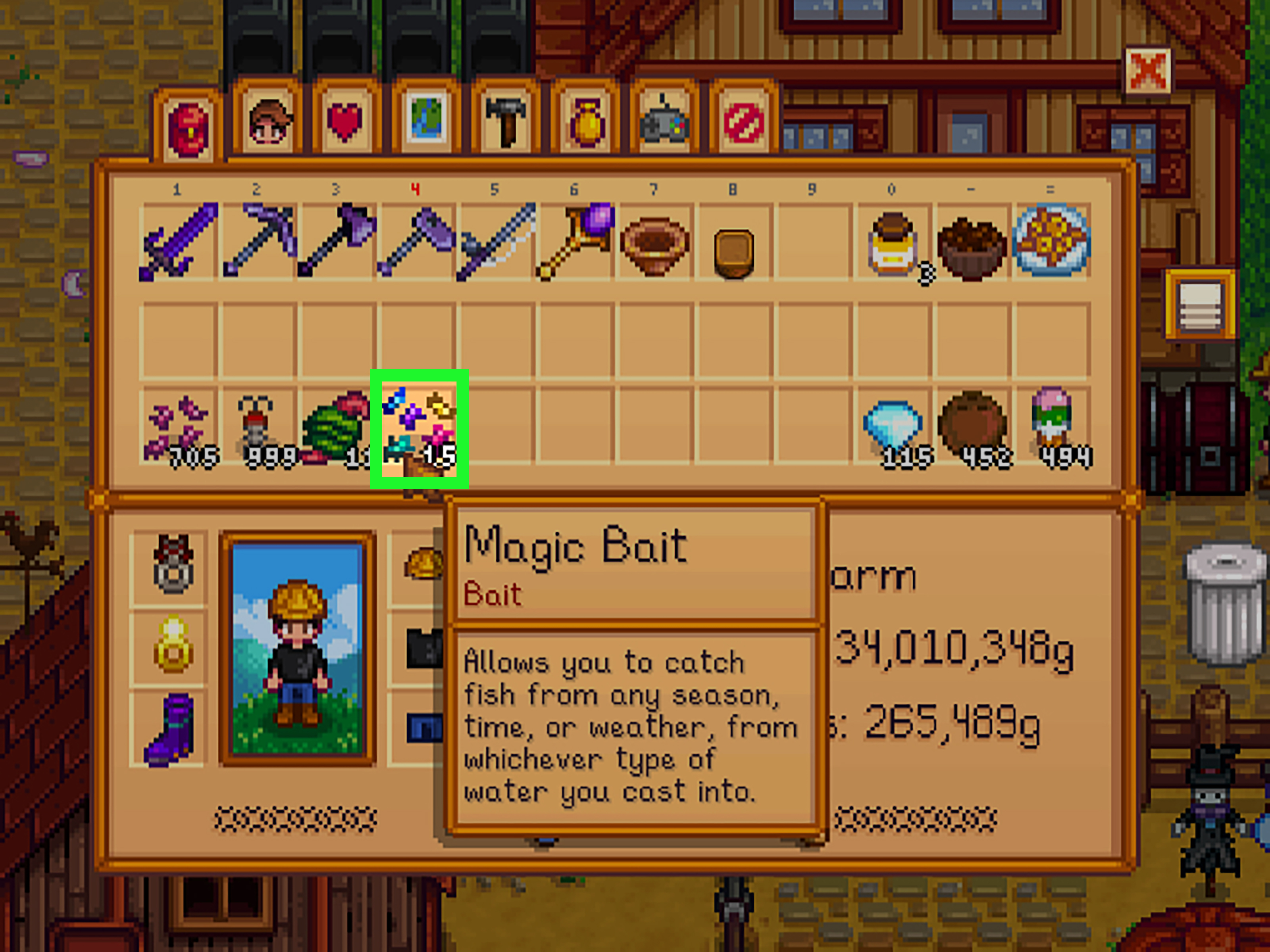
For example, suppose your rod contains standard Bait and you want to use Magic Bait. Drag the Magic Bait onto the rod. The Magic Bait takes the attachment slot, while the standard Bait moves back into your inventory. Make sure you have room for the returned stack before attempting the exchange.
What Does Bait Do in Stardew Valley?
Fishing rods do not require bait, but bait reduces the time between casting and receiving a bite. Standard Bait cuts the delay before a nibble by approximately half, allowing you to attempt more catches during the same game-day.
Bait does not directly make the fishing minigame easier. It will not slow a Catfish, calm an Octopus, or persuade a legendary fish to stop moving like it drank six Triple Shot Espressos. It mainly reduces waiting time. Certain specialized baits add other benefits, but controlling the fishing bar still depends on your skill level, food bonuses, tackle, and practice.
Common Types of Fishing Bait
- Standard Bait: Makes fish bite faster and is inexpensive to craft or buy.
- Deluxe Bait: Produces faster bites and increases the size of the fishing bar.
- Wild Bait: Speeds up bites and may produce two fish from one catch.
- Magic Bait: Lets you catch fish regardless of normal season, time, or weather restrictions.
- Magnet: Increases the chance of finding fishing treasure chests.
- Targeted Bait: Improves the chance of hooking a particular fish used to create it.
- Challenge Bait: Can reward multiple fish from a successful catch, but mistakes reduce the final number.
For routine fishing, standard or Deluxe Bait is usually enough. Save specialized bait for a specific objective, such as completing a collection, farming a valuable species, hunting treasure, or catching fish outside their usual schedule.
How to Get More Bait
Craft Standard Bait
The standard Bait recipe unlocks at Fishing Level 2. One piece of Bug Meat creates five pieces of Bait. Early in the game, the Mines are an excellent source of Bug Meat because insects frequently appear on the upper floors.
Instead of selling every piece of Bug Meat for pocket change, convert it into bait. Five faster fishing attempts will usually generate more value than the raw material itself.
Buy Bait From Willy
Willy sells standard Bait at the Fish Shop after you reach Fishing Level 2. Buying it is convenient when you need a quick stack before a fishing trip and do not feel like introducing yourself to another cave insect with a sword.
Use a Worm Bin
A Worm Bin produces bait over time and can support regular fishing without repeated shopping trips. Place it near a storage chest containing rods, tackle, and fishing food to create a simple preparation station.
Upgrade to a Deluxe Worm Bin
Later in the game, the Deluxe Worm Bin produces Deluxe Bait. This is especially useful for players who fish frequently and want the larger fishing bar provided by Deluxe Bait without continually buying individual pieces.
Why Won’t Bait Attach to My Fishing Rod?
You Are Using the Bamboo Pole
This is the most common problem. Upgrade to the Fiberglass Rod or a better model. The free Bamboo Pole has no bait slot.
You Are Using the Training Rod
The Training Rod simplifies beginner catches but cannot hold bait. Once you feel comfortable with the minigame, switch to the Fiberglass Rod.
You Are Pressing the Wrong Controller Button
The button used to select a stack is not always the same button used to attach it. On Xbox, use X to attach. On PlayStation, use Square. On Nintendo Switch, use Y.
You Are Managing Items From the Toolbar
Open the complete inventory menu. Mobile players in particular may struggle when trying to drag bait from the on-screen toolbar.
Your Inventory Is Full
A full inventory can interfere with removing or exchanging attachments because the displaced bait needs an open slot. Clear at least one space before changing bait types.
Your Controls Have Been Remapped
Check the Options menu if the standard inputs do not work. Modified key bindings, accessibility settings, controller software, or platform-level button assignments may change the required action.
Practical Tips for Fishing With Bait
- Attach a full stack before leaving the farm so you do not waste daylight managing inventory beside the water.
- Keep spare bait in a chest near your preferred fishing location.
- Use Deluxe Bait when targeting difficult fish because the larger fishing bar helps during the minigame.
- Combine bait with an Iridium Rod and suitable tackle for harder catches.
- Carry fishing-buff food when pursuing legendary or highly erratic fish.
- Check your remaining bait before festivals, rainy-day fishing trips, or long visits to Ginger Island.
- Use standard Bait for ordinary income and reserve rare bait for clearly defined goals.
A dependable early-game setup is a Fiberglass Rod with standard Bait and a stack of food for energy. A stronger mid-game setup is an Iridium Rod with Deluxe Bait and a Trap Bobber or Cork Bobber. Late-game players can experiment with the Advanced Iridium Rod, specialized bait, and two complementary tackles.
Frequently Asked Questions
Does bait make fish easier to catch?
Standard Bait mainly makes fish bite faster. It does not directly slow the fish during the minigame. Deluxe Bait is an exception because it also enlarges the fishing bar.
Does every cast consume bait?
Normally, one piece of bait is consumed as you fish. A rod with the Preserving enchantment has a chance to avoid consuming bait during a nibble.
Can you attach bait and tackle at the same time?
Yes, but you need an Iridium Rod or Advanced Iridium Rod. The Fiberglass Rod has room for bait only.
Can you put bait in a Crab Pot?
Yes. Place the Crab Pot in water and interact with it while holding bait. The Luremaster profession removes the need to bait Crab Pots.
Is the Fiberglass Rod worth buying?
For players who fish regularly, yes. Faster bites mean more catches per day, more Fishing experience, and more potential income. The upgrade often pays for itself quickly.
Conclusion
Learning how to put bait on a fishing rod in Stardew Valley begins with the correct equipment. The Bamboo Pole and Training Rod cannot use bait, so purchase at least the Fiberglass Rod before troubleshooting your controls.
On PC, select the bait and right-click the rod. On Xbox, use A and then X. On PlayStation, use Cross and then Square. On Nintendo Switch, use A and then Y. Mobile players can simply drag the bait onto the rod from the full inventory screen.
After that, bait works automatically, reducing the dead time between casts and bites. That may sound like a modest improvement, but in a game where midnight arrives suspiciously fast, saving a few seconds on every cast can produce more fish, more experience, and considerably less conversation with an unmoving bobber.
Player Experience Notes: Lessons From Baiting the Rod
My first serious attempt to use bait followed the classic Stardew Valley beginner pattern: receive the Bamboo Pole, find some Bug Meat, craft bait, and assume the two items naturally belong together. I opened the inventory and clicked the pole repeatedly. I right-clicked it. I dragged bait around it. I may have attempted to intimidate it. Nothing happened because the Bamboo Pole cannot use bait. The lesson was simple but memorable: when an attachment refuses to work, inspect the equipment before blaming the controls.
After buying the Fiberglass Rod, the difference was immediately noticeable. Standard Bait did not turn every cast into a fish, but it removed much of the awkward waiting. On a full fishing day at the mountain lake, shorter intervals between bites meant more opportunities before the clock forced a sprint home. The rod upgrade felt less dramatic than purchasing a new weapon, yet it improved the entire rhythm of the activity. Fishing became an active routine instead of a collection of long pauses interrupted by occasional panic.
Another useful experience involved inventory preparation. I once reached the ocean during a rainy spring morning, ready to hunt Catfish elsewhere later in the day, only to discover that my bait stack contained three pieces. Three. That is not a fishing supply; it is a sample platter. Returning home would have wasted valuable hours, so the trip became much less productive than planned. Since then, I have kept a small fishing chest containing bait, tackle, food, and backup equipment near the farm exit. A second chest near a favorite fishing area can be even more convenient.
Specialized bait also taught me not to use expensive resources without a goal. Magic Bait is enormously useful when a fish’s normal season or weather conditions are inconvenient, but spending it on random afternoon Carp is the fishing equivalent of using an Iridium Bar as a paperweight. Standard Bait handles ordinary income trips perfectly well. Deluxe Bait is better when the larger fishing bar matters, while Magnet is best saved for treasure-focused sessions.
Controller play introduces another small learning curve. Selecting a bait stack and attaching it often require different buttons. Pressing the primary button twice may only move the stack or return it to its original slot. Once the correct secondary action becomes muscle memoryX on Xbox, Square on PlayStation, or Y on Switchthe process takes only a few seconds.
The most valuable lesson is that bait improves efficiency, not skill. It brings fish to the hook faster, but it cannot complete the minigame for you. Difficult catches still demand practice, higher Fishing levels, useful food, and well-chosen tackle. Think of bait as the employee who schedules more appointments; you are still the one who has to survive them.
Once the equipment, controls, and preparation routine become familiar, attaching bait stops feeling like a hidden puzzle. It becomes a tiny habit performed before every trip: check the rod, load the bait, pack some food, and head toward the water. The fish may still escape, but at least they will arrive faster to personally disappoint you.