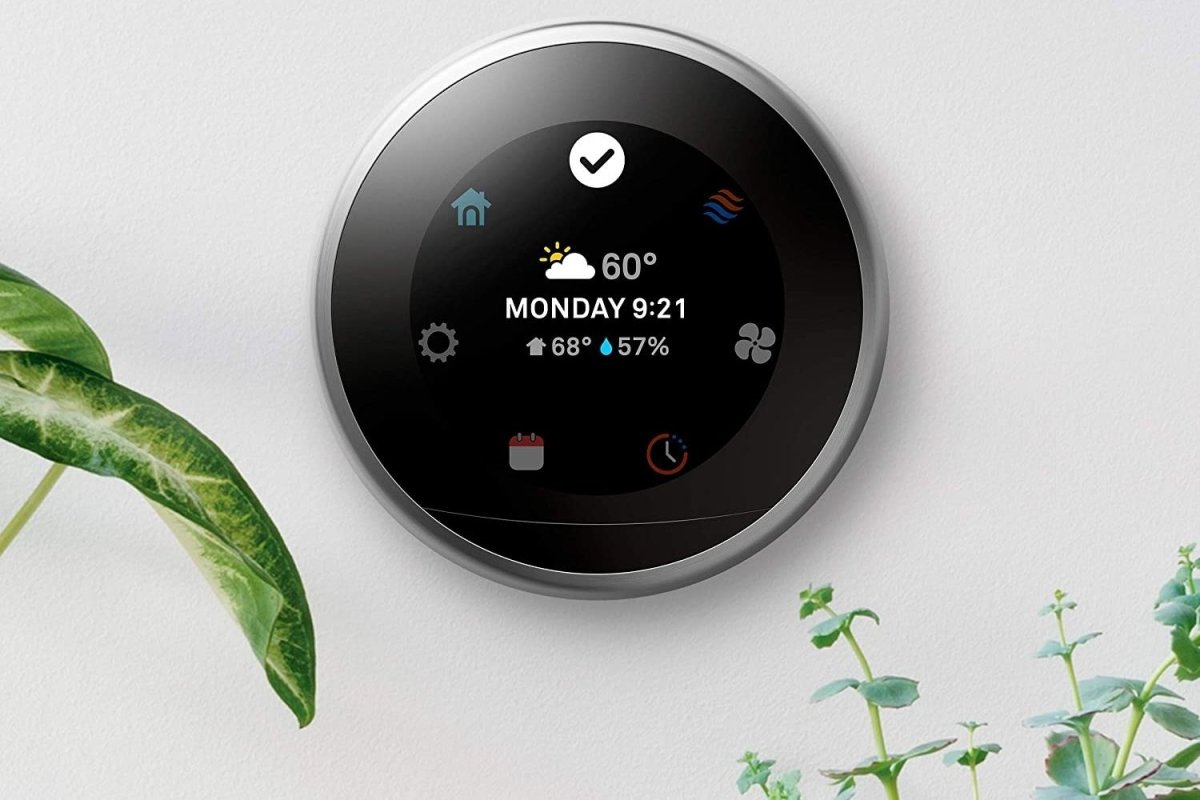
A smart thermostat sounds like a small home upgrade until you realize how much responsibility the little rectangle on your wall actually has. It decides when the furnace wakes up, when the air conditioner gets a break, and whether your bedroom feels cozy or suspiciously similar to a commercial freezer.
Bob Vila’s tested smart thermostat picks cover nearly every type of homeowner, including buyers who want automatic learning, affordable Alexa control, multi-room sensors, a large touchscreen, or simple buttons that do not require a degree in software engineering. The current lineup includes six notable models from Google Nest, Amazon, Ecobee, Sensi, and Honeywell Home.
This guide examines those picks, compares their strongest features, and explains what homeowners should check before buying. The goal is not to crown the thermostat with the longest feature list. It is to identify the model that works with your HVAC system, daily routine, smart home platform, and tolerance for fiddling with wires.
Research basis: Bob Vila tested six smart thermostats for installation, usability, automation, connectivity, and everyday performance.
Best Smart Thermostats at a Glance
| Category | Smart Thermostat | Best For | Important Consideration |
|---|---|---|---|
| Best Overall | Google Nest Learning Thermostat, 4th Gen | Automatic learning, design, and easy everyday control | Premium price and strongest fit with Google Home |
| Best Value | Amazon Smart Thermostat | Affordable Alexa-based automation | Requires a C-wire or compatible power adapter |
| Best Smart Features | Ecobee Smart Thermostat Essential | Energy reports, scheduling, and broad platform support | Room sensors and power extender may cost extra |
| Best Touchscreen | Sensi Touch 2 Smart Thermostat | Large display, simple controls, and privacy-conscious users | Hardwired installation and optional sensors |
| Best Basic | Honeywell Home X2S Smart Thermostat | Familiar buttons and straightforward scheduling | C-wire required |
| Best With Remote Sensor | Honeywell Home T9 Smart Thermostat | Homes with hot rooms, cold rooms, or multiple floors | Additional sensors increase the total cost |
Product categories and tested lineup:
Are Smart Thermostats Worth Buying?
For many households, yesbut the savings come from better habits and automation rather than decorative Wi-Fi. A smart thermostat can reduce unnecessary heating and cooling when the house is empty, adjust temperatures according to a schedule, and allow you to correct an inefficient setting from anywhere. That last feature is surprisingly useful when you remember, halfway to the airport, that the air conditioner is still working enthusiastically for an audience of houseplants.
ENERGY STAR reports that certified smart thermostats save the average household approximately 8 percent on heating and cooling costs, or about $50 per year. Actual savings vary according to climate, insulation, occupancy, HVAC equipment, and how aggressively the temperature is adjusted. A homeowner who already follows a disciplined schedule may save less than someone whose old thermostat has been set to the same temperature since the previous presidential administration.
Smart thermostats also provide convenience that cannot be measured entirely in dollars. Remote control, vacation modes, maintenance alerts, humidity readings, energy reports, geofencing, and room sensors can make an HVAC system easier to manage. Many utilities offer rebates on ENERGY STAR-certified thermostats, potentially reducing the initial cost.
ENERGY STAR certification uses real-world household data; average savings are approximately 8 percent or $50 annually.
The Best Smart Thermostats: Bob Vila’s Tested Picks
1. Google Nest Learning Thermostat, 4th Gen: Best Overall
The fourth-generation Nest Learning Thermostat is the strongest all-around choice for homeowners who value polished design and automation. Its circular 2.7-inch display can show temperature, time, weather, humidity, and other useful information, while the rotating dial provides physical control without covering the wall in buttons.
The thermostat gradually learns when household members adjust the temperature and uses those patterns to build a schedule. It can also work with Nest Temperature Sensors to manage comfort in selected rooms. The Google Home app handles installation, scheduling, remote adjustments, and system settings.
Compatibility is another advantage. Google says the model works with most 24-volt gas, electric, oil, forced-air, heat-pump, radiant, and multistage systems. A C-wire is not required in most homes because the thermostat uses power-sharing technology, although a small number of systems may still need a C-wire or Nest Power Connector.
The main drawback is cost. This is a premium thermostat, and people who do not use Google Home may prefer a less expensive or more platform-neutral option. For Google-oriented households that want automation without constantly editing schedules, however, it is the most complete package in Bob Vila’s lineup.
Nest specifications and compatibility:
2. Amazon Smart Thermostat: Best Bang for the Buck
The Amazon Smart Thermostat focuses on essential features at an accessible price. It supports remote adjustments through the Alexa app, voice commands through compatible Echo devices, scheduling, and Alexa routines. Amazon’s automated “Hunches” can adjust the temperature according to whether the household appears to be home, away, or asleep.
The device was developed using Honeywell Home thermostat technology, which gives it a more established HVAC foundation than its minimalist appearance might suggest. The display is simple and readable, although it lacks the colorful touchscreen found on more expensive competitors.
This model makes the most sense in a home already committed to Alexa. It does not offer the same range of smart home integrations as Ecobee, Nest, or some Honeywell Home models. Its energy dashboard is useful for identifying patterns, but homeowners should treat the figures as general guidance rather than utility-grade measurement.
Installation requires continuous power through a C-wire. Homes without one may need a compatible adapter, which adds another step to an otherwise affordable upgrade. For an Alexa household with suitable wiring, the Amazon Smart Thermostat delivers a great deal of practical functionality without a premium price.
Amazon features, wiring, installation, and ENERGY STAR status:
3. Ecobee Smart Thermostat Essential: Best Smart Features
The Ecobee Smart Thermostat Essential balances advanced software with an approachable color touchscreen. Users can create schedules, activate vacation settings, receive maintenance alerts, review daily HVAC activity, and adjust the temperature through the Ecobee app. It also works with Apple HomeKit, Google Assistant, and Amazon Alexa, making it one of the more flexible choices for mixed-device households.
Ecobee’s greatest strength is the quality of its energy-management experience. The app presents understandable usage information instead of burying homeowners beneath charts that look as though they escaped from an accounting convention. It also learns how long the home typically takes to reach a selected temperature, helping the system start heating or cooling at a more appropriate time.
The Essential supports Ecobee sensors for improved room awareness, but those accessories are generally sold separately. That matters in a larger home where the upstairs bedroom and downstairs living room appear to experience entirely different seasons.
A C-wire is normally required. Ecobee offers a Power Extender Kit for compatible systems without one, but it is an additional purchase for this model. Homeowners wanting broad smart home support, useful reports, and a modern interface should place the Ecobee near the top of their list.
Ecobee scheduling, app control, integrations, alerts, energy reports, and power requirements:
4. Sensi Touch 2 Smart Thermostat: Best Touchscreen
The Sensi Touch 2 is built for homeowners who want smart features without an overly complicated interface. Its wide color touchscreen is easy to read from across a room, while the Sensi app provides step-by-step installation guidance, scheduling, remote access, geofencing, maintenance reminders, and HVAC runtime reports.
Sensi also emphasizes privacy. That may appeal to shoppers who want connected climate control but are uncomfortable with every appliance developing an intense interest in their daily routine. The thermostat integrates with Alexa, Google Home, and Samsung SmartThings.
Optional indoor sensors can report temperature and humidity in specific rooms, while an outdoor sensor can assist with heat-pump management. These accessories make the Sensi system expandable, although they raise the total cost.
The Touch 2 is hardwired and has a C terminal. Sensi sells a C-wire kit for homes without an existing common wire. The company states that many installations can be completed quickly, but installation time increases when wiring changes are necessary. Overall, this is an excellent choice for buyers who prioritize a generous display, clear app controls, and straightforward operation.
Sensi display, integrations, sensors, reporting, installation, and wiring accessories:
5. Honeywell Home X2S Smart Thermostat: Best Basic
Not everyone wants a thermostat that behaves like a tiny wall-mounted tablet. The Honeywell Home X2S keeps physical buttons, familiar temperature controls, and a conventional display while adding Wi-Fi access, flexible programming, auto-away functionality, filter reminders, and smart home integration.
Scheduling can be configured for seven individual days, weekdays and weekends, or other common weekly patterns. Remote control is available through the First Alert app by Resideo, and the thermostat supports Amazon Alexa, Google Assistant, and Apple Home. Matter certification gives it broader compatibility with modern smart home systems.
The X2S supports many conventional and heat-pump configurations but does not work with high-voltage electric baseboard heating. It requires a 24-volt C-wire, so checking the wiring behind the existing thermostat is essential.
This model is ideal for homeowners who want remote control and scheduling but do not need learning algorithms, animated weather displays, or a thermostat that attempts to become the most charismatic object in the hallway.
Honeywell Home X2S features, schedules, integrations, Matter certification, and compatibility:
6. Honeywell Home T9 Smart Thermostat: Best With Remote Sensor
The Honeywell Home T9 addresses one of the most common thermostat problems: the temperature beside the thermostat may not represent the temperature where people actually spend their time. A hallway may be perfectly comfortable while the home office feels like a sauna and the upstairs bedroom is preparing to preserve frozen vegetables.
The T9 uses wireless room sensors to monitor temperature and occupancy in selected spaces. Users can prioritize a particular room or combine readings from several rooms. This makes the thermostat especially useful in larger homes, multistory houses, converted attics, additions, and layouts with persistent hot or cold spots.
Its full-color touchscreen displays current temperature, target temperature, and humidity. Geofencing and scheduling can reduce unnecessary HVAC operation when the home is empty. The T9 also supports several major smart home platforms, including Alexa, Google Assistant, Apple HomeKit, and Samsung SmartThings.
A C-wire is required, and adding several sensors can make the system more expensive than a basic smart thermostat. Still, sensor-based comfort can be more valuable than flashy software when the household regularly argues over which room is “actually” cold.
Honeywell Home T9 sensor prioritization, geofencing, touchscreen, integrations, and wiring:
How to Choose the Right Smart Thermostat
Start With HVAC Compatibility
Compatibility should be checked before comparing colors, displays, or voice assistants. Determine whether the home uses a conventional furnace and central air conditioner, a heat pump, multistage equipment, dual-fuel heating, a boiler, radiant heat, or high-voltage electric baseboards. A thermostat designed for a standard 24-volt system may not work with line-voltage heating.
Count the connected terminals behind the current thermostat and photograph them before disconnecting anything. Wire colors are not reliable identifiers; the terminal letters are what matter. Manufacturer compatibility checkers can confirm whether a particular model supports the system.
HVAC compatibility and wiring guidance:
Understand the C-Wire
Smart thermostats need steady electrical power for Wi-Fi, sensors, displays, and processors. Many receive this power through the common wire, usually labeled C. Some models operate without one, while others use a power extender or adapter. Do not assume that an unused blue wire is automatically a C-wire; verify where it connects at the HVAC control board.
Choose a Smart Home Ecosystem
Amazon households may prefer the low-cost Amazon thermostat. Google Home users receive the smoothest experience from Nest. Ecobee offers broad support for households mixing Apple, Google, and Amazon products. Matter-certified models can provide additional flexibility, but buyers should still confirm which controls are available through each platform.
Decide Whether You Need Room Sensors
A remote sensor does not independently heat or cool a room unless the home has a zoned HVAC system. Instead, it tells the thermostat which room’s temperature should influence the heating or cooling decision. Sensors are highly useful when the thermostat is located near a draft, exterior door, kitchen, sunny window, or other area that poorly represents the rest of the home.
Look Beyond Manufacturer Savings Claims
Manufacturers often advertise substantial potential savings, but calculations use different assumptions. The ENERGY STAR average of roughly 8 percent is a more conservative benchmark. The largest improvements generally occur when a smart thermostat replaces inefficient habits, such as cooling an empty home all afternoon or maintaining the same temperature overnight.
Independent laboratory testing notes that interface, automation, and usability often matter more than basic temperature accuracy.
Real-World Smart Thermostat Experiences: What Daily Use Is Actually Like
The first real-world lesson is that installation difficulty depends more on the house than the thermostat. In a newer home with clearly labeled wires and an existing C-wire, replacement may involve shutting off HVAC power, photographing the old connections, attaching the new base, and following instructions in an app. In an older house, the project can suddenly involve an unlabeled wire bundle, a furnace control board in a dark basement, and a growing appreciation for professional HVAC technicians.
Once installed, the most noticeable benefit is not usually a dramatic first-month utility bill. It is the disappearance of small daily chores. A good schedule lowers the temperature automatically at bedtime, begins warming or cooling the house before the family wakes, and enters an energy-saving mode after everyone leaves. Remote access becomes useful on unusual days: arriving home early, staying late at work, extending a vacation, or discovering that a guest has interpreted “comfortable” as 64 degrees in August.
Learning thermostats require patience. During the first several days, users may need to correct temperatures while the system observes patterns. A household with predictable work and sleep schedules is easier for an algorithm to understand than one containing shift workers, remote employees, frequent travelers, children, pets, and a relative who adjusts the thermostat every time they walk past it. In complicated households, a carefully programmed schedule may be more dependable than automatic learning.
Room sensors can produce a larger comfort improvement than the thermostat itself. Consider a two-story house where the thermostat is downstairs. On summer evenings, the first floor may reach the target temperature while heat remains trapped upstairs. A bedroom sensor lets the system prioritize the sleeping area instead of shutting off based only on the cooler hallway. The trade-off is that cooling one stubborn room may make another room colder and may increase total HVAC runtime. Sensors provide better information, not magical control over airflow, insulation, or duct design.
Energy reports are most helpful when they reveal patterns that lead to action. A report may show that cooling runtime rises sharply at 4 p.m., suggesting solar heat gain through west-facing windows. It may reveal that an aggressive overnight setting forces the system to work hard every morning. These insights can encourage adjustments to schedules, window coverings, air filters, weather sealing, or ceiling-fan use. The thermostat becomes less of a remote-controlled switch and more of a diagnostic window into household behavior.
Internet outages are usually less dramatic than buyers fear. Most smart thermostats continue controlling the HVAC system and accept manual adjustments at the wall, but remote commands, geofencing, cloud reports, and voice control may stop temporarily. This is why good physical controls still matter. A thermostat should remain usable by a houseguest, child, or family member who does not have the app. No one should need an account password and a firmware update merely to make the living room two degrees warmer.
The best ownership experience comes from choosing fewer features that will actually be used. A large home may benefit from the Honeywell T9’s room sensors. A Google-oriented household may appreciate Nest’s learning and design. An Alexa user may get everything needed from Amazon’s budget model. A person who prefers familiar controls may be happier with the Honeywell X2S than with a premium touchscreen. Smart home equipment succeeds when it quietly fits daily lifenot when it creates another hobby involving menus, notifications, and troubleshooting.
Real-world usability themes are supported by hands-on tests from Bob Vila, Consumer Reports, Good Housekeeping, Tom’s Guide, and The Verge.
Final Verdict
The Google Nest Learning Thermostat, 4th Gen is the best overall choice from Bob Vila’s tested group because it combines intelligent scheduling, excellent hardware, broad HVAC compatibility, and a refined app. The Amazon Smart Thermostat is the stronger value for Alexa households, while the Ecobee Smart Thermostat Essential offers an appealing balance of reports, scheduling, and ecosystem flexibility.
The Sensi Touch 2 is the pick for a large, readable interface. The Honeywell Home X2S suits buyers who prefer simple buttons, and the Honeywell Home T9 is the most practical option for homes suffering from uneven temperatures.
Before purchasing any smart thermostat, verify the HVAC configuration, wiring requirements, Wi-Fi coverage, smart home support, and local utility rebates. The smartest thermostat is not necessarily the one with the most impressive technology. It is the one that keeps the home comfortable, reduces wasted energy, and does its job without starting a family argument every evening.
Note: Product availability, prices, software features, utility rebates, and HVAC compatibility can change. Confirm current specifications with the manufacturer and consult a qualified HVAC professional when wiring or system compatibility is uncertain.
Final comparison synthesized from Bob Vila, ENERGY STAR, DOE, manufacturer specifications, and independent U.S. product testing.